Hisense C2 Ultra vs Anker Nebula X1 (2026): Gaming or Film?
Hisense C2 Ultra vs Anker Nebula X1: a budget gaming-friendly laser projector against a premium, quiet, high-contrast home-cinema model. Here's how they differ.
Head-to-head comparison · Research-based · Affiliate links
We earn a commission from qualifying purchases made through our links, at no extra cost to you. It never decides our picks. How we make money
Hisense C2 Ultra vs Anker Nebula X1: which one should you buy?
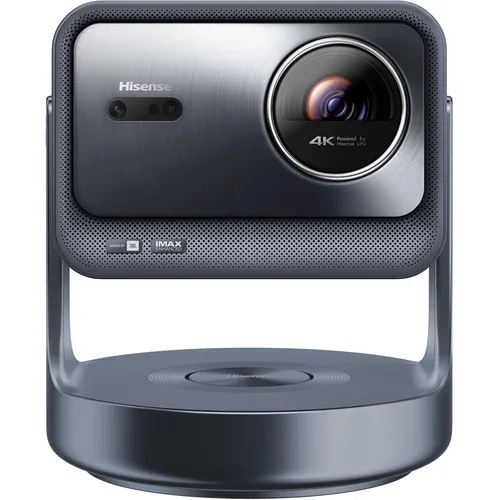
Best for: Budget-minded gamers wanting bright, colorful, HDR-ready big-screen projection
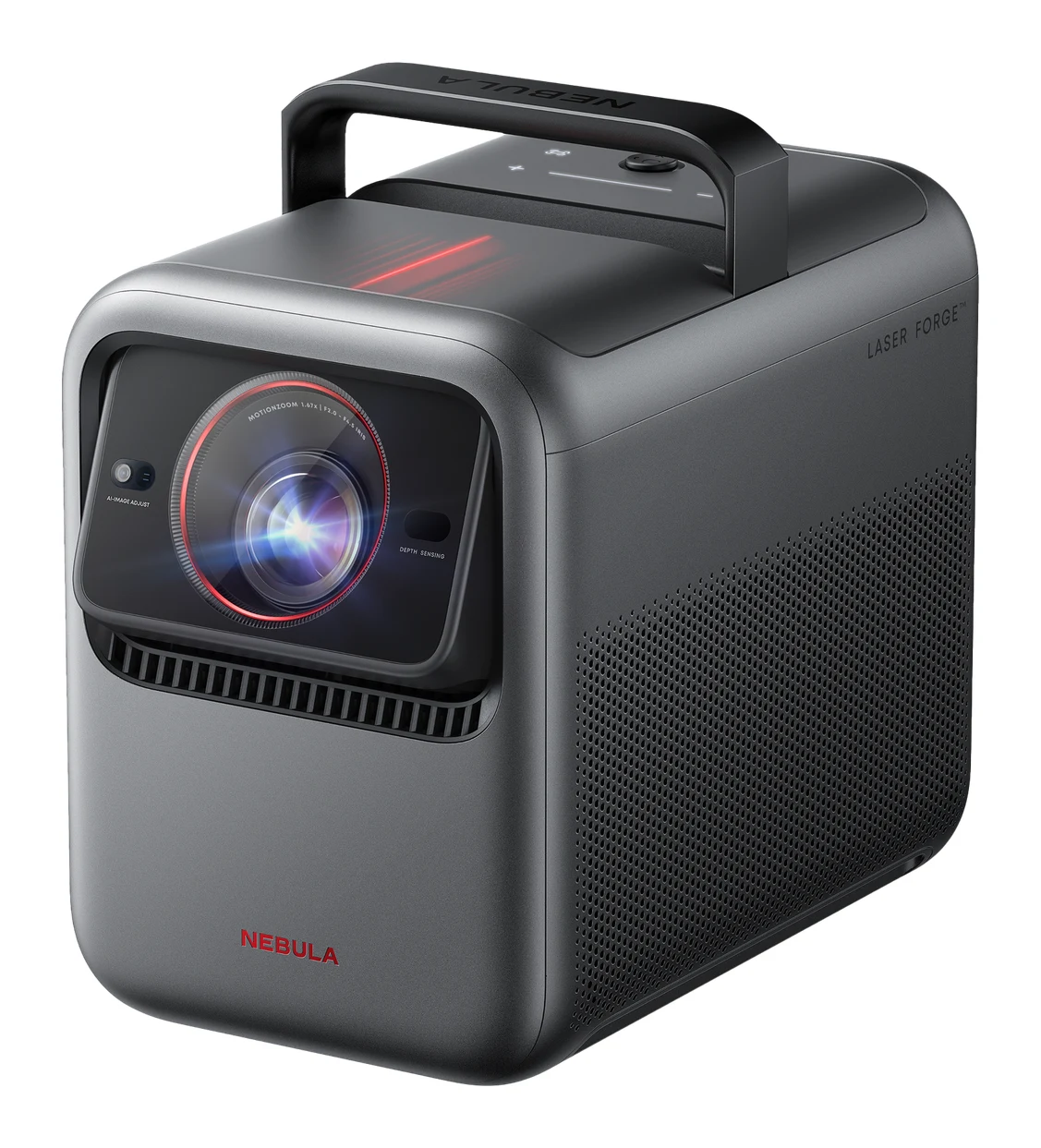
Best for: Home-cinema fans wanting quiet, high-contrast, easy-setup projection at a premium
Most buyers should pick the Hisense C2 Ultra: in the Hisense C2 Ultra vs Anker Nebula X1 matchup it is the budget-tier option, and it has the higher expert average, with 240Hz gaming at 1080p, wide HDR support and a built-in subwoofer. The Anker Nebula X1 is the better choice if you're willing to pay the premium for stronger contrast, extra brightness, quiet running and faster setup.
Both are 4K triple-laser DLP projectors with a 0.47" DMD, 1.67x optical zoom and a throw ratio of roughly 0.9 to 1.5:1, so they overlap more than they differ on paper. The differences are in picture character, gaming features, setup and sound, and those are what this comparison covers.
Hisense C2 Ultra vs Anker Nebula X1: picture quality
The Hisense C2 Ultra uses a Red + Green + Blue TriChroma laser rated at 110% BT.2020, and reviewers praise its vivid color. It is rated at 3000 ANSI lumens, which reviewers call very bright for a portable projector. Its weak spot is contrast. The maker lists 2000:1 (2,000,000:1 dynamic), and reviewers say black levels and native contrast are modest. Some also report a rainbow effect.
The Anker Nebula X1 uses an RGB laser engine with a 14-element all-glass lens. It is rated at 3,500 ANSI lumens, and reviewers say that's enough to use in ambient light and outdoors. Its listed contrast is 5000:1 native (56,000:1 dynamic per ProjectorCentral). Reviewers call its contrast and blacks very good for a DLP projector. The criticisms are that the image can look overly sharp at factory settings and that DLP dithering makes dark scenes look slightly rough. Anker doesn't list a BT.2020 coverage figure, so there is no like-for-like color-gamut number to compare.
Who wins: the Nebula X1 for movie fans who watch in dim rooms or want extra brightness for ambient light. The Hisense is the pick if saturated color matters more to you than deep blacks.
Gaming and HDR formats
This is where the Hisense C2 Ultra separates itself. It is designed for Xbox and supports 1080p/240Hz gaming and ALLM, and its refresh rate is listed as 4K@60Hz and 1080p@240Hz. On the HDR side it supports Dolby Vision, HDR10+ and IMAX Enhanced.
The Nebula X1 supports Dolby Vision and HDR10, and it is ISF certified. It has two HDMI 2.1 ports, one with eARC. Anker's facts don't list a refresh rate, an ALLM feature or any gaming-specific mode, so we can't say how it handles high-frame-rate play. The Hisense doesn't list its HDMI version, though it does list its gaming modes. It does not list ISF certification either.
Who wins: the Hisense C2 Ultra for gamers, and for anyone who wants HDR10+ and IMAX Enhanced support. The Nebula X1 only gets the edge if you value ISF certification for calibrated movie viewing.
Setup, placement and noise
Both projectors have a motorized or gimbal-style stand. The Hisense gimbal swivels 360° and tilts 135°, and it adds autofocus, auto keystone, obstacle avoidance and wall-color adaption. The catch is that reviewers find its auto-adjustment slow and sometimes intrusive, and they call the stand bulky.
The Nebula X1 has a motorized 25° micro gimbal with auto focus, keystone and screen fit. Reviewers say this makes its automatic setup fast. Its keystone correction is listed as automatic, vertical ±40° and horizontal ±30°. It also has a retractable carry handle, and its dimensions are listed as 282 × 186 × 245.5 mm with the handle retracted.
The Nebula's liquid cooling keeps noise under 26 dB, and reviewers praise how quiet it runs. The Hisense maker doesn't list a noise figure, so there's nothing to compare there. On size, the two weigh about the same: 13.9 lb for the Hisense and 6.2 kg / 13.7 lb for the Nebula.
Who wins: the Nebula X1 for quiet running and quick setup. The Hisense offers a wider range of tilt and swivel if you like to reposition the projector.
Sound and smart platform
The Hisense uses JBL 2.1 sound: 2x10W speakers plus a 20W subwoofer. Reviewers praise the built-in subwoofer. Its smart platform is VIDAA OS. It has Wi-Fi 6E and Bluetooth 5.3, and its ports are 2x HDMI (one with eARC), 2x USB, Ethernet (RJ45), optical audio out and 3.5 mm audio out.
The Nebula X1 has four built-in speakers (15W × 2 + 5W × 2) with Dolby Audio. Reviewers call the sound strong, and optional wireless speakers can expand it to 4.1.2 surround. It can also double as a Bluetooth speaker. It runs Google TV with built-in Netflix and Chromecast. Reviewers say Google TV can lag, and there's no Dolby Atmos. Its connections are USB-A, USB-C and optical audio out alongside the HDMI 2.1 ports, with no Ethernet or 3.5 mm output listed. The processor is a Quad-Core ARM Cortex-A55 with 2 GB RAM / 32 GB storage.
Who wins: the Nebula X1 if you want an expandable sound system and Google TV with Chromecast. The Hisense is the simpler all-in-one with a subwoofer and a wider selection of wired ports, including Ethernet. If you'd rather skip a projector altogether, our best budget TVs guide covers the alternative.
What experts say
Expert scores favor the Hisense C2 Ultra, which has an expert average of 9.2 out of 10. It earned 4.5 out of 5 from TechRadar, 4.5 out of 5 from Trusted Reviews and 9.5 out of 10 from 7Review. Reviewers praise its vivid triple-laser color, bright image, Dolby Vision, HDR10+ and IMAX Enhanced support, JBL sound with subwoofer and Xbox-focused gaming features. The common criticisms are modest black levels and native contrast, some rainbow effect, a bulky stand and slow, intrusive auto-adjustment.
The Anker Nebula X1 has an expert average of 8.4 out of 10. It scored 4.5 out of 5 from TechRadar, 90 out of 100 from Engadget, 4.5 out of 5 from Trusted Reviews, 4 out of 5 from What Hi-Fi and 7 out of 10 from How-To Geek. Reviewers praise its brightness, contrast and blacks, fast automatic setup, quiet cooling and strong built-in sound. They criticize its premium price (higher still with the optional speakers), an overly sharp factory image, dithering in dark scenes, laggy Google TV and the lack of Dolby Atmos.
TechRadar and Trusted Reviews rated both projectors equally at 4.5 out of 5, so the gap in the averages comes from the other reviews. The Nebula's average also includes a lower How-To Geek score.
Choose Hisense C2 Ultra if…
Best for: Budget-minded gamers wanting bright, colorful, HDR-ready big-screen projection
Choose the Hisense C2 Ultra over the Nebula X1 if you want a budget-tier projector built for gaming, with 240Hz at 1080p, HDR10+ and a built-in subwoofer. It gives up some contrast and black-level depth in return.
Read our full Hisense C2 Ultra review →- Weight
- 13.9 lb
- Resolution
- 3840 x 2160 (pixel-shift, 0.47" DLP DMD)
- Ports
- 2x HDMI (one with eARC), 2x USB, Ethernet (RJ45), optical audio out, 3.5 mm audio out
- Speakers
- JBL 2x10W + 20W subwoofer
- Brightness
- 3000 ANSI lumens
- Throw ratio
- 0.9-1.5:1
Reasons to buy
- Triple RGB laser rated 110% BT.2020 for vivid color
- 3000 ANSI lumens, very bright for a portable projector
- Dolby Vision, HDR10+ and IMAX Enhanced support
- JBL 2.1 sound with built-in subwoofer
- Designed for Xbox, with 1080p/240Hz gaming and ALLM
Reasons to avoid
- Black levels and native contrast are modest
- Some rainbow effect
- Bulky stand
- Auto-adjustment is slow and can be intrusive
- TechRadar
- 9.0
- Trusted Reviews
- 9.0
- 7Review
- 9.5
- PC Gamer
- 8.4
Choose the Hisense C2 Ultra if you want the budget-tier option and you play games, especially on Xbox, where it offers 1080p/240Hz and ALLM. It also covers Dolby Vision, HDR10+ and IMAX Enhanced, and it has a built-in subwoofer. It suits buyers who care about bright, colorful, HDR-ready big-screen projection and can live with modest black levels, some rainbow effect and a slower auto-setup.
Choose Anker Nebula X1 if…
Best for: Home-cinema fans wanting quiet, high-contrast, easy-setup projection at a premium
Choose the Nebula X1 over the Hisense if picture quality, quiet running and fast setup matter more than cost. It suits home-cinema and outdoor-movie fans who want better contrast, extra brightness and a sound system they can expand.
Read our full Anker Nebula X1 review →- Weight
- 6.2 kg / 13.7 lb
- Resolution
- 3840×2160 (DLP 0.47" DMD)
- Ports
- 2 x HDMI 2.1 (1 with eARC), USB-A, USB-C, optical audio out
- Speakers
- 15W × 2 + 5W × 2, Dolby Audio
- Brightness
- 3,500 ANSI Lumens
- Throw ratio
- 0.9:1 - 1.5:1
Reasons to buy
- 3,500 ANSI lumens, usable in ambient light and outdoors
- Very good contrast and blacks for a DLP projector
- Fast automatic setup with motorized gimbal and auto-adjust
- Quiet liquid cooling keeps noise under 26 dB
- Strong built-in sound, expandable with optional wireless speakers
Reasons to avoid
- Premium price, higher still with optional speakers
- Image can look overly sharp at factory settings
- DLP dithering makes dark scenes look slightly rough
- Google TV can lag, and there is no Dolby Atmos
- TechRadar
- 9.0
- What Hi-Fi?
- 8.0
- Engadget
- 9.0
- Trusted Reviews
- 9.0
- How-To Geek
- 7.0
Choose the Anker Nebula X1 if picture quality, quiet running and fast setup matter more than cost. It suits home-cinema and outdoor-movie fans who want better contrast, extra brightness (3,500 ANSI lumens) and a sound system they can expand with optional wireless speakers. Be ready for the premium price, a Google TV interface that can lag and no Dolby Atmos.
Compare our picks side by side
The specs most of our picks share, from each maker’s spec page (— = not published). Expert score = the average of published expert reviews, which rate each product for its price. Scroll sideways on small screens.
| Spec | Hisense C2 Ultra | Anker Nebula X1 |
|---|---|---|
| Best for | Our Pick | The Alternative |
| Expert score | 9.0 | 8.4 |
| Price vs. these picks | Lower | Higher |
| Weight | 13.9 lb | 6.2 kg / 13.7 lb |
| Resolution | 3840 x 2160 (pixel-shift, 0.47" DLP DMD) | 3840×2160 (DLP 0.47" DMD) |
| Ports | 2x HDMI (one with eARC), 2x USB, Ethernet (RJ45), optical audio out, 3.5 mm audio out | 2 x HDMI 2.1 (1 with eARC), USB-A, USB-C, optical audio out |
| Speakers | JBL 2x10W + 20W subwoofer | 15W × 2 + 5W × 2, Dolby Audio |
| Brightness | 3000 ANSI lumens | 3,500 ANSI Lumens |
| Throw ratio | 0.9-1.5:1 | 0.9:1 - 1.5:1 |
| Connectivity | Wi-Fi 6E, Bluetooth 5.3, 2x HDMI 2.1, USB 3.0, Ethernet | Wi-Fi, Bluetooth, HDMI 2.1, USB-A, USB-C |
| Light source | Red + Green + Blue TriChroma laser, 25,000+ hours | RGB laser, 30,000 hours lifespan |
| Where to buy | Check price | Check price |
The verdict
The Hisense C2 Ultra is the better pick for most people. It costs less, scores higher with experts on average and is built for gaming, with bright, vivid, HDR-rich images. The Anker Nebula X1 earns its premium only if you'll use what it does better: contrast and blacks, quiet cooling, quick automatic setup and expandable sound.
Ready to buy?
 Our PickHisense C2 UltraCheck price
 The AlternativeAnker Nebula X1Check price
Frequently asked questions
Is the Hisense C2 Ultra better than the Anker Nebula X1?
For most buyers, yes: the Hisense C2 Ultra is the budget-tier option and has the higher expert average (9.2 out of 10 versus 8.4). The Nebula X1 is better if you want stronger contrast, more brightness, quieter running and faster setup.
Which is better for gaming, the Hisense C2 Ultra or the Nebula X1?
The Hisense C2 Ultra is the better gaming choice. It is designed for Xbox and supports 1080p/240Hz and ALLM. Anker's facts for the Nebula X1 don't list a refresh rate or gaming mode, though it has two HDMI 2.1 ports.
Which projector is brighter?
The Anker Nebula X1 is brighter on paper at 3,500 ANSI lumens, and reviewers say it is usable in ambient light and outdoors. The Hisense C2 Ultra is rated at 3000 ANSI lumens, which reviewers call very bright for a portable projector.
Which has better contrast and black levels?
The Anker Nebula X1 has better contrast. It lists 5000:1 native, and reviewers call its contrast and blacks very good for a DLP projector. The Hisense C2 Ultra lists 2000:1, and reviewers call its black levels and native contrast modest.
Is the Nebula X1 quieter than the Hisense C2 Ultra?
The Nebula X1 is the only one with a listed noise level: its liquid cooling keeps noise under 26 dB. Hisense doesn't list a noise figure for the C2 Ultra, so the two can't be compared directly.
Do the Hisense C2 Ultra and Nebula X1 support Dolby Vision?
Yes, both support Dolby Vision. The Hisense C2 Ultra adds HDR10+ and IMAX Enhanced, while the Nebula X1 supports HDR10 and is ISF certified.
Sources
Specs are taken from the manufacturers' official pages; expert recommendations from the publications below.
- Hisense C2 Ultra: hisense-usa.com, projectorreviews.com, bhphotovideo.com, projectorcentral.com
- Anker Nebula X1: soundcore.com, projectorcentral.com, bhphotovideo.com, projector-database.com
More buying guides
Hisense C2 Ultra Review (2026): Bright-Room 4K Projector
A bright, colourful triple-laser 4K projector with built-in JBL sound, a flexible gimbal stand and gaming modes. Here is what the specs and expert reviews say, including the contrast and rainbow caveats.
Published Oct 22, 2026Anker Nebula X1 Review (2026): Bright 4K, Premium Price
A look at the Anker Nebula X1, a bright triple-laser 4K projector with motorized setup, Dolby Vision and Google TV, and who should or shouldn't buy it.
Published Oct 28, 2026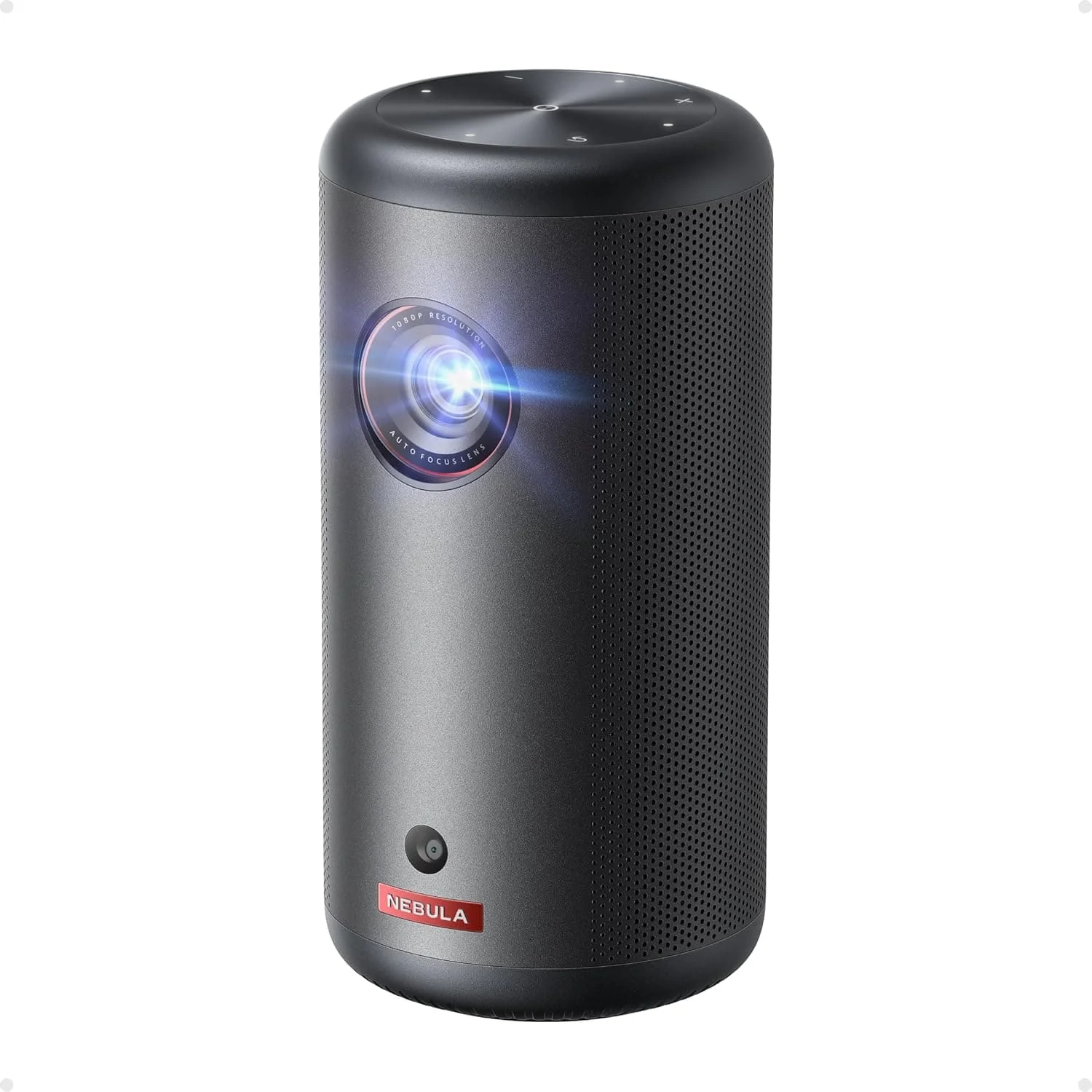
Anker Nebula Capsule 3 Review (2026): Portable but Dim
A hand-sized, battery-powered Google TV projector with quick auto setup and a loud 8W speaker. Its low brightness and short battery life set the limits.
Published Oct 28, 2026