Best Indoor Security Cameras 2026 for Privacy-Minded Homes
The best indoor security cameras for 2026, compared on resolution, privacy features, storage and Wi-Fi support, from a budget pan/tilt cam to a premium 2K Nest.
24 products compared · Research-based · Affiliate links
We earn a commission from qualifying purchases made through our links, at no extra cost to you. It never decides our picks. How we make money
Which one should you buy?
Our picks by what matters to you · details below ↓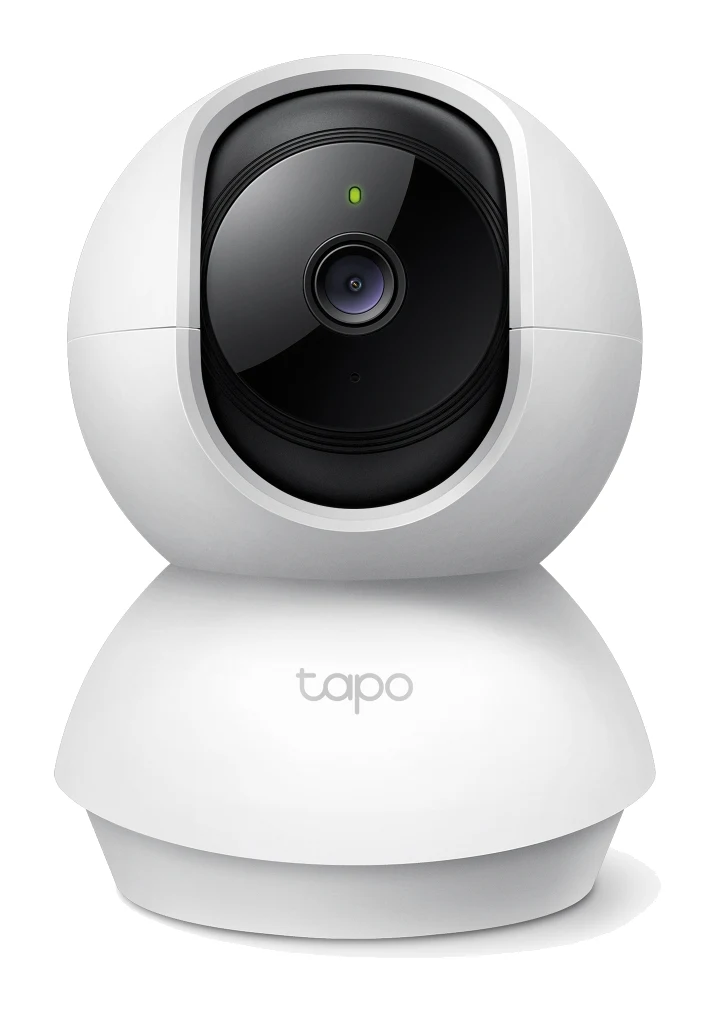
Best for: Budget shoppers wanting pan/tilt and motion tracking
Check price on Amazon- Best BudgetWyze Cam v4Best for: Cost-conscious buyers prioritizing video clarityCheck price
- Also GreatRing Indoor Cam (2nd Gen)Best for: Privacy-conscious users wanting manual lens coverCheck price
- Best ValueArlo Essential Indoor Camera (3rd Gen)Best for: Value seekers wanting automated privacy protectionCheck price
- Premium PickGoogle Nest Cam Indoor (Wired, 3rd Gen)Best for: Premium users wanting continuous monitoring coverageCheck price

Finding the best indoor security cameras is mostly a matter of matching a few trade-offs to your home: sharp video or pan/tilt coverage, a physical privacy cover or a spotlight, local storage or cloud. We narrowed the field to five cameras that cover the main needs, from a budget pan/tilt camera to a premium 2K model with a very wide view.
This guide is research-based, drawing on manufacturer specs and independent expert recommendations. The picks below are in rank order, and each section explains why the camera earned its label and what the main trade-off is. Use the check-price buttons in each product card for current pricing.
Best Indoor Security Cameras at a Glance
| Pick | Camera | Resolution | Wi-Fi | Standout feature | Buy |
|---|---|---|---|---|---|
| Best Overall | TP-Link Tapo C200 | 1080p Full HD | 2.4 GHz | 360° pan and 114° tilt, microSD storage | Check price |
| Best Budget | Wyze Cam v4 | 2.5K QHD | Wi-Fi 6 (2.4 GHz) | Spotlight and 99 dB siren | Check price |
| Also Great | Ring Indoor Cam (2nd Gen) | 1080p HD | 2.4 GHz | Manual privacy cover | Check price |
| Best Value | Arlo Essential Indoor Camera (3rd Gen) | 2K (2304 x 1296) | 2.4 GHz and 5 GHz | Automated Privacy Shield | Check price |
| Premium Pick | Google Nest Cam Indoor (Wired, 3rd Gen) | 2K (2560 x 1440) with HDR | 2.4 GHz / 5 GHz | 152° diagonal field of view | Check price |
TP-Link Tapo C200: Best Overall
Best for: Budget shoppers wanting pan/tilt and motion tracking
The Tapo C200 earned Best Overall by combining full pan/tilt coverage, motion tracking and subscription-free local storage at a budget tier. It also scored top marks for value and features in this group.
Read our full TP-Link Tapo C200 review →- Dimensions
- 3.36 × 3.42 × 4.63 in (85.4 × 86.8 × 117.7 mm)
- Resolution
- 1080P HD (1920 x 1080 px)
- Storage
- microSD Card Slot (Up to 512 GB)
- Connectivity
- IEEE 802.11b/g/n, 2.4 GHz Wi-Fi
- Night Vision
- 850 nm IR LED (40 ft / 12 m)
- Field of View
- 88.3° diagonal, 75.2° horizontal, 40.8° vertical
Reasons to buy
- 360° pan and 114° tilt coverage
- Local microSD storage up to 512 GB, no subscription
- Person and baby crying detection
- Motion tracking follows subjects automatically
- Night vision up to 40 feet
Reasons to avoid
- 1080p resolution, lower than 2K rivals
- 15 fps frame rate
- 2.4 GHz Wi-Fi only
- Trusted Reviews
- 9.0
- Tech Advisor
- 8.0
- The Straits Times
- 7.0
- Our Family Reviews
- 9.0
- Black Tubi
- 7.5
- CCTV Info
- 8.0
- Buyer's Guide
- 8.0
The Tapo C200 is our Best Overall pick because it is the only camera here that moves. It pans 360° horizontally and tilts 114° vertically, so one camera can cover a whole room that a fixed camera would only partly see. Motion tracking can follow a subject automatically, and detection covers people as well as baby crying. Six independent expert guides recommend it.
Keep reading about TP-Link Tapo C200
Storage is the other big draw. It has a microSD slot that takes cards up to 512 GB, and the manufacturer lists local storage with no subscription required. Night vision reaches up to 40 feet using an 850 nm IR LED, and two-way audio uses a built-in microphone and speaker. If you go the local-storage route, our guide to the best microSD cards for cameras is a useful next read.
The trade-offs are on the video side. Resolution is 1080p, below the 2K and 2.5K cameras in this group, and the frame rate is 15 fps. It also connects over 2.4 GHz Wi-Fi only. It suits anyone who wants wide room coverage and no ongoing storage fees.
Wyze Cam v4: Best Budget
Best for: Cost-conscious buyers prioritizing video clarity
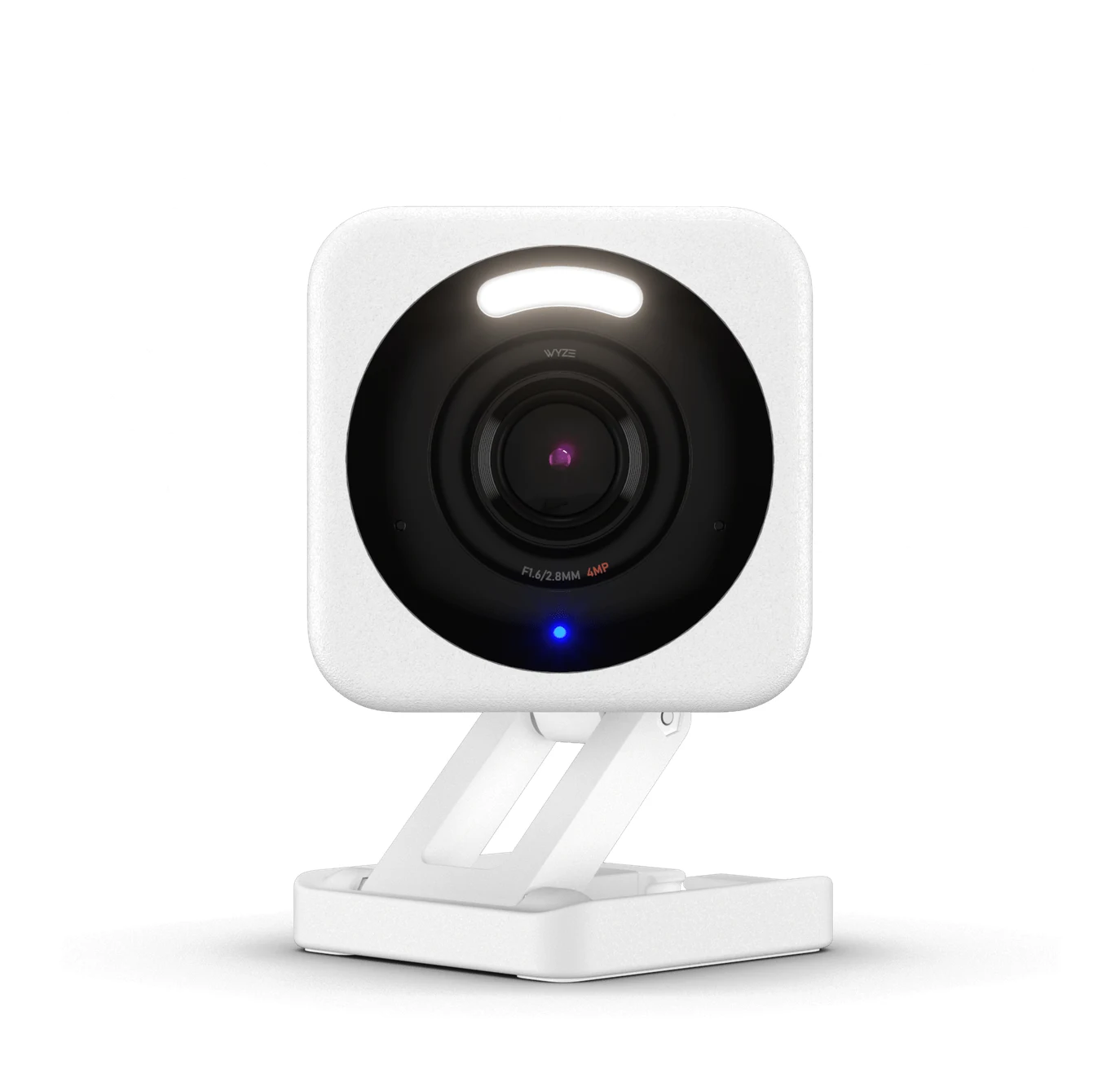
The Wyze Cam v4 is the Best Budget pick thanks to 2.5K video, a spotlight and siren, and local storage at a budget tier. It has the most expert recommendations (9) of the five.
Read our full Wyze Cam v4 review →- Dimensions
- 2.64 in x 2.28 in x 3.98 in
- Resolution
- 2560 x 1440 (2.5K QHD)
- Storage
- Paid cloud storage available
- Connectivity
- Wi-Fi 6 (2.4 GHz), Bluetooth 5.2
- Night Vision
- 4x IR LEDs (850 nm) + 2 spotlight LEDs (5000k, 72 lumens)
- Field of View
- 115.8° diagonal, 98.5° horizontal, 53.1° vertical
Reasons to buy
- 2.5K QHD resolution with color night vision
- Motion-activated spotlight and 99 dB siren
- Local recording to microSD up to 512 GB
- Highest expert recommendation count in this group
- IP65 rating for indoor or outdoor use
Reasons to avoid
- Fixed camera with no pan/tilt
- Powered through microUSB cable
- 15 fps frame rate at night
- Android Police
- 7.5
- TechGearLab
- 9.0
- CCTV Info
- 7.6
- HomeCamCafe
- 9.0
- Tom's Guide
- 9.0
The Wyze Cam v4 is the Best Budget pick and the most widely recommended camera in this group, with nine independent expert guides behind it. It records at 2.5K QHD (2560 x 1440) with enhanced color night vision, which puts it ahead of the 1080p cameras on sharpness. It supports Wi-Fi 6 on 2.4 GHz and Bluetooth 5.2.
Keep reading about Wyze Cam v4
It also adds active deterrents. A motion-activated spotlight and a 99 dB siren are built in, and 24/7 local recording is supported through a microSD card up to 512GB. An IP65 rating means it can be used indoors or outdoors, which is handy if you later want to move it to a porch or garage.
The main limitation is that it is a fixed camera with no pan/tilt, so placement matters. Frame rate is 20 FPS in the daytime and drops to 15 FPS at night, and power comes through a 6 ft microUSB cable. Choose it if you want 2.5K QHD video and the strongest expert backing for a small outlay.
Ring Indoor Cam (2nd Gen): Also Great
Best for: Privacy-conscious users wanting manual lens cover
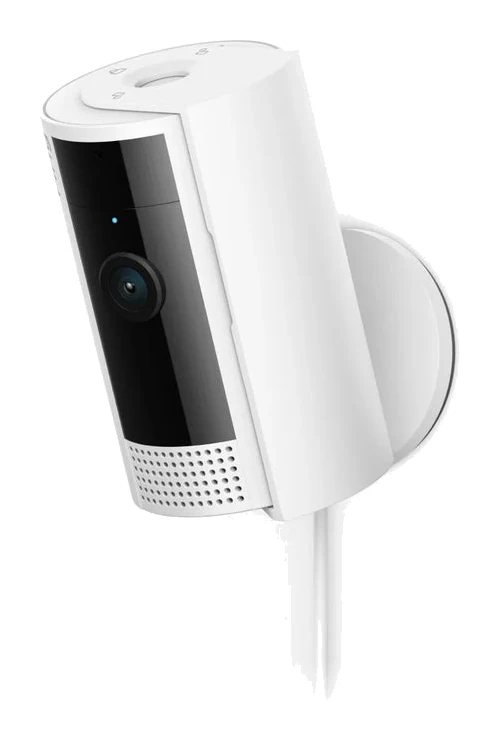
The Ring Indoor Cam (2nd Gen) is a solid Also Great choice for its physical privacy cover, flexible motion zones and wide view. It has 8 expert recommendations and easy setup.
Read our full Ring Indoor Cam (2nd Gen) review →- Dimensions
- 1.93 in × 1.93 in × 3.81 in
- Resolution
- 1080p HD
- Storage
- Ring Protect subscription required
- Connectivity
- 802.11 b/g/n wifi connection @ 2.4GHz
- Night Vision
- Color Night Vision
- Field of View
- 143° diagonal, 115° horizontal, 59° vertical
Reasons to buy
- Manual privacy cover blocks lens and mutes microphone
- Customizable motion zones with 6-second pre-roll
- Wide 143° diagonal field of view
- Works with Alexa
- Simple plug-in installation
Reasons to avoid
- 1080p resolution, below 2K competitors
- 2.4 GHz Wi-Fi only
- Mid-range price tier for 1080p video
- Trusted Reviews
- 8.0
- Security.org
- 9.5
- WiFi Speed
- 8.2
The Ring Indoor Cam (2nd Gen) earns its Also Great label with privacy and simplicity. A built-in manual privacy cover blocks the lens and mutes the microphone. Eight independent expert guides recommend it.
Keep reading about Ring Indoor Cam (2nd Gen)
Motion detection includes customizable motion zones and a 6-second pre-roll. The field of view is a wide 143° diagonal (115° horizontal, 59° vertical). Video is 1080p HD with color night vision, audio is two-way with noise cancellation, and it works with Alexa. Setup is plug-in, using a 6 ft Micro USB cable and a 10W USB-A power adapter that is included.
The drawbacks are resolution and price positioning. 1080p is below the 2K cameras here, and it sits in the mid-range tier despite that. It also uses 2.4 GHz Wi-Fi only. It is a good fit for Alexa households that want a cover they can close by hand.
Arlo Essential Indoor Camera (3rd Gen): Best Value
Best for: Value seekers wanting automated privacy protection
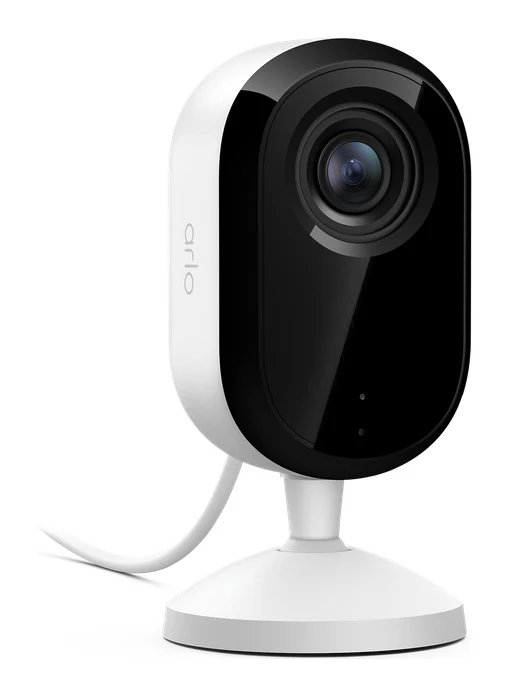
The Arlo Essential Indoor (3rd Gen) earned Best Value by pairing 2K video and a motorized privacy shield with dual-band Wi-Fi at a budget tier. It also scored full marks for features.
- Dimensions
- 2.09 × 2.09 × 4.09 in (53.27 × 53.27 × 103.93 mm)
- Resolution
- 2304 x 1296
- Storage
- Arlo Secure subscription required
- Connectivity
- 2.4GHz & 5GHz
- Night Vision
- Color night vision and IR B&W
- Field of View
- 130° diagonal
Reasons to buy
- 2K resolution (2304 x 1296)
- Automated Privacy Shield physically covers lens
- AI notifications identify people and animals
- Dual-band Wi-Fi, 2.4 and 5 GHz
- Color night vision plus IR black-and-white mode
Reasons to avoid
- Fixed camera with no pan/tilt
- 130° field of view is narrower than some rivals
- How-To Geek
- 8.0
- The Ambient
- 9.0
- Trusted Reviews
- 9.0
- Tom's Guide
- 7.0
The Arlo Essential Indoor Camera (3rd Gen) is the Best Value pick because it packs several higher-tier features into a budget tier. Video is 2K (2304 x 1296), and the camera offers both color night vision and IR black-and-white night vision. Five independent expert guides recommend it.
Keep reading about Arlo Essential Indoor Camera (3rd Gen)
Its Automated Privacy Shield physically covers the lens when the camera is disarmed, so privacy does not depend on remembering to close a cover. AI-powered notifications can identify people and animals. It is the only camera here besides the Nest to support both 2.4 GHz and 5 GHz Wi-Fi, with a stated wireless range of up to 300 ft (91 m) line of sight. Power is plug-in over USB-C, and the field of view is 130° diagonal.
It is a fixed camera with no pan/tilt, and its 130° view is narrower than some rivals. It is best for people who want sharper video, a motorized shield and dual-band Wi-Fi without paying premium money.
Google Nest Cam Indoor (Wired, 3rd Gen): Premium Pick
Best for: Premium users wanting continuous monitoring coverage
The Nest Cam Indoor (Wired, 3rd Gen) is the Premium Pick for its HDR 2K video, widest field of view and smart alerts. It costs more and leans on a subscription for cloud storage.
Read our full Google Nest Cam Indoor (Wired, 3rd Gen) review →- Dimensions
- 3.9 in H x 2.5 in W x 2.2 in D (98.5 x 64 x 56.9 mm)
- Resolution
- 2K (2560x1440)
- Storage
- Cloud (subscription required)
- Connectivity
- 802.11ac (2.4 GHz / 5 GHz), Bluetooth Low Energy
- Night vision
- Up to 15 ft (4.5 m) illumination
- Field of View
- 152° diagonal
Reasons to buy
- 2K HDR video at up to 30 FPS
- Wide 152° diagonal field of view
- Person, animal and vehicle detection
- Customizable Activity Zones reduce false alerts
- Wired power for continuous 24/7 operation
Reasons to avoid
- Premium price tier
- Cloud storage requires a subscription
- Night vision range limited to 15 ft
- HomeCamCafe
- 8.0
- ElderLivingHub
- 8.2
- Tom's Guide
- 8.0
The Nest Cam Indoor (Wired, 3rd Gen) is the Premium Pick for its HDR 2K video and the widest view in this group. It records 2K video (2560x1440) with HDR at up to 30 FPS and covers a 152° diagonal field of view. Eight independent expert guides recommend it.
Keep reading about Google Nest Cam Indoor (Wired, 3rd Gen)
Smart alerts detect people, animals and vehicles, and customizable Activity Zones help cut false alerts. Audio is full-duplex two-way with noise cancellation. Wired power through a 10 ft (3 m) USB-C cable means continuous 24/7 operation with no battery to maintain, and Wi-Fi covers 2.4 GHz and 5 GHz.
The trade-offs are cost and storage. It sits in the premium tier, and the manufacturer lists cloud storage as subscription required. Night vision range is up to 15 ft. Pick it if video quality, field of view and smart alerts matter more than saving money, and you are comfortable with a subscription.
Compare our picks side by side
The specs most of our picks share, from each maker’s spec page (— = not published). Expert score = the average of published expert reviews, which rate each product for its price. Scroll sideways on small screens.
| Spec | TP-Link Tapo C200 | Wyze Cam v4 | Ring Indoor Cam (2nd Gen) | Arlo Essential Indoor Camera (3rd Gen) | Google Nest Cam Indoor (Wired, 3rd Gen) |
|---|---|---|---|---|---|
| Best for | Best Overall | Best Budget | Also Great | Best Value | Premium Pick |
| Expert score | 8.1 | 8.4 | 8.6 | 8.3 | 8.1 |
| Price vs. these picks | Lower | Lower | Middle | Lower | Higher |
| Dimensions | 3.36 × 3.42 × 4.63 in (85.4 × 86.8 × 117.7 mm) | 2.64 in x 2.28 in x 3.98 in | 1.93 in × 1.93 in × 3.81 in | 2.09 × 2.09 × 4.09 in (53.27 × 53.27 × 103.93 mm) | 3.9 in H x 2.5 in W x 2.2 in D (98.5 x 64 x 56.9 mm) |
| Resolution | 1080P HD (1920 x 1080 px) | 2560 x 1440 (2.5K QHD) | 1080p HD | 2304 x 1296 | 2K (2560x1440) |
| Storage | microSD Card Slot (Up to 512 GB) | Paid cloud storage available | Ring Protect subscription required | Arlo Secure subscription required | Cloud (subscription required) |
| Connectivity | IEEE 802.11b/g/n, 2.4 GHz Wi-Fi | Wi-Fi 6 (2.4 GHz), Bluetooth 5.2 | 802.11 b/g/n wifi connection @ 2.4GHz | 2.4GHz & 5GHz | 802.11ac (2.4 GHz / 5 GHz), Bluetooth Low Energy |
| Night Vision | 850 nm IR LED (40 ft / 12 m) | 4x IR LEDs (850 nm) + 2 spotlight LEDs (5000k, 72 lumens) | Color Night Vision | Color night vision and IR B&W | Up to 15 ft (4.5 m) illumination |
| Field of View | 88.3° diagonal, 75.2° horizontal, 40.8° vertical | 115.8° diagonal, 98.5° horizontal, 53.1° vertical | 143° diagonal, 115° horizontal, 59° vertical | 130° diagonal | 152° diagonal |
| Two-way audio | Two-Way Audio with Noise Cancellation | Simultaneous 2-way Audio | Two-way audio with noise cancellation | 2-Way Audio + Echo Cancellation | Full-duplex 2-way audio with noise cancellation |
| Motion detection | Yes | Yes | Advanced with customizable zones and 6-second pre-roll | 110° horizontal | Yes |
| Where to buy | Check price | Check price | Check price | Check price | Check price |
How to Choose the Best Indoor Security Camera
Decide how you want to handle privacy
Indoor cameras watch private spaces, so the lens and microphone controls matter. Ring uses a manual cover that blocks the lens and mutes the microphone. Arlo uses an Automated Privacy Shield that covers the lens when the camera is disarmed. Pick the style that fits how you will actually use the camera.
Weigh coverage against resolution
A pan/tilt camera like the Tapo C200 covers a room by moving, while fixed cameras rely on field of view. The Nest (152° diagonal), Ring (143° diagonal) and Arlo (130° diagonal) all aim for a wide fixed view. Resolution ranges from 1080p on the Tapo and Ring to 2K on the Arlo and Nest and 2.5K on the Wyze.
Check storage before you buy
The Tapo C200 and Wyze Cam v4 both support local microSD recording up to 512 GB, which avoids a recurring plan for continuous recording. The Nest relies on cloud storage with a subscription. Confirm the storage and plan details for any camera before you commit.
Look at your Wi-Fi
The Tapo C200 and Ring Indoor Cam use 2.4 GHz only, and the Wyze Cam v4 supports Wi-Fi 6 on 2.4 GHz. The Arlo and Nest add 5 GHz. If the camera will sit far from your router, a stronger signal helps; our guide to Wi-Fi range extenders covers ways to fix dead zones.
Consider night vision and alerts
Night vision distance is stated for the Tapo (up to 40 feet) and Nest (up to 15 ft). Color night vision is offered on the Wyze, Ring and Arlo. For alerts, the Tapo detects people and baby crying, the Arlo identifies people and animals, and the Nest detects people, animals and vehicles.
How We Picked
We compared the cameras using manufacturer specifications and the number of independent expert guides recommending each one. We looked at resolution, field of view, privacy controls, storage options, Wi-Fi support, night vision and alert features, and we weighed those against each camera's price tier. This roundup is research-based. Specs come from manufacturer pages and are used as published. Ratings and prices are not included here, because prices change and the site's live check-price buttons show current offers.
Bottom Line
For most homes, the TP-Link Tapo C200 is the best all-rounder, thanks to pan/tilt coverage and subscription-free local storage. The Wyze Cam v4 is the pick for the highest resolution on a budget and has the most expert recommendations. The Arlo Essential Indoor Camera (3rd Gen) is the best value for privacy-minded buyers who want 2K and dual-band Wi-Fi. Choose the Ring Indoor Cam (2nd Gen) for a manual privacy cover and Alexa support, and the Google Nest Cam Indoor (Wired, 3rd Gen) if you want the widest field of view and 2K HDR video and accept a cloud subscription.
Ready to buy?
 Best OverallTP-Link Tapo C200Check price
- Best BudgetWyze Cam v4Check price
- Also GreatRing Indoor Cam (2nd Gen)Check price
- Best ValueArlo Essential Indoor Camera (3rd Gen)Check price
- Premium PickGoogle Nest Cam Indoor (Wired, 3rd Gen)Check price
Frequently asked questions
What are the best indoor security cameras in 2026?
Our top picks are the TP-Link Tapo C200 (Best Overall), Wyze Cam v4 (Best Budget), Ring Indoor Cam 2nd Gen (Also Great), Arlo Essential Indoor Camera 3rd Gen (Best Value) and Google Nest Cam Indoor Wired 3rd Gen (Premium Pick). The ranking is based on manufacturer specs and independent expert recommendations.
Which indoor security camera has a physical privacy cover?
The Ring Indoor Cam (2nd Gen) has a built-in manual privacy cover that blocks the lens and mutes the microphone. The Arlo Essential Indoor Camera (3rd Gen) has an Automated Privacy Shield that physically covers the lens when the camera is disarmed.
Can I use an indoor security camera without a subscription?
The TP-Link Tapo C200 and Wyze Cam v4 both support local microSD recording up to 512 GB, so you can store footage without relying on cloud storage. The Google Nest Cam Indoor lists cloud storage as subscription required. Check the storage details of any camera before buying.
Which indoor camera can pan and tilt?
In this guide, only the TP-Link Tapo C200 pans and tilts, with 360° horizontal and 114° vertical range plus automatic motion tracking. The other four cameras are fixed and rely on their field of view.
Do indoor security cameras work on 5 GHz Wi-Fi?
The Arlo Essential Indoor Camera (3rd Gen) supports 2.4 GHz and 5 GHz, and the Google Nest Cam Indoor lists 2.4 GHz / 5 GHz as well. The Tapo C200 and Ring Indoor Cam (2nd Gen) use 2.4 GHz only, and the Wyze Cam v4 supports Wi-Fi 6 on 2.4 GHz.
Sources
Specs are taken from the manufacturers' official pages; expert recommendations from the publications below.
- TP-Link Tapo C200: tp-link.com, bhphotovideo.com, static.tp-link.com
- Wyze Cam v4: wyze.com, support.wyze.com, eu.support.wyze.com, ca.wyze.com
- Ring Indoor Cam (2nd Gen): ring.com, dell.com
- Arlo Essential Indoor Camera (3rd Gen): us.arlo.com, kb.arlo.com, arlo.com
- Google Nest Cam Indoor (Wired, 3rd Gen): store.google.com, consumerreports.org
More buying guides
Google Nest Cam Indoor (Wired, 3rd Gen) Review: Wide View
A look at the Google Nest Cam Indoor (Wired, 3rd Gen): sharp 2K HDR video, a wide 152° view and Google Home integration, with trade-offs in storage, subscription features and flexibility.
Published Oct 25, 2026
Best Outdoor Security Cameras 2026: Solar & No-Fee Options
Five outdoor security cameras compared on power, storage, subscriptions, field of view and smart home support, based on manufacturer specs and expert recommendations.
Published Oct 20, 2026
Best Security Camera Without Subscription 2026: Pay Once
Five security cameras that record to local storage with no monthly fee, from a solar-powered 4K outdoor camera to a budget plug-in and a tracking indoor cam.
Published Oct 22, 2026