Hisense C2 Ultra vs Hisense M2 Pro (2026): Bright vs Budget
The Hisense M2 Pro is the better pick for most people watching in dim rooms on a budget. The C2 Ultra wins on brightness, sound and ports.
Head-to-head comparison · Research-based · Affiliate links
We earn a commission from qualifying purchases made through our links, at no extra cost to you. It never decides our picks. As an Amazon Associate I earn from qualifying purchases. How we make money
Hisense M2 Pro vs Hisense C2 Ultra: which one should you buy?
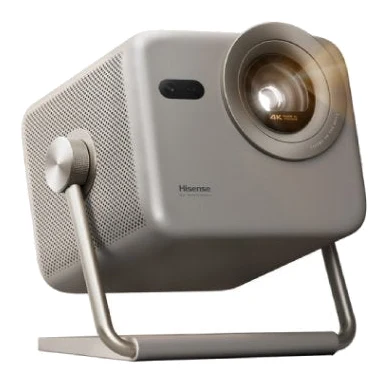
Best for: Budget buyers watching movies in dim, darkened rooms
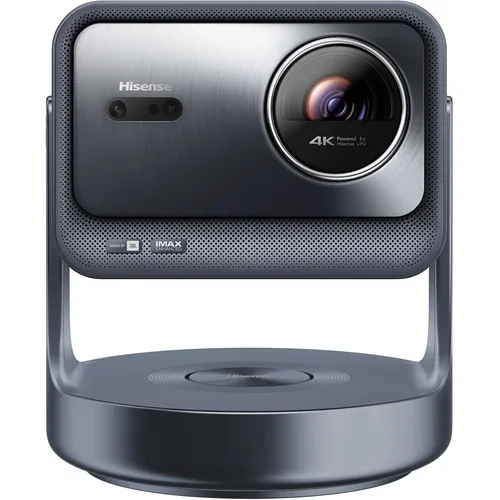
Best for: Gamers wanting a bright, all-in-one living room projector
If you're weighing the Hisense C2 Ultra vs Hisense M2 Pro, most buyers should pick the M2 Pro: it's the budget-tier option, it has the slightly higher expert average, and it delivers a triple-laser 4K image for dark-room movie nights. The C2 Ultra is the better choice if your room isn't fully dark, you want stronger built-in sound, or you plan to connect consoles and other gear.
Both are triple-laser DLP projectors from Hisense with 110% BT.2020 colour coverage and a 25,000-hour (M2 Pro) or 25,000+ hour (C2 Ultra) light source. Beyond that they are built for quite different homes.
Hisense C2 Ultra vs Hisense M2 Pro: brightness and picture
Brightness is the clearest gap. The C2 Ultra is rated at 3000 ANSI lumens, while the M2 Pro is rated at 1300 ANSI lumens. Reviewers praise the C2 Ultra for its much brighter picture, and they say the M2 Pro's 1300 ANSI lumens limits it to dim rooms. If you can't control ambient light, the C2 Ultra is the safer choice by a wide margin.
On paper, the two share a lot of picture tech. Both list Dolby Vision, HDR10 and HLG. The C2 Ultra also lists HDR10+ and IMAX Enhanced. For the M2 Pro, HDR10+ is mentioned by reviewers rather than on the maker's list.
Resolution is worded differently. The M2 Pro lists a 3840 x 2160 (4K UHD) image. The C2 Ultra gets to 4K via pixel shifting from a 1920 x 1080 native chip. Reviewers praise the M2 Pro's true 4K UHD image, but the C2 Ultra's spec sheet shows how it reaches 4K, so it's worth knowing.
The M2 Pro lists 1,000:1 contrast, while the C2 Ultra lists 2,000,000:1 dynamic, or 2000:1 on the Hisense site. Reviewers say the C2 Ultra's native contrast is relatively low, so blacks are not deep. Reviewers also note that DLP rainbow effect may bother some viewers on the C2 Ultra.
The M2 Pro has its own picture caveat. Reviewers say its factory picture settings and white balance need tweaking, so expect to spend a little time in the menus.
Edge: the C2 Ultra for bright rooms and mixed lighting. The M2 Pro for a dedicated dark room where brightness matters less.
Sound: built-in speakers
This round also goes to the C2 Ultra. It has JBL 2.1-channel sound, with 2x10W speakers and a 20W subwoofer. Reviewers call the sound surprisingly strong for a projector.
The M2 Pro has built-in 2x10W speakers with Dolby Audio and DTS Virtual:X. Reviewers say the audio can sound thin. You may want an external speaker or soundbar. The M2 Pro lists Bluetooth 5.0, which may help with wireless audio. The C2 Ultra lists an optical out, a 3.5mm analog out and eARC for wired setups.
Edge: the C2 Ultra if you want an all-in-one setup with no extra audio gear.
Ports and gaming
The C2 Ultra is far better equipped. Its ports are:
- 1x HDMI 2.0
- 1x HDMI 2.1 (eARC)
- 1x USB 3.0
- 1x USB 2.0
- Ethernet
- optical out
- 3.5mm analog out
It also lists Wi-Fi 6E, Bluetooth, AirPlay 2 and Miracast. Reviewers praise the connectivity as flexible.
The M2 Pro lists Wi-Fi 802.11a/b/g/n/ac, Bluetooth 5.0, AirPlay 2 and Miracast, with no wired Ethernet. Reviewers say it has only one HDMI input. If you have a console, a streaming box and a soundbar, you'll be swapping cables or buying a switch.
On gaming, both list a 240Hz mode. The M2 Pro has a 240Hz refresh rate (HSR240) with a low-latency game mode. The C2 Ultra is designed for Xbox, with a 240Hz mode and Auto Low Latency Mode. Its refresh rate is listed as 4K/60Hz, with 2K up to 240Hz. Reviewers praise its low input lag. The M2 Pro's spec sheet doesn't say which HDMI version its single input uses, which matters if you care about high-refresh console gaming.
On smart features, the M2 Pro runs the VIDAA OS platform with Netflix, Prime Video, YouTube and Disney+ built in. The C2 Ultra's listing doesn't name a smart platform, so check what you'll be streaming with before buying.
Edge: the C2 Ultra for gamers and anyone with several devices. The M2 Pro is fine for one source plus built-in streaming.
Setup, placement and portability
Both projectors take the hassle out of setup. Each lists auto keystone, autofocus, obstacle avoidance and wall-colour correction or adaptation. The C2 Ultra's lists a 3D ToF sensor for this.
The C2 Ultra adds placement flexibility. It has a gimbal stand with 360° horizontal rotation and 135° vertical tilt, plus optical zoom (0.9–1.5:1 throw) for a 65"–300" image. Reviewers say the gimbal stand and wide zoom range make placement flexible. The trade-off is size. It weighs 13.9 lb, measures 9.7" x 7.1" x 8.5" (W x H x D), and reviewers describe the stand as bulky. They also say it needs mains power and that its auto-adjust can be slow.
The M2 Pro lists a 1.0 - 1.3:1 throw ratio and a 65"-200" image. Its spec sheet doesn't list optical zoom. At 3.9kg / 8.6 lbs, reviewers praise its light body as easy to move around. That suits someone who wants to carry it between rooms or put it away after each use.
Edge: the M2 Pro for portability. The C2 Ultra for a permanent living-room spot and bigger screen sizes.
What experts say
Reviewers are positive about both. The Hisense M2 Pro has an expert average of 9.3 out of 10. What Hi-Fi? gave it 5/5, Trusted Reviews gave it 5/5, and Empire gave it 4/5. It's also recommended in 2 expert buying guides. Reviewers praise its vivid triple-laser colour, true 4K UHD image with Dolby Vision, light body, simple setup and budget-tier price for a 4K triple-laser projector. The common criticisms are the single HDMI input, the 1300 ANSI lumens limit, factory settings that need tweaking, and thin built-in audio.
The Hisense C2 Ultra has an expert average of 9 out of 10, with TechRadar and Trusted Reviews each giving it 4.5/5. Reviewers praise its brightness, JBL sound, connectivity, Xbox-oriented gaming and flexible placement. They criticise its modest native contrast, the DLP rainbow effect, its bulk and weight, and slow auto-adjust.
The score gap is small. Neither scores as a clear loser, so the choice comes down to room, budget and what you plug in.
Choose the Hisense C2 Ultra if…
Best for: Gamers wanting a bright, all-in-one living room projector
Pick the C2 Ultra over the M2 Pro if you need a brighter image, better built-in sound and more connectivity for gaming and living-room use. It is the premium choice and is less portable.
Read our full Hisense C2 Ultra review →- Weight
- 13.9 lb
- Display
- 0.47" DLP DMD, pixel-shifted
- Resolution
- 4K (3840 x 2160), via pixel shifting from 1920 x 1080 native
- Refresh rate
- 4K/60Hz; 2K up to 240Hz
- Ports
- 1x HDMI 2.0, 1x HDMI 2.1 (eARC), 1x USB 3.0, 1x USB 2.0, Ethernet, optical out, 3.5mm analog out
- Audio
- JBL 2.1 channel, 2x10W speakers + 20W subwoofer
Reasons to buy
- 3000 ANSI lumens gives a much brighter picture
- JBL 2.1 sound with subwoofer is surprisingly strong
- HDMI 2.1 with eARC, Ethernet and USB ports for flexible connections
- Xbox-oriented gaming with 240Hz mode and low input lag
- Gimbal stand with wide zoom range makes placement flexible
Reasons to avoid
- Native contrast is relatively low, so blacks are not deep
- DLP rainbow effect may bother some viewers
- Bulky stand and 13.9 lb weight reduce portability
- Needs mains power; auto-adjust can be slow
- TechRadar
- 9.0
- Trusted Reviews
- 9.0
- 7Review
- 9.5
- PC Gamer
- 8.4
Choose the C2 Ultra if your room has some ambient light, or if you want a projector that doubles as your main living-room screen. Its 3000 ANSI lumens, JBL 2.1 sound with subwoofer and HDMI 2.1 with eARC make it the more complete package, especially for Xbox and multi-device setups. It's the premium option, and it's less portable. If you're sensitive to the rainbow effect or care about deep blacks, keep reviewers' comments on its contrast in mind.
Choose the Hisense M2 Pro if…
Best for: Budget buyers watching movies in dim, darkened rooms
Choose the M2 Pro if you want a portable, affordable triple-laser 4K projector for dark-room movie nights. It costs far less than the C2 Ultra, but you give up brightness, ports and built-in sound.
Read our full Hisense M2 Pro review →- Weight
- 3.9kg / 8.6 lbs
- Display
- 0.47" DMD DLP chip, single-chip
- Resolution
- 3840 x 2160 (4K UHD)
- Refresh rate
- 240Hz (HSR240)
- Ports
- 1x HDMI 2.1, 1x USB 3.0, Bluetooth 5.0, Wi-Fi 802.11a/b/g/n/ac
- Audio
- 2*10W
Reasons to buy
- Triple RGB laser engine with 110% BT.2020 for vivid color
- True 4K UHD image with Dolby Vision, HDR10 and HLG
- Light 3.9kg body is easy to move around
- Auto focus, keystone and obstacle avoidance make setup simple
- Budget-tier price for a 4K triple-laser projector
Reasons to avoid
- Only one HDMI input, per reviewers
- 1300 ANSI lumens limits it to dim rooms
- Factory picture settings and white balance need tweaking
- Built-in 2x10W audio can sound thin
- What Hi-Fi?
- 10.0
- Trusted Reviews
- 10.0
- Empire
- 8.0
Choose the M2 Pro if you mainly watch movies in a dim or darkened room and want a 4K triple-laser image at a budget-tier price. It's light at 3.9kg, simple to set up, and has VIDAA OS streaming apps built in. Be ready for a single HDMI input, thin built-in sound and some picture tweaking, but for many buyers those are fair trade-offs for the lower cost.
Compare our picks side by side
The specs most of our picks share, from each maker’s spec page (— = not published). Expert score = the average of published expert reviews, which rate each product for its price. Scroll sideways on small screens.
| Spec | Hisense M2 Pro | Hisense C2 Ultra |
|---|---|---|
| Best for | Our Pick | The Alternative |
| Expert score | 9.3 | 9.0 |
| Price vs. these picks | Lower | Higher |
| Weight | 3.9kg / 8.6 lbs | 13.9 lb |
| Display | 0.47" DMD DLP chip, single-chip | 0.47" DLP DMD, pixel-shifted |
| Resolution | 3840 x 2160 (4K UHD) | 4K (3840 x 2160), via pixel shifting from 1920 x 1080 native |
| Refresh rate | 240Hz (HSR240) | 4K/60Hz; 2K up to 240Hz |
| Ports | 1x HDMI 2.1, 1x USB 3.0, Bluetooth 5.0, Wi-Fi 802.11a/b/g/n/ac | 1x HDMI 2.0, 1x HDMI 2.1 (eARC), 1x USB 3.0, 1x USB 2.0, Ethernet, optical out, 3.5mm analog out |
| Audio | 2*10W | JBL 2.1 channel, 2x10W speakers + 20W subwoofer |
| Brightness | 1300 ANSI Lumens | 3000 ANSI lumens |
| Color Space | 110% BT.2020 | 110% BT.2020 |
| Where to buy | View on Amazon | View on Amazon |
The verdict
For most buyers, the Hisense M2 Pro is the one to get. It has the higher expert average, the budget-tier position, and a vivid 4K image that works well in a dark room. Step up to the Hisense C2 Ultra only if you need real brightness, better built-in sound, or more ports and Xbox-oriented gaming. In that case the C2 Ultra's premium price buys you more brightness, better built-in sound and more connectivity.
Ready to buy?
 Our PickHisense M2 ProView on Amazon
 The AlternativeHisense C2 UltraView on Amazon
Frequently asked questions
Is the Hisense C2 Ultra better than the Hisense M2 Pro?
The Hisense C2 Ultra is better for brightness, sound and connectivity, but not for everyone. It's rated at 3000 ANSI lumens against 1300 for the M2 Pro, and it has JBL 2.1 sound and more ports. The M2 Pro has a slightly higher expert average (9.3 vs 9 out of 10), is lighter, and sits in the budget tier.
Which is brighter, the Hisense C2 Ultra or the M2 Pro?
The Hisense C2 Ultra is brighter. It lists 3000 ANSI lumens, while the M2 Pro lists 1300 ANSI lumens. Reviewers say the M2 Pro's brightness limits it to dim rooms.
Which Hisense projector is better for gaming?
The Hisense C2 Ultra is the stronger gaming choice. It's designed for Xbox, has a 240Hz mode and Auto Low Latency Mode, and offers an HDMI 2.1 port with eARC. The M2 Pro also lists a 240Hz refresh rate and a low-latency game mode, but reviewers say it has only one HDMI input.
Does the Hisense M2 Pro have good built-in speakers?
Reviewers say the Hisense M2 Pro's built-in 2x10W speakers can sound thin. It supports Dolby Audio and DTS Virtual:X, but you may want an external speaker or soundbar. The C2 Ultra's JBL 2.1 system with a subwoofer is the better built-in option.
Which is more portable, the Hisense C2 Ultra or the M2 Pro?
The Hisense M2 Pro is more portable. It weighs 3.9kg / 8.6 lbs, and reviewers call it easy to move around. The C2 Ultra weighs 13.9 lb, has a bulky stand, and needs mains power.
Do the Hisense C2 Ultra and M2 Pro both support AirPlay 2?
Yes, both the Hisense C2 Ultra and the Hisense M2 Pro list AirPlay 2 and Miracast. The M2 Pro also has VIDAA OS with Netflix, Prime Video, YouTube and Disney+, while the C2 Ultra's listing doesn't name a smart platform.
Sources
Specs are taken from the manufacturers' official pages; expert recommendations from the publications below.
- Hisense M2 Pro: shop.hisense-usa.com, projectorreviews.com, rtings.com, projectorcentral.com
- Hisense C2 Ultra: hisense-usa.com, projectorreviews.com, projectorcentral.com, techradar.com
More buying guides
Hisense C2 Ultra Review (2026): Bright-Room 4K Projector
A bright, colourful triple-laser 4K projector with built-in JBL sound, a flexible gimbal stand and gaming modes. Here is what the specs and expert reviews say, including the contrast and rainbow caveats.
Published Oct 22, 2026Hisense M2 Pro Review (2026): Compact Triple-Laser 4K
A look at the Hisense M2 Pro, a compact triple-laser 4K projector aimed at movie fans in dim rooms, based on its specs and what independent experts report.
Published Oct 25, 2026Hisense C2 Ultra vs Anker Nebula X1 (2026): Gaming or Film?
Hisense C2 Ultra vs Anker Nebula X1: a budget gaming-friendly laser projector against a premium, quiet, high-contrast home-cinema model. Here's how they differ.
Published Oct 30, 2026