PhotoSpring Classic 10in Digital Frame Review: Easy Gifting
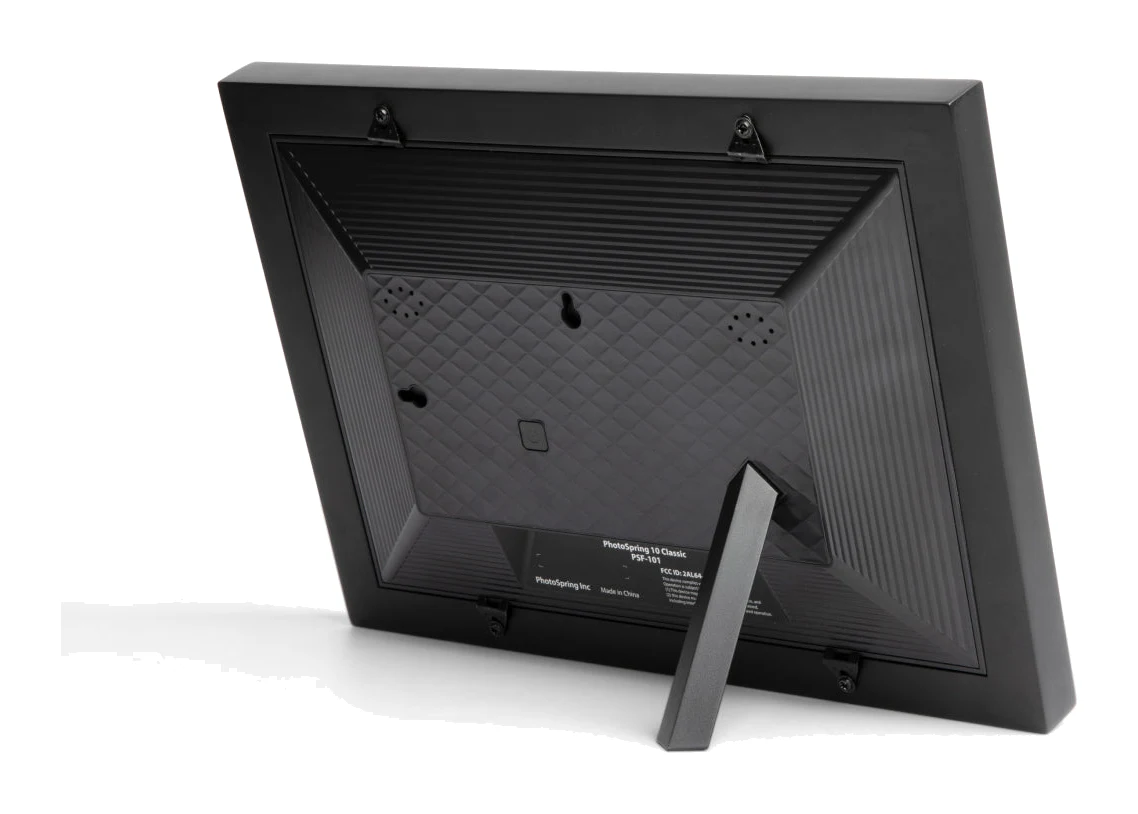
A look at the PhotoSpring Classic 10in digital frame: easy setup, flexible photo sending and no subscription, balanced against a plain plastic build and a glossy screen.
Research-based · We earn from qualifying purchases
Our verdict
A good pick for gifting or sharing family photos with relatives who aren't tech-savvy, thanks to easy setup, flexible photo sending and no subscription. Skip it if you want premium build, wide viewing angles or a motion sensor.
The good
- 10.1" touchscreen makes browsing and setup easy, even for non-technical users
- No subscription fee, with free lifetime software updates
- Send photos by email, app, web or Google Photos
- Bright, sharp IPS screen with colorful images
- Gift mode lets you preload photos and a message before shipping
+2 more
- Bright, sharp IPS screen with colorful images
- Gift mode lets you preload photos and a message before shipping
The bad
- Plastic build feels a bit cheap
- Glossy screen picks up fingerprints and reflections; viewing angles trail pricier frames
- No motion sensor, and the stand can fit loosely
- Software is functional but not the most refined
+1 more
- Software is functional but not the most refined
Digital photo frames have a simple job: put your family pictures somewhere you will actually see them. This PhotoSpring Classic 10in digital frame review looks at a model aimed squarely at people who want that without fuss. It is a 10.1" Wi-Fi frame with a touchscreen, no subscription fee and several ways for relatives to send photos. It is best suited to gift buyers, and to anyone setting up a frame for a person who is not comfortable with technology.
This review is based on the manufacturer's specifications and on what independent expert reviews report, not on our own hands-on testing.
PhotoSpring Classic 10in Digital Frame: specs at a glance
From the manufacturer- Power
- AC adapter only (no battery)
- Warranty
- 1 Year
- Processor
- 64 bit 1.5ghz Quad Core
- Resolution
- 1280x800 IPS display
- Screen size
- 10.1" diagonal
- Connectivity
- WiFi
- Model number
- PSF-101
- Color options
- Black or white
- Photo sharing
- Email, App, Web, Google Photos
- Video support
- up to 5min / 1GB file size
- Photo capacity
- over 20,000 photos
- Memory capacity
- 32GB (28GB for user storage)
- Dimensions with frame
- 12.0 x 8.8 x 1.6"
- Screen (picture size)
- 8.5 x 5.3"
Key features
- 10.1" touchscreen that makes browsing and setup easy
- No subscription fee, ever
- Send photos by email, app, web or Google Photos
- 32GB storage, with 28GB for user photos
- Plays HD video up to 5 minutes (1GB file size)
- Gift mode: preload photos and a message before shipping
- Family members can send photos from anywhere in the world
- Free lifetime software updates
What the PhotoSpring Classic is
The Classic is a Wi-Fi-only frame built around a 10.1" diagonal IPS display with a resolution of 1280x800. It is powered by a 64 bit 1.5ghz Quad Core processor and ships in black or white. The model number is PSF-101. Its pitch is less about hardware than about ownership: no recurring fee, free lifetime software updates, and a set of ways to get photos onto it that do not require the recipient to do anything technical.
It has also been picked up by independent buying guides. It is recommended in 2 expert guides, which is a modest number but a sign that reviewers see it as a sensible choice in its niche.
Design and build
The frame measures 12.0 x 8.8 x 1.6" with its surround, and the visible picture area is 8.5 x 5.3". On a shelf or sideboard it is a sensible, mid-sized frame rather than a statement piece.
The design is deliberately conventional. The black or white colour options let it blend in with different rooms. Reviewers are fairly consistent about the downsides, though. A common criticism is that the plastic build feels a bit cheap. Another is that the stand can fit loosely. If you want a frame that reads as a piece of furniture, this is not it. If you want something that looks like a normal photo frame and does its job, it is fine.
The frame runs on an AC adapter only and has no battery. That is typical for a frame meant to stay in one place, but it does mean you will need to position it near an outlet. It is not something to carry from room to room.
Features and what they mean day to day
Touchscreen control
Reviewers praise the 10.1" touchscreen. Browsing, setup and settings are handled by touching the display, which makes the frame approachable for non-technical users. For a frame that is often bought as a present, this matters more than almost any spec. If the person receiving it cannot get past the setup screen, the frame becomes an expensive ornament.
Sending photos
Photos can reach the frame by email, app, web or Google Photos. In practice this gives family members several routes, so each person can use whichever they find easiest. Relatives can send photos from anywhere in the world, so the frame can feel "alive" without the owner having to manage anything. Google Photos support is useful for people who already keep their pictures there.
Gift mode
Gift mode lets you preload photos and a message before shipping. The recipient opens the box to a frame that already shows pictures and a personal note, rather than an empty screen and a setup chore. Gift mode is listed among the frame's strengths.
No subscription
There is no subscription fee, ever, and software updates are free for life. There is no subscription fee, which is a selling point for anyone who wants to avoid ongoing costs.
Display and performance
The 1280x800 IPS panel is described by reviewers as bright and sharp, with colourful images. For family snapshots viewed from across a room, that is the kind of picture quality most people want. IPS panels are generally chosen for good colour, and reviewers' comments on the picture are positive.
There are caveats. The screen is glossy, so it picks up fingerprints and reflections, which is worth remembering if the frame will sit opposite a window or a bright lamp. Because the screen is also a touchscreen, fingerprints will be part of daily life. Reviewers also note that viewing angles trail those of pricier frames, so it looks best when you are facing it rather than viewing from a steep angle.
The frame uses a 64 bit 1.5ghz Quad Core processor.
Storage, video and connectivity
The frame has 32GB of memory, with 28GB available for user storage. That is enough for over 20,000 photos, which is far more than most families will ever put on a frame. In day-to-day use, you are unlikely to run out of room.
It also plays HD video up to 5 minutes (1GB file size). That is fine for short clips of a child's birthday or a holiday moment, though it is not designed for long recordings. If you plan to show a lot of video, check that your clips stay within the limit.
Connectivity is Wi-Fi only. This is what powers the photo-sending features, so a reliable home network is essentially a requirement. Photos reach the frame by email, app, web or Google Photos, and family members can send photos from anywhere in the world.
What experts like and what they criticise
Reviewers praise:
- The 10.1" touchscreen, which makes browsing and setup easy even for non-technical users.
- The lack of a subscription fee, together with free lifetime software updates.
- The range of ways to send photos: email, app, web or Google Photos.
- A bright, sharp IPS screen with colourful images.
- Gift mode, which lets you preload photos and a message before shipping.
A common criticism is:
- A plastic build that feels a bit cheap.
- A glossy screen that picks up fingerprints and reflections, and viewing angles that trail pricier frames.
- No motion sensor, and a stand that can fit loosely.
- Software that is functional but not the most refined.
These are not fatal flaws, but they are real, and they point to a clear profile: this is a frame where the value is in the experience of using and sharing, not in premium materials or finishing.
Who should buy it, and who should skip it
Buy it if:
- You are choosing a gift for a parent or grandparent and want something that works when it is unboxed.
- You want relatives to send photos from different places and in different ways.
- You dislike subscriptions and want free updates for the life of the product.
- You want a bright, colourful picture in a conventional frame.
Skip it if:
- You want a premium build quality. The plastic construction is a common criticism.
- You will be viewing the frame from wide angles or in a bright, reflective spot.
- You want a motion sensor to manage the display.
- You want highly polished software. Reviewers call it functional rather than refined.
How it fits in its category
The PhotoSpring Classic sits in the mid-range part of the market. Its appeal is practical rather than technical: easy setup, flexible sharing and no ongoing cost. Pricier frames may offer better viewing angles and a more premium feel, as reviewers point out, but this one concentrates on the features that matter to most families. If your priority is the experience of giving and receiving photos rather than the frame as an object, it is a sensible shortlist candidate.
Verdict
The PhotoSpring Classic does not try to be a luxury item, and it is more convincing for that. A touchscreen that is simple to use, several ways to send photos, gift mode and a no-subscription promise add up to a frame designed around real family use. The trade-offs are a plastic build, a glossy screen and a stand that may fit loosely, plus software that is more functional than polished. If those compromises are acceptable, it is a good pick for gifting or for sharing family photos with relatives who aren't tech-savvy. If build quality and viewing angles are your priorities, look elsewhere.
Related buying guides
Not sure about the PhotoSpring Classic 10in Digital Frame? Consider these
- Best OverallAura Aspen 12" HD FrameWhy we picked it →

- Also GreatLexar Pexar 11-inchWhy we picked it →

- Premium PickAura Walden 15Why we picked it →


Frequently asked questions
Is the PhotoSpring Classic 10in digital frame worth it?
Reviewers think it is a good choice for gifting or sharing family photos with relatives who are not tech-savvy, thanks to easy setup, flexible photo sending and no subscription. It is less compelling if you want a premium build, wide viewing angles or a motion sensor.
Does the PhotoSpring Classic require a subscription?
No. There is no subscription fee, ever, and the frame receives free lifetime software updates.
How can I send photos to the PhotoSpring Classic?
You can send photos by email, app, web or Google Photos. Family members can send photos from anywhere in the world.
Can the PhotoSpring Classic play video?
Yes. It plays HD video up to 5 minutes (1GB file size), so it suits short clips rather than long recordings.
Does the PhotoSpring Classic have a battery?
No. It runs on an AC adapter only, so it needs to be placed near a power outlet.
How many photos can the PhotoSpring Classic hold?
It has 32GB of memory, with 28GB for user storage. That is enough for over 20,000 photos.
Sources
Specs are taken from the manufacturers' official pages; expert recommendations from the publications below.
- PhotoSpring Classic 10in Digital Frame: photospring.com, tomsguide.com, bestreviewguide.com
Related reviews & guides

Best Digital Photo Frames 2026: Easy Sharing for Families
Five digital photo frames compared on display, storage, sharing and trade-offs, from cloud-only Aura models to expandable local-storage options, based on manufacturer specs and expert recommendations.
Published Oct 22, 2026
Aura Walden 15 Review (2026): A Big, Easy Family Frame
The Aura Walden 15 is a large 4:3 digital photo frame with unlimited cloud storage and easy sharing. Here is what it does well, where experts find fault, and who should buy it.
Published Oct 29, 2026Aura Aspen 12" HD Frame Review (2026): Built to Look Real
The Aura Aspen is a subscription-free digital frame that aims to look like a real picture frame and show phone photos well. Here is what the specs and expert reviews say.
Published Oct 23, 2026