Best 3D Printers for Beginners 2026: Easy to Set Up
Five beginner-friendly 3D printers compared on setup, auto leveling, build volume and monitoring, drawn from manufacturer specs and independent expert recommendations.
12 products compared · Research-based · Affiliate links
We earn a commission from qualifying purchases made through our links, at no extra cost to you. It never decides our picks. How we make money
Which one should you buy?
Our picks by what matters to you · details below ↓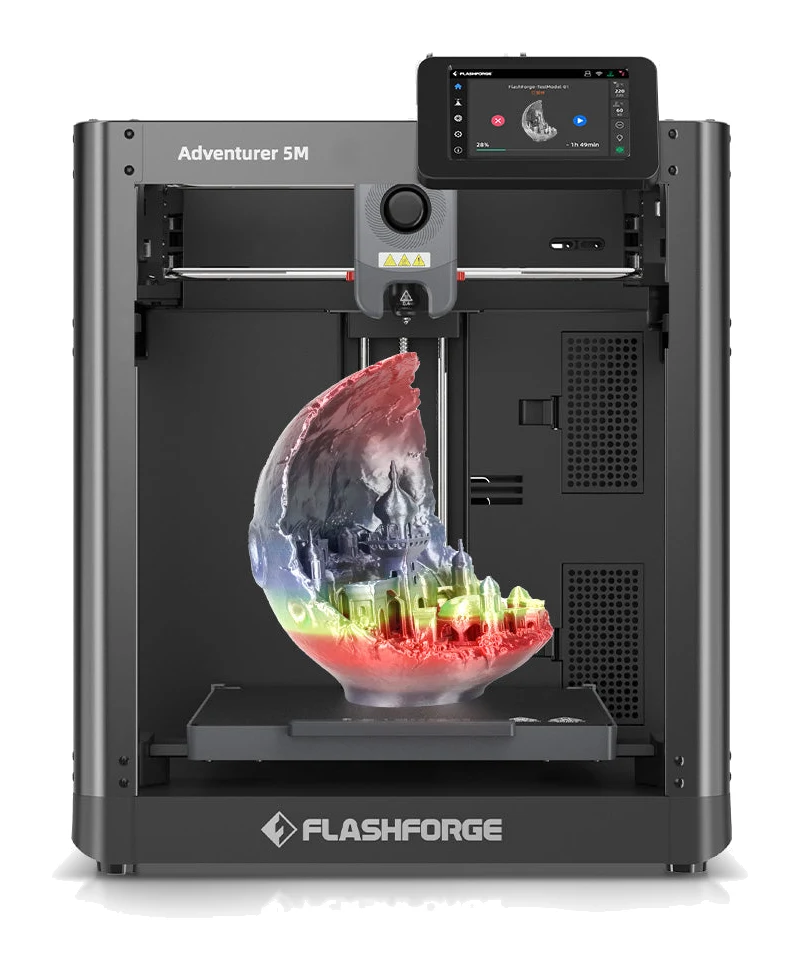
Best for: Users wanting top value with quick setup and auto leveling
Check price on Amazon- Best ValueCreality SPARKX i7Best for: Budget-conscious buyers needing larger build area and AI monitoringCheck price
- Best BudgetAnycubic Kobra XBest for: Beginners wanting native multicolor printing and failure detectionCheck price
- Also GreatElegoo Mars 5 UltraBest for: Beginners seeking fine-detail resin printing with auto levelingCheck price
- Premium PickBambu Lab A1Best for: Users prioritizing quiet operation and expert-backed auto-calibrationCheck price
Choosing from the best 3D printers for beginners is mostly about avoiding frustration: a printer that sets up quickly, levels its own bed and warns you when a print goes wrong will teach you more than a cheaper machine that fights you at every step. This guide compares five printers that suit first-time buyers, covering four filament machines and one resin model.
This guide is research-based, drawing on manufacturer specs and independent expert recommendations. This guide covers five printers chosen from the provided manufacturer specs and expert recommendations. Each section explains what earned the printer its label and where it makes compromises.
Best 3D Printers for Beginners at a Glance
| Rank | Printer | Label | Type | Price tier | Build volume | Standout for beginners | Buy |
|---|---|---|---|---|---|---|---|
| 1 | Flashforge Adventurer 5M | Best Overall | Filament (FDM) | Budget | 220 × 220 × 220 mm | 10-minute setup, one-click auto leveling | Check price |
| 2 | Creality SPARKX i7 | Best Value | Filament | Budget | 260 × 260 × 255 mm | 5-minute setup, AI camera monitoring | Check price |
| 3 | Anycubic Kobra X | Best Budget | Filament | Budget | 260 × 260 × 260 mm³ | Built-in 4-color printing | Check price |
| 4 | Elegoo Mars 5 Ultra | Also Great | Resin | Mid-range | 153.36 × 77.76 × 165 mm | 9K mono LCD for fine detail | Check price |
| 5 | Bambu Lab A1 | Premium Pick | Filament | Premium | 256 × 256 × 256 mm | Strain gauge auto-calibration, quiet running | Check price |
Flashforge Adventurer 5M: Best Overall
Best for: Users wanting top value with quick setup and auto leveling
Earns Best Overall by combining the top value for money and feature set with a quick 10-minute setup, auto leveling and safety features such as runout sensing and power loss recovery. It was chosen from the provided data, not hands-on testing.
Read our full Flashforge Adventurer 5M review →- Weight
- 10.8 kg (24 lbs)
- Resolution
- 100-400 microns (0.1-0.4 mm layer thickness)
- Print speed
- 300 mm/s (print), 600 mm/s (travel)
- Build volume
- 220 × 220 × 220 mm
- Build plate size
- 220 × 220 × 220 mm
- Warranty
- 12 months
Reasons to buy
- 10-minute setup with 95% pre-assembly
- One-click automatic bed leveling
- CoreXY metal frame with vibration compensation
- Quick-swap nozzles in four sizes
- PEI magnetic plate, runout sensor, power loss recovery
Reasons to avoid
- Smaller 220 mm cube build volume than rivals
- Limited to 4.3-inch touchscreen display
- TechGearLab
- 6.8
- Seek & Score
- 9.7
- A Valid Review
- 8.6
- Dial In 3D
- 9.0
The Adventurer 5M takes the top spot because it removes the usual early hurdles. It ships with 95% pre-assembly and a 10-minute setup, and its one-click automatic bed leveling handles the first-layer problems that trip up many newcomers. Five independent expert guides recommend it, a solid endorsement for a beginner machine.
Keep reading about Flashforge Adventurer 5M
Under the hood it uses a CoreXY all-metal structure with vibration compensation, a 20,000 mm/s² maximum acceleration and a 600 mm/s maximum travel speed. The listed maximum print speed is 300 mm/s. Quick-swap nozzles come in 0.25mm, 0.4mm, 0.6mm and 0.8mm sizes, with 0.4mm as the standard. That lets you try finer detail or faster, chunkier prints as you learn. It handles PLA, PETG, TPU, PLA-CF and PETG-CF.
Safety and convenience features suit beginners too. There is a PEI magnetic build plate, a filament runout sensor and power loss recovery, and a 4.3-inch touchscreen. Wi-Fi, Ethernet and USB connectivity are all included. The main trade-off is the 220 × 220 × 220 mm build volume, which is smaller than the other filament printers in this guide. It is a great fit if you want a dependable first printer and mostly make small to medium parts.
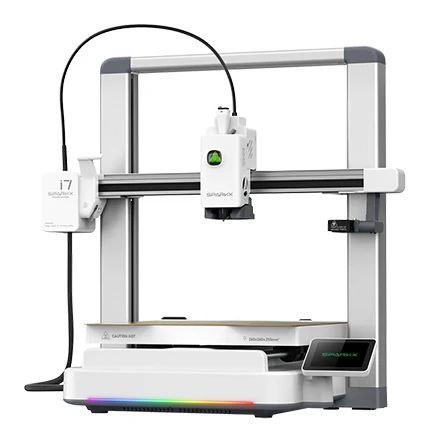
Creality SPARKX i7: Best Value
Best for: Budget-conscious buyers needing larger build area and AI monitoring
Best Value thanks to a strong value for money and a feature set that includes full auto leveling, AI monitoring and fast setup. It also offers a bigger build area than the top pick, based on listed specs.
- Weight
- 9.12 kg
- Resolution
- 100±0.1 mm
- Print speed
- ≤ 500 mm/s
- Build Volume
- 260 × 260 × 255 mm
- Build plate size
- 260 × 260 × 255 mm
- Warranty
- Up to 12-Month
Reasons to buy
- Larger 260 × 260 × 255 mm build volume
- AI camera detects spaghetti and tangles
- Tool-free quick-swap hotend in about 5 seconds
- 45 dB Night Mode for quiet printing
- 5-minute setup from unboxing to first print
Reasons to avoid
- Multicolor printing needs the optional CFS Lite system
- Smaller 2.85-inch screen
- 3D Printing Store
- 8.2
- CGMagazine
- 8.5
- Dial In 3D
- 8.2
- The Gadgeteer
- 8.0
- Faux Hammer
- 4.0
The SPARKX i7 earns Best Value by packing a lot of smart features into the budget tier. Setup is listed at 5 minutes from unboxing to first print, and full auto leveling means no manual bed adjustments. Six independent expert guides recommend it, the highest count among the budget picks.
Keep reading about Creality SPARKX i7
Its standout feature is the AI camera. It uses a 720p camera with lighting to watch for spaghetti, air printing and tangles, which helps catch failures early. The tool-free quick-swap hotend allows 5-second nozzle changes with 0.2/0.4/0.6/0.8 mm nozzles compatible. A 45 dB Night Mode is aimed at quieter, overnight printing. There is also a CubeMe AI photo-to-3D feature that turns portraits into printable models.
The build volume is 260 × 260 × 255 mm, larger than the top pick, and the direct drive extruder reaches up to 300 °C for PLA, PETG, PLA-CF and TPU (shore 64D or harder). The trade-offs: multicolor printing, which the maker says cuts filament waste by 50%, requires the optional CFS Lite system, and the 2.85-inch touchscreen is the smallest of the filament printers here. It suits beginners who want monitoring and a bigger bed without moving up a price tier.
Anycubic Kobra X: Best Budget
Best for: Beginners wanting native multicolor printing and failure detection
Best Budget because it packs built-in multicolor, auto leveling and AI monitoring into the budget tier. A good fit for beginners who want color and failure detection early.
Read our full Anycubic Kobra X review →- Weight
- 9.5 kg
- Resolution
- 50–350 µm
- Print speed
- Up to 600 mm/s
- Build Volume
- 260 × 260 × 260 mm³
- Build plate size
- 260 × 260 × 260 mm
- Warranty
- 1 year
Reasons to buy
- Native 4-color printing, expandable to 19 colors
- LeviQ 3.0 auto leveling with 49-point mesh
- AI failure detection for spaghetti and foreign objects
- Direct drive extruder suited to flexible TPU
- Dual-band Wi-Fi, LAN and USB connectivity
Reasons to avoid
- Multicolor expansion needs additional ACE 2 Pro modules
- Larger footprint than the top two picks
- TechRadar
- 9.0
- Faux Hammer
- 8.0
- Tom's Hardware
- 9.0
- 3dwork.io
- 8.4
The Kobra X is the pick for beginners who want color early. It includes native 4-color printing, expandable to 19 colors with ACE 2 Pro modules, all within the budget tier. Five independent expert guides recommend it.
Keep reading about Anycubic Kobra X
Automatic bed leveling uses LeviQ 3.0 with 49-point mesh leveling, and AI-powered failure detection looks for spaghetti and foreign objects through a 720p camera. A 3.5-inch capacitive touchscreen and dual-band 2.4/5 GHz Wi-Fi, LAN and USB keep file transfer simple. The direct drive extruder is optimized for flexible filaments like TPU, and the magnetic PEI spring steel bed should make removing finished prints easier.
Speed is listed at up to 600 mm/s, with a recommended speed of 300 mm/s, and the 260 × 260 × 260 mm³ build volume matches the other large-bed picks. The trade-offs are that growing past four colors needs additional ACE 2 Pro modules, and the machine has a larger footprint than the top two picks. It is a good match if multicolor models are why you want a printer in the first place.
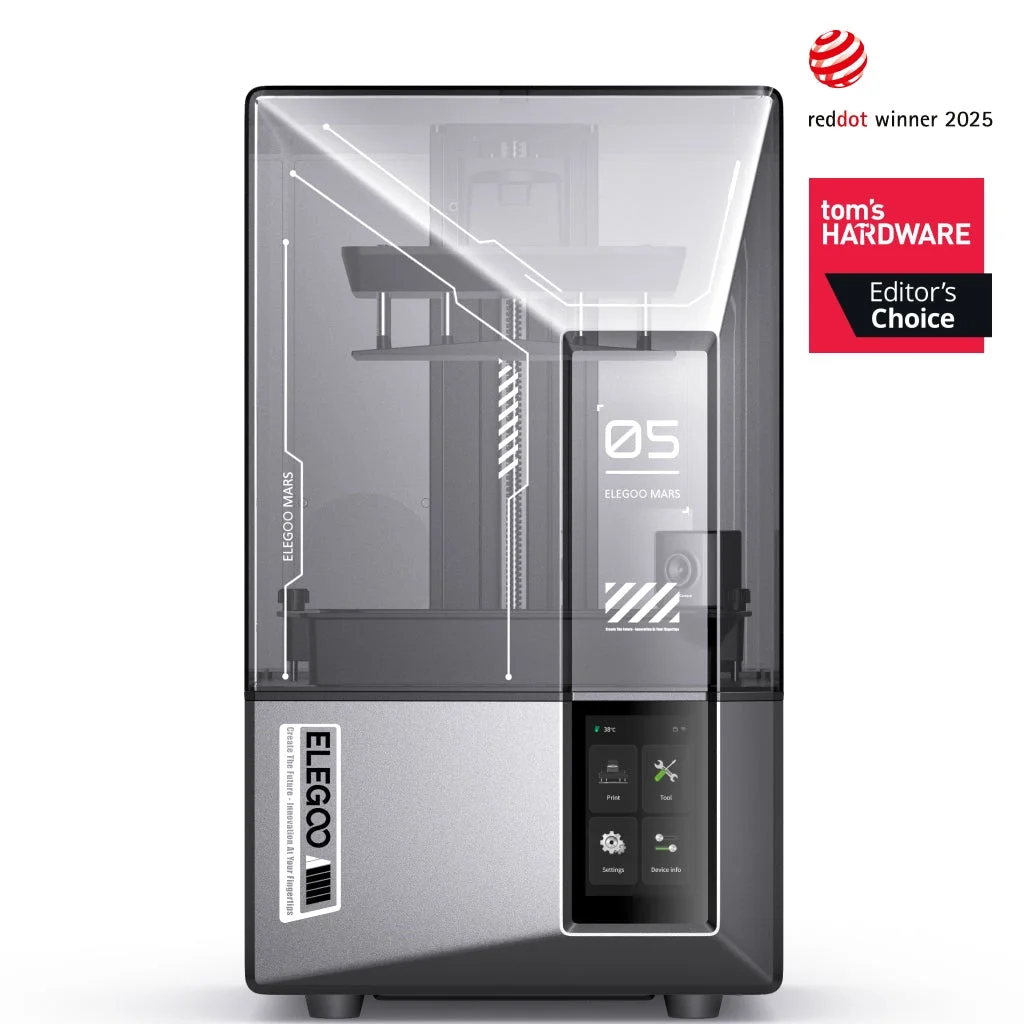
Elegoo Mars 5 Ultra: Also Great
Best for: Beginners seeking fine-detail resin printing with auto leveling
Also Great for beginners who want fine-detail resin printing, with auto leveling and smart sensors easing setup. It sits in the mid-range tier and suits small, detailed models.
- Weight
- 8.8 kg
- Resolution
- 8520 × 4320 (9K) / 18 μm XY
- Print speed
- MAX 150 mm/h
- Build Volume
- 153.36 × 77.76 × 165 mm
- Build plate size
- 153.36 × 77.76 × 165 mm
- Connectivity
- Wi-Fi, USB
Reasons to buy
- 9K mono LCD with 18 μm XY resolution
- One-click automatic leveling
- AI camera with warp detection and time-lapse
- Sensors detect resin shortages and leveling failures
- Tilt Release enables prints up to 150 mm/h
Reasons to avoid
- Compact 153 × 78 × 165 mm build volume
- Resin printing differs from filament-based options
- CGMagazine
- 8.0
- Gaming Trend
- 9.5
- Reviews Trusted
- 9.0
- 3DTechValley
- 9.5
- TechTeamGB
- 9.0
The Mars 5 Ultra is the odd one out here because it is a resin printer, not a filament machine. It earns its place for beginners who care about small, highly detailed models such as miniatures. A 7-inch 9K mono LCD delivers 18 μm XY resolution, and the layer thickness range runs from 0.01–0.2 mm. Six independent expert guides recommend it.
Keep reading about Elegoo Mars 5 Ultra
Beginner-friendly touches include one-click automatic leveling, an AI camera with real-time monitoring, warp detection and time-lapse recording, and smart mechanical sensors that detect resin shortages and leveling failures. Tilt Release technology supports print speeds up to 150 mm/h, and Wi-Fi and USB connectivity allow remote monitoring and cluster printing.
The trade-off is the compact 153.36 × 77.76 × 165 mm build volume, which rules out larger parts. Resin printing also works differently from filament printing, so check what extra supplies and handling it involves before you buy. It sits in the mid-range tier and is best for detail-focused hobbyists rather than general-purpose printing.
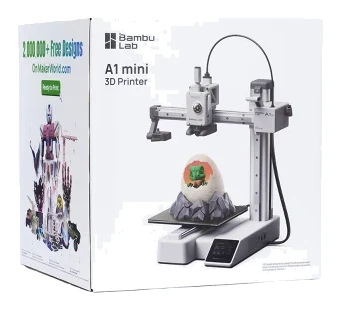
Bambu Lab A1: Premium Pick
Best for: Users prioritizing quiet operation and expert-backed auto-calibration
Premium Pick on the strength of the highest expert recommendation count (8) and top expert backing, plus quiet operation and auto-calibration. Its premium tier is why value ranks lowest.
- Weight
- 8.3 kg
- Resolution
- 0.05–0.35 mm
- Print speed
- 500 mm/s
- Build Volume
- 256 × 256 × 256 mm
- Build plate size
- 256 x 256 x 256 mm
- Warranty
- 2-year
Reasons to buy
- Strain gauge auto-calibration and bed leveling
- Active motor noise cancellation below 48 dB
- Ready to print in 20 minutes
- Quick-swap all-metal hotend for easy maintenance
- Built-in camera with timelapse support
Reasons to avoid
- Premium price tier, lowest value for money of the group
- Multi-color printing requires the optional AMS Lite
- TechRadar
- 10.0
- Angl3d
- 8.8
The A1 has the highest expert recommendation count in this guide, with eight independent guides recommending it. It is pre-assembled and listed as ready to print in 20 minutes, and full auto-calibration with strain gauge bed leveling aims to deliver reliable first prints.
Keep reading about Bambu Lab A1
Noise is a highlight: active motor noise cancellation keeps printing below 48 dB. The quick-swap all-metal hotend simplifies maintenance, and a built-in monitoring camera supports timelapse. The build volume is 256 × 256 × 256 mm, maximum print speed is 500 mm/s, and the hotend reaches 300 °C. Connectivity covers Wi-Fi, Bambu-Bus and a microSD card, and a 3.5 inch touchscreen handles controls.
The main trade-offs are cost and add-ons. It is the only premium-tier printer here, which is why it ranks lowest for value, and multi-color printing requires the optional AMS Lite accessory. It is the right pick if you want a polished, quiet machine and are willing to spend more for it.
Compare our picks side by side
The specs most of our picks share, from each maker’s spec page (— = not published). Expert score = the average of published expert reviews, which rate each product for its price. Scroll sideways on small screens.
| Spec | Flashforge Adventurer 5M | Creality SPARKX i7 | Anycubic Kobra X | Elegoo Mars 5 Ultra | Bambu Lab A1 |
|---|---|---|---|---|---|
| Best for | Best Overall | Best Value | Best Budget | Also Great | Premium Pick |
| Expert score | 8.5 | 7.4 | 8.6 | 9.0 | 9.4 |
| Price vs. these picks | Lower | Lower | Lower | Middle | Higher |
| Weight | 10.8 kg (24 lbs) | 9.12 kg | 9.5 kg | 8.8 kg | 8.3 kg |
| Resolution | 100-400 microns (0.1-0.4 mm layer thickness) | 100±0.1 mm | 50–350 µm | 8520 × 4320 (9K) / 18 μm XY | 0.05–0.35 mm |
| Print speed | 300 mm/s (print), 600 mm/s (travel) | ≤ 500 mm/s | Up to 600 mm/s | MAX 150 mm/h | 500 mm/s |
| Build volume | 220 × 220 × 220 mm | 260 × 260 × 255 mm | 260 × 260 × 260 mm³ | 153.36 × 77.76 × 165 mm | 256 × 256 × 256 mm |
| Build plate size | 220 × 220 × 220 mm | 260 × 260 × 255 mm | 260 × 260 × 260 mm | 153.36 × 77.76 × 165 mm | 256 x 256 x 256 mm |
| Warranty | 12 months | Up to 12-Month | 1 year | — | 2-year |
| Heated bed | Yes, up to 110°C | ≤ 100 ℃ | Yes, up to 100°C | — | Yes, max 100°C |
| Connectivity | Wi-Fi, Ethernet, USB | — | Wi-Fi (dual-band 2.4/5 GHz), LAN, USB | Wi-Fi, USB | Wi-Fi, Bambu-Bus, microSD card |
| Where to buy | Check price | Check price | Check price | Check price | Check price |
How to Choose a Beginner 3D Printer
Filament or resin
Most beginners start with filament (FDM) printers. They suit a wide range of everyday and functional prints and use spool-based materials such as PLA, PETG and TPU. Resin printers like the Elegoo Mars 5 Ultra trade build size for fine detail, so they fit miniatures and small, intricate models better than larger parts.
Auto leveling and setup time
A poorly leveled bed is a common cause of failed first layers. Every printer in this guide includes automatic leveling in some form, from one-click systems to mesh or strain gauge approaches. Setup claims range from 5 minutes to 20 minutes, so a short setup is a good sign for a first printer.
Monitoring and failure detection
Cameras and sensors help you spot a failing print before it wastes a lot of filament or resin. The SPARKX i7, Kobra X, Mars 5 Ultra and Bambu Lab A1 all include a camera, and the Flashforge Adventurer 5M adds a filament runout sensor and power loss recovery.
Build volume
Check that the build area fits what you want to make. The three large-bed filament picks (SPARKX i7, Kobra X and A1) offer roughly 256 to 260 mm per side, while the Adventurer 5M offers 220 mm. The resin pick is considerably smaller.
Multicolor and add-ons
Multicolor printing is appealing but often needs extra hardware. The Kobra X includes native 4-color printing, while the SPARKX i7 needs the optional CFS Lite and the Bambu Lab A1 needs the optional AMS Lite. Factor those add-ons into your plans.
Noise
If the printer will sit in a living space, look at noise claims. The SPARKX i7 lists a 45 dB Night Mode, and the Bambu Lab A1 lists noise cancellation below 48 dB.
How We Picked
We compared printers using manufacturer specs and independent expert recommendations. We looked at setup effort, leveling, monitoring features, build volume, listed speeds, connectivity and how many independent expert guides recommend each model.
This guide is research-based, so treat the rankings as a shortlist rather than a verdict. Prices change often, so use the check price buttons for current availability and cost.
Bottom Line
For most newcomers, the Flashforge Adventurer 5M is the best starting point thanks to its quick setup, auto leveling and safety features. The Creality SPARKX i7 is the better choice if you want a larger bed and AI monitoring, and the Anycubic Kobra X suits those who want built-in color. Choose the Elegoo Mars 5 Ultra for detailed small models, or the Bambu Lab A1 if you want a quiet, highly recommended premium machine.
Ready to buy?
 Best OverallFlashforge Adventurer 5MCheck price
- Best ValueCreality SPARKX i7Check price
- Best BudgetAnycubic Kobra XCheck price
- Also GreatElegoo Mars 5 UltraCheck price
- Premium PickBambu Lab A1Check price
Frequently asked questions
What is the best 3D printer for a complete beginner?
Based on specs and expert recommendations, the Flashforge Adventurer 5M is our top pick. It lists a 10-minute setup with 95% pre-assembly, one-click automatic bed leveling and safety features such as a filament runout sensor and power loss recovery.
Should a beginner buy a filament or resin 3D printer?
Most beginners are better served by a filament printer, which suits a wider range of everyday prints. A resin printer such as the Elegoo Mars 5 Ultra is worth considering if you mainly want very fine detail on small models, since its build volume is compact.
Do beginner 3D printers need automatic bed leveling?
It is strongly worth having. Every printer in this guide includes automatic leveling in some form, which helps with reliable first layers and removes a common beginner hurdle.
Can beginner 3D printers print in multiple colors?
Some can. The Anycubic Kobra X includes native 4-color printing and can expand to 19 colors with ACE 2 Pro modules. The Creality SPARKX i7 needs the optional CFS Lite system, and the Bambu Lab A1 needs the optional AMS Lite accessory.
Which of these 3D printers is the quietest?
The Creality SPARKX i7 lists a 45 dB Night Mode, and the Bambu Lab A1 lists active motor noise cancellation below 48 dB. Check the manufacturer details if noise is a priority.
Were these 3D printers tested hands-on?
No. This guide is based on manufacturer specs and independent expert recommendations. Use the check price buttons to see current availability and pricing.
Sources
Specs are taken from the manufacturers' official pages; expert recommendations from the publications below.
- Flashforge Adventurer 5M: flashforge.com, matterhackers.com, latin.flashforge.com, shop3duniverse.com
- Creality SPARKX i7: creality.com, makers101.com, wol3d.com, inventorsgarage.store
- Anycubic Kobra X: anycubic.com, ageofminiatures.com, filascope.com, 3dpros.com
- Elegoo Mars 5 Ultra: us.elegoo.com, tomshardware.com, microcenter.com, 3dprinting.com
- Bambu Lab A1: bambulab.com, 3dpros.com, simplyprint.io, makerspecs.com
More buying guides
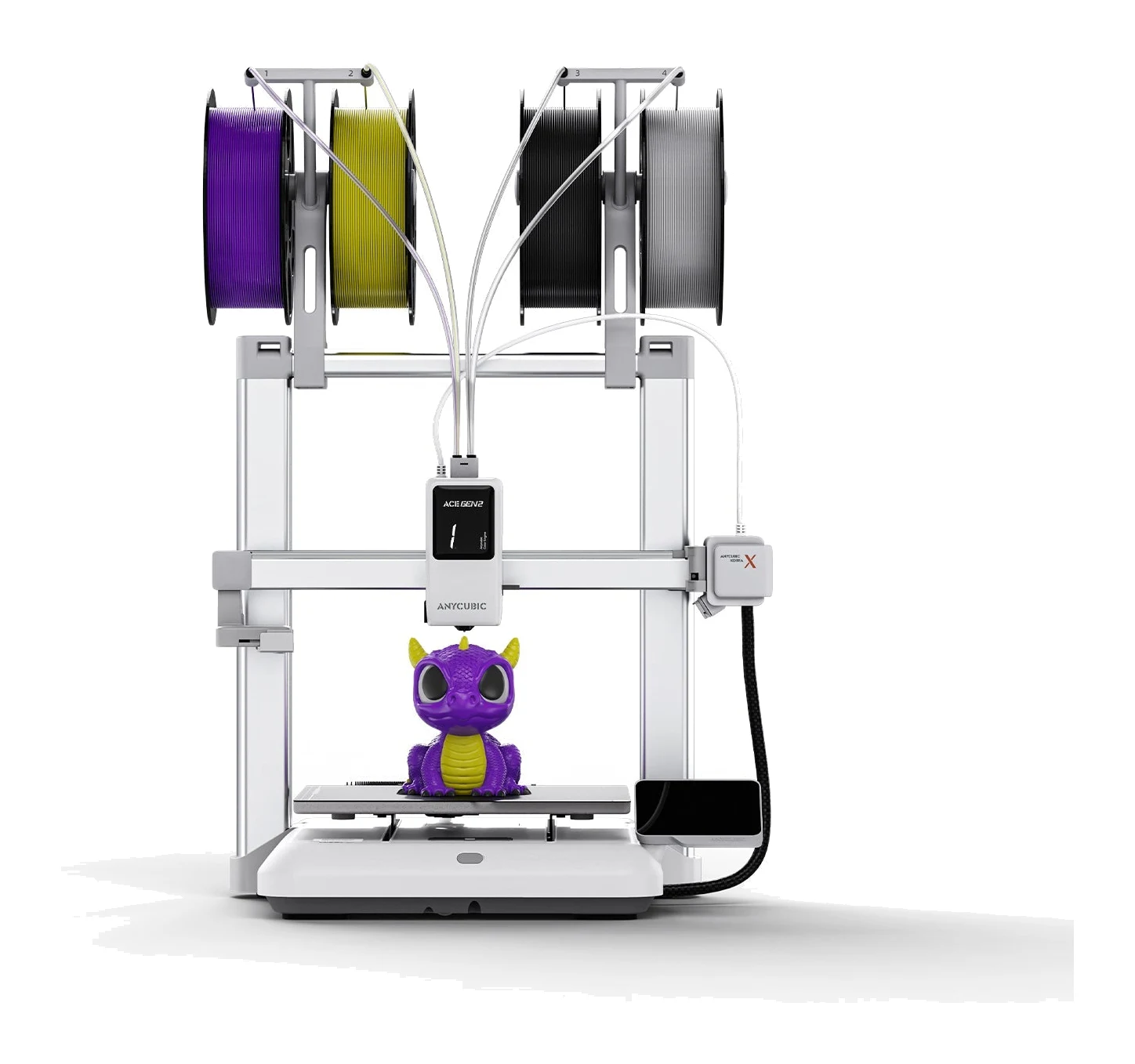
Anycubic Kobra X Review (2026): Multicolor for Beginners
The Anycubic Kobra X puts a four-color system into the toolhead of a mid-range printer. Here's what the specs and expert reviews say about who it suits.
Published Oct 30, 2026Flashforge Adventurer 5M Review (2026): Fast and Fuss-Free
A spec-based look at the Flashforge Adventurer 5M: a CoreXY printer with auto-leveling, quick-swap nozzles and networking, held back by its open frame.
Published Oct 25, 2026
Best Printer for Home Office 2026: Five All-in-Ones Compared
Five home office all-in-ones compared on print speed, running costs, scanning and paper handling, from a fast color laser to a compact ink tank model.
Published Oct 17, 2026