Razer Iskur V2 NewGen vs ThunderX3 SOLO 360 (2026): Lumbar
The premium Razer Iskur V2 NewGen offers adjustable lumbar and a higher weight limit. The budget ThunderX3 SOLO 360 counters with flexible armrests, synchronous tilt and breathable upholstery.
Head-to-head comparison · Research-based · Affiliate links
We earn a commission from qualifying purchases made through our links, at no extra cost to you. It never decides our picks. As an Amazon Associate I earn from qualifying purchases. How we make money
Razer Iskur V2 NewGen vs ThunderX3 SOLO 360: which one should you buy?
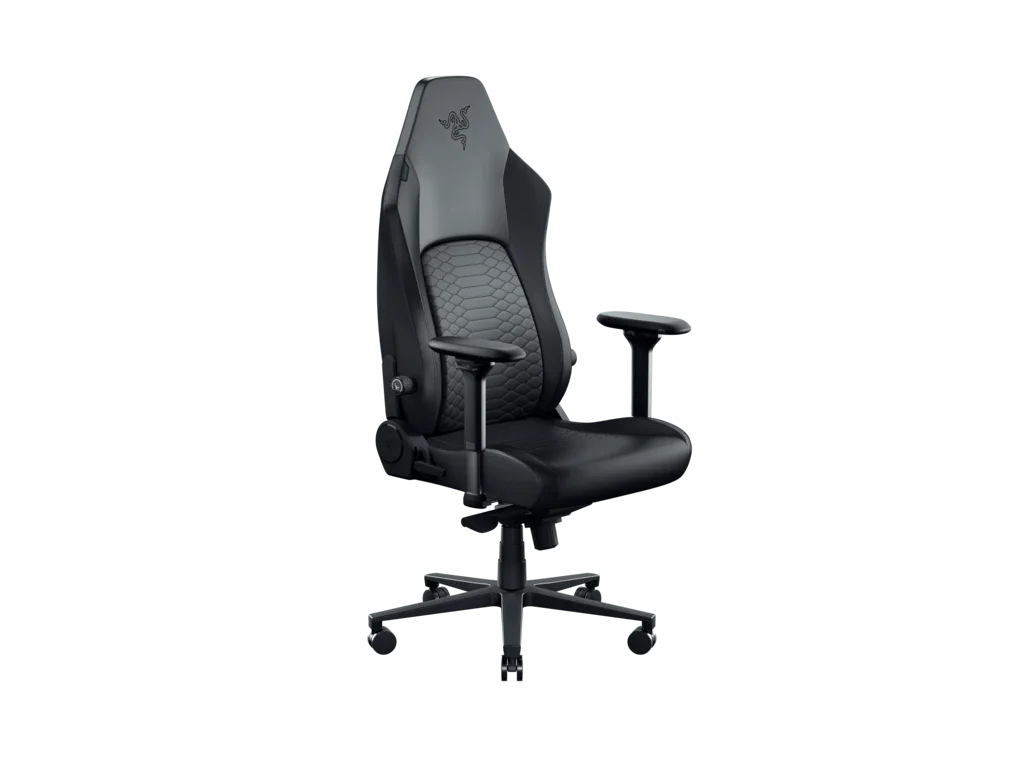
Best for: Taller or larger users wanting premium adjustable lumbar support
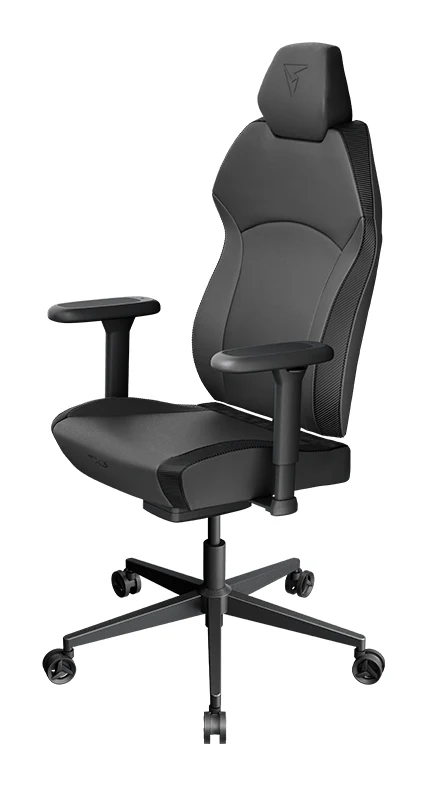
Best for: Budget buyers wanting a breathable, office-friendly chair with flexible armrests
If you're weighing the Razer Iskur V2 NewGen vs ThunderX3 SOLO 360, taller or larger users who want adjustable lumbar support and will pay more should pick the Razer Iskur V2 NewGen. It has adjustable lumbar support, a higher weight limit and a sturdier build. The ThunderX3 SOLO 360 is the better choice if you want to spend less, need a breathable mesh or fabric chair, or prefer flexible armrests and a lighter, office-friendly design.
The Razer is the premium option and the ThunderX3 is the budget one. The gap between them in expert scores is small, so the decision comes down to a few concrete differences rather than a clear winner.
Lumbar support: Razer HyperFlex vs a fixed curve
This is the clearest difference between the two chairs. The Iskur V2 NewGen has Razer's built-in HyperFlex lumbar support. It swivels 360° with your spine and adjusts up, down, in and out, with 40 mm of protrusion and 60 mm of height adjustment. Reviewers praise it for following your movement.
The SOLO 360 has an ergonomically curved lumbar design, but it is fixed and not adjustable. Reviewers flag that as a drawback. If the shape suits your back, you may not mind. If you want to tune the support to your spine or sit for long stretches, the Razer is the stronger chair.
Winner: Razer Iskur V2 NewGen, for anyone who wants to dial in their lower-back support.
Armrests, tilt and recline
The two chairs take different approaches here.
The Razer has 4D armrests that move 40 mm front to back and rotate 50° inward and outward. Its maximum recline is 153.5° ± 2°, which is a long way back for lounging.
The ThunderX3 has 3D x 360° armrests that rotate, adjust laterally and retract, which reviewers single out as a highlight. Its SYNC4 mechanism moves the seat and backrest together with synchronous tilt. It also has a multi-angle recline lock and weight-sensitive backrest resistance. Reviewers like the tilt, and PC Gamer lists its recline at 125 degrees. The common complaint is that the armrests are bulky, sit high and don't lower much.
If you want to lie back, the Razer reclines further. If you want a chair that moves with you while you work, and armrests that tuck in close to a desk, the SOLO 360 has the more flexible setup. Its headrest is also car-seat-style, adjusting vertically and locking in place. The Razer includes a sculpted memory foam head cushion, though reviewers find its strap-on neck pillow awkward.
Winner: ThunderX3 SOLO 360 for desk work and armrest flexibility. Razer Iskur V2 NewGen for deep recline.
Upholstery and airflow
The Iskur V2 NewGen uses Gen-2 EPU leather with CoolTouch technology, which reviewers say feels cooler to the touch and resists peeling. The seat cushion is perforated dual-density cold-cured foam for airflow and pressure relief. Even so, reviewers note that leather-style upholstery can't match mesh for airflow.
That is where the SOLO 360 has an edge. It comes in breathable mesh, multi-layer breathable Loft Air fabric, or leatherette in Racer or Modern styles. The foam inside is fully molded to hold its shape. If you run warm or want an office-style look, the fabric and mesh options are a real advantage.
One caution on the ThunderX3: reviewers say the seat cushion can feel hard, especially for heavier users. On the Razer, some find the seat firm or short, and its seat depth is 450 mm. The SOLO 360's is 48 cm, and it has a seat height range of 45–53 cm. Razer doesn't list a seat height range.
Winner: ThunderX3 SOLO 360 for breathability and choice. The Razer's cooler-feeling leather-style cover is its answer, but it doesn't match mesh.
Size, build and weight capacity
The Razer is built for bigger frames. It supports users up to 136 kg (299 lbs) and is recommended for people 160 – 200 cm (5.3 – 6.6 ft) tall. It has an ultra-wide shoulder arch and seat base, a steel frame, an aluminum alloy base and five PU casters. It weighs 60.8 lbs / 27.6 kg, so it is a heavy chair.
The SOLO 360 has a steel frame, a 350mm steel base and a BIFMA tested, class 4 gas lift. Its recommended maximum user weight is 125kg (275lbs), and it weighs 21.0kg / 46.3lbs. ThunderX3 doesn't list a recommended user height. Reviewers do count its nylon casters as a weak point, and heavier users find the seat hard. The chair is also easier to handle: reviewers say assembly is quick, even for one person.
Taller or larger users should lean towards the Razer. Smaller rooms and people who move their chair around will appreciate the lighter ThunderX3.
Winner: Razer Iskur V2 NewGen for larger users and a sturdier feel.
Price and warranty
Reviewers call the SOLO 360 good value. They describe the Iskur V2 NewGen as a premium-priced chair that is only a minor upgrade over the original Iskur V2. That matters if you already own or are considering the earlier model.
The Razer comes with a 3-year limited warranty, plus a 5-year extended option via the Razer.com program. ThunderX3's warranty is reported inconsistently: Club386 says three years, while PC Gamer lists 1 year. Check the seller's terms before you buy.
Winner: ThunderX3 SOLO 360 on cost, Razer Iskur V2 NewGen on clear warranty coverage.
What experts say
Expert scores for the two chairs are close. The Razer Iskur V2 NewGen averages 8.7 out of 10. TechRadar gave it 4 out of 5, ProSettings.net 4.5 out of 5 and CGMagazine 9 out of 10. Reviewers praise the HyperFlex lumbar, the cooler-feeling EPU leather, the dual-density perforated seat and the sturdy steel and aluminum construction. Their criticisms are the premium price for what some call a minor upgrade, the weaker airflow compared with mesh, the awkward strap-on neck pillow and a seat that some find firm or short.
The ThunderX3 SOLO 360 averages 8.4 out of 10. PC Gamer scored it 89 out of 100, Club386 4.5 out of 5, GeekaWhat (Loft Air version) 3.8 out of 5 and GBAtemp 8 out of 10. It is also recommended in one expert buying guide. Reviewers like the armrests, the SYNC4 tilt, the value, the upholstery choices and the quick assembly. They criticise the fixed lumbar support, the nylon casters, the bulky high armrests and a hard seat cushion.
In short, the Razer scores slightly higher with reviewers, though the gap is small. The ThunderX3 earns its score by delivering a lot for less money.
If neither chair feels right, you could also look at our Sihoo M57 ergonomic office chair review for another adjustable option.
Choose Razer Iskur V2 NewGen if…
Best for: Taller or larger users wanting premium adjustable lumbar support
Choose the Iskur V2 NewGen over the SOLO 360 if you want adjustable, adaptive lumbar support and a sturdier, more premium build with a higher weight capacity. It suits taller or larger users willing to pay more for a leather-style racing chair.
Read our full Razer Iskur V2 NewGen review →- Weight
- 60.8 lbs / 27.6 kg
- Dimensions
- Backrest 33.5 in / 85 cm (height) x 21.3 in / 54 cm (width)
- Warranty
- 3-year limited (5-year extended via Razer.com program)
- Material
- Gen-2 EPU leather with CoolTouch Technology
- Recline angle
- Maximum 153.5° ± 2°
- Lumbar support
- Razer HyperFlex built-in, 360° swivel, adjustable up/down/in/out (protrusion 40 mm, height 60 mm)
Reasons to buy
- HyperFlex lumbar swivels with your spine and adjusts up, down, in, out
- Gen-2 EPU leather with CoolTouch feels cooler and resists peeling
- Dual-density perforated foam seat for airflow and pressure relief
- Fits users up to 136 kg and 200 cm tall
- Sturdy steel frame, aluminum base and 4D armrests
Reasons to avoid
- Premium price for what reviewers call a minor upgrade over the Iskur V2
- Leather-style upholstery still can't match mesh for airflow
- Strap-on neck pillow feels awkward to reviewers
- Seat feels firm or short to some users
- Tom's Guide
- 9.0
- CGMagazine
- 9.0
- ProSettings.net
- 9.0
- The Shortcut
- 9.0
- Final Weapon
- 9.0
- TechRadar
- 8.0
Choose the Iskur V2 NewGen if adjustable lumbar support is your priority and you're willing to pay the premium for it. It is also the better fit for taller or larger users, thanks to its 136 kg (299 lbs) limit and 160 – 200 cm recommended height range. It also suits anyone who likes to recline far back and wants a 3-year warranty with a 5-year extension option. Accept that the leather-style cover won't breathe like mesh.
Choose ThunderX3 SOLO 360 if…
Best for: Budget buyers wanting a breathable, office-friendly chair with flexible armrests
Choose the SOLO 360 over the Iskur V2 NewGen if you want a more affordable chair with synchronous tilt and flexible armrests. It also offers breathable mesh or fabric options and a lighter, more office-friendly design, provided you can live without adjustable lumbar support.
Read our full ThunderX3 SOLO 360 review →- Weight
- 21.0kg / 46.3lbs
- Dimensions
- Backrest 86 cm high and 53 cm wide; seat depth 48 cm; seat height 45–53 cm
- Warranty
- Three years; PC Gamer lists 1 year
- Material
- Breathable mesh, leatherette (Racer, Modern) or multi-layer breathable fabric (Loft Air); molded foam inside
- Recline angle
- 125 degrees
- Lumbar support
- Fixed ergonomically curved design, not adjustable
Reasons to buy
- 3D x 360° armrests rotate, adjust laterally and retract
- SYNC4 synchronous tilt moves seat and backrest together comfortably
- Budget-friendly, with reviewers calling it good value
- Offers mesh, Loft Air fabric or leatherette upholstery
- Quick assembly, even for one person
Reasons to avoid
- Lumbar support is fixed and not adjustable
- Nylon casters are a reviewer-noted weak point
- Bulky armrests sit high with limited lowering
- Seat cushion can feel hard, especially for heavier users
- PC Gamer
- 8.9
- Club386
- 9.0
- GBAtemp
- 8.0
- GeekaWhat (Loft Air)
- 7.6
- PCGuide
- 8.0
Choose the SOLO 360 if you want the budget option and a lighter chair that suits an office. The mesh and Loft Air fabric options help if you run warm, and the 3D x 360° armrests and SYNC4 tilt make it flexible for daily work. You need to be fine with fixed lumbar support, nylon casters and a seat that some find hard.
Compare our picks side by side
The specs most of our picks share, from each maker’s spec page (— = not published). Expert score = the average of published expert reviews, which rate each product for its price. Scroll sideways on small screens.
| Spec | Razer Iskur V2 NewGen | ThunderX3 SOLO 360 |
|---|---|---|
| Best for | Our Pick | The Alternative |
| Expert score | 8.8 | 8.3 |
| Price vs. these picks | Higher | Lower |
| Weight | 60.8 lbs / 27.6 kg | 21.0kg / 46.3lbs |
| Dimensions | Backrest 33.5 in / 85 cm (height) x 21.3 in / 54 cm (width) | Backrest 86 cm high and 53 cm wide; seat depth 48 cm; seat height 45–53 cm |
| Warranty | 3-year limited (5-year extended via Razer.com program) | Three years; PC Gamer lists 1 year |
| Material | Gen-2 EPU leather with CoolTouch Technology | Breathable mesh, leatherette (Racer, Modern) or multi-layer breathable fabric (Loft Air); molded foam inside |
| Recline angle | Maximum 153.5° ± 2° | 125 degrees |
| Lumbar support | Razer HyperFlex built-in, 360° swivel, adjustable up/down/in/out (protrusion 40 mm, height 60 mm) | Fixed ergonomically curved design, not adjustable |
| Where to buy | View on Amazon | View on Amazon |
The verdict
The Razer Iskur V2 NewGen is the better chair for taller or larger users who want a racing-style seat, because adjustable lumbar support and a sturdier, higher-capacity build are what you pay the premium for. The ThunderX3 SOLO 360 is the smarter buy if your budget is tight, you prefer breathable upholstery, or you value armrest and tilt flexibility over lumbar tuning. Neither chair is a mistake, so pick the one that matches your body and your budget.
Ready to buy?
 Our PickRazer Iskur V2 NewGenView on Amazon
 The AlternativeThunderX3 SOLO 360View on Amazon
Frequently asked questions
Is the Razer Iskur V2 NewGen better than the ThunderX3 SOLO 360?
The Razer Iskur V2 NewGen is better for taller or larger users who want adjustable lumbar support and a sturdier build and are willing to pay more. Reviewers score it slightly higher, at 8.7 out of 10 against 8.4 out of 10 for the ThunderX3 SOLO 360. The SOLO 360 is better if you want to spend less or want a mesh or fabric chair.
Which chair has better lumbar support, the Iskur V2 NewGen or the SOLO 360?
The Razer Iskur V2 NewGen has the better lumbar support. Its HyperFlex lumbar swivels with your spine and adjusts up, down, in and out. The ThunderX3 SOLO 360 has a fixed, ergonomically curved lumbar design that isn't adjustable.
Which chair is better for big and tall users?
The Razer Iskur V2 NewGen is the better choice for big and tall users. It supports up to 136 kg (299 lbs) and is recommended for people 160 – 200 cm (5.3 – 6.6 ft) tall. The ThunderX3 SOLO 360 lists a recommended maximum of 125kg (275lbs), and reviewers say its seat cushion can feel hard for heavier users.
Does the ThunderX3 SOLO 360 come in mesh?
Yes, the ThunderX3 SOLO 360 is offered in breathable mesh, multi-layer Loft Air fabric, or leatherette in Racer or Modern styles. The Razer Iskur V2 NewGen uses Gen-2 EPU leather with CoolTouch technology instead, and reviewers say leather-style upholstery can't match mesh for airflow.
Which chair has the better armrests?
The ThunderX3 SOLO 360 has the more flexible armrests. They are 3D x 360° adjustable: they rotate, adjust laterally and retract. The Razer Iskur V2 NewGen has 4D armrests with 40 mm of front-to-back adjustment and 50° of inward-outward rotation. Reviewers note that the ThunderX3's armrests are bulky and sit high.
Which chair has the better warranty?
The Razer Iskur V2 NewGen has the clearer warranty: 3 years limited, with a 5-year extended option via the Razer.com program. The ThunderX3 SOLO 360's warranty is reported as three years by Club386, but PC Gamer lists 1 year, so confirm the terms with the seller.
Sources
Specs are taken from the manufacturers' official pages; expert recommendations from the publications below.
- Razer Iskur V2 NewGen: razer.com, tomshardware.com, cgmagonline.com, tomsguide.com
- ThunderX3 SOLO 360: tx3.tech, pcgamer.com, club386.com, geekawhat.com
More buying guides
Razer Iskur V2 NewGen Review (2026): Roomy and Supportive
Our Razer Iskur V2 NewGen review covers the adaptive lumbar support, 4D armrests and roomy seat, plus the upholstery and head cushion criticisms.
Published Oct 28, 2026ThunderX3 SOLO 360 Review (2026): Flexible Armrests
A look at the ThunderX3 SOLO 360 chair: flexible 3D armrests, SYNC4 recline, steel construction and the compromises around lumbar support and seat cushioning.
Published Nov 6, 2026Best Gaming Chairs 2026: Comfort for Long Sessions
Five of the best gaming chairs for 2026, compared on lumbar support, armrests, recline, weight capacity and warranty, based on manufacturer specs and expert recommendations.
Published Oct 27, 2026