Razer Viper V4 Pro vs Logitech G305 LIGHTSPEED (2026)
A budget AA-powered wireless mouse against a premium 49 g esports mouse with 8000 Hz polling. Here is who should buy which.
Head-to-head comparison · Research-based · Affiliate links
We earn a commission from qualifying purchases made through our links, at no extra cost to you. It never decides our picks. As an Amazon Associate I earn from qualifying purchases. How we make money
Razer Viper V4 Pro vs Logitech G305 LIGHTSPEED: which one should you buy?
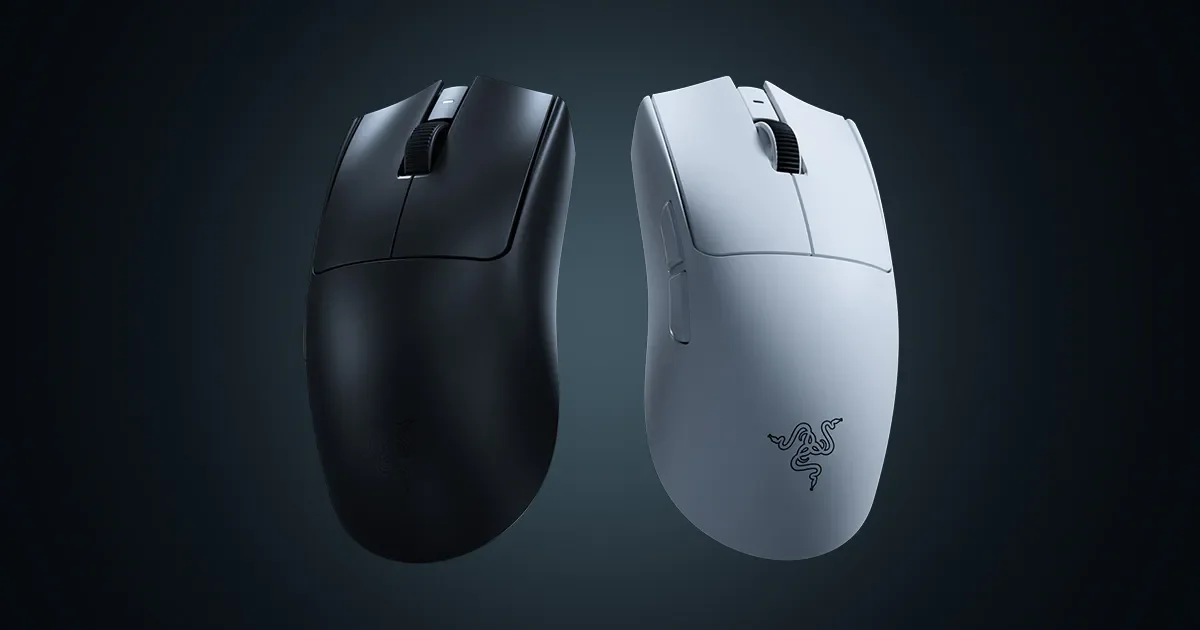
Best for: Competitive FPS players wanting an ultralight, high-polling wireless mouse
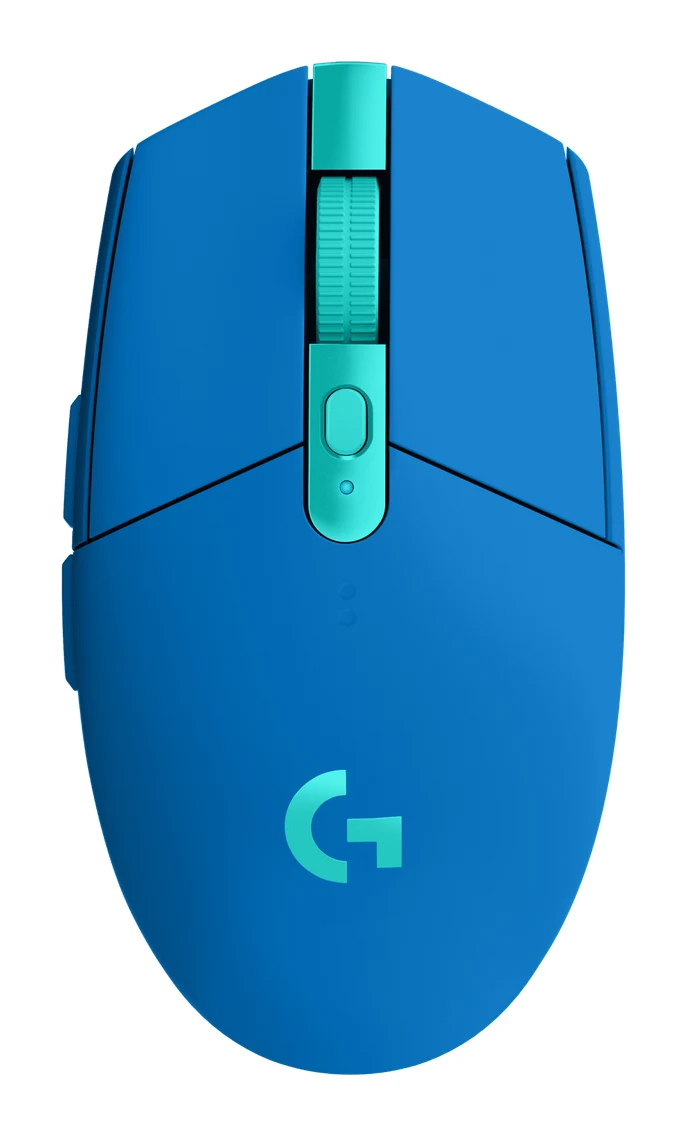
Best for: Budget buyers wanting reliable wireless for office and casual gaming
Most competitive players should pick the Razer Viper V4 Pro in the Logitech G305 LIGHTSPEED vs Razer Viper V4 Pro matchup, thanks to its 49 g shell, 8000 Hz polling and wired USB-C option. The Logitech G305 LIGHTSPEED is the better choice if you want dependable wireless and very long battery life from the budget option, mainly for office work and casual gaming.
These two mice sit at opposite ends of the wireless gaming market. The Viper V4 Pro is the premium one, built around low weight and high-end sensor specs. The G305 is the budget one, built around reliability and a replaceable AA battery. The right pick depends on how much those extras matter to you.
Logitech G305 LIGHTSPEED vs Razer Viper V4 Pro: weight and shape
Weight is the clearest difference. The Viper V4 Pro weighs 49 g (50 g White Edition), and Razer pitches it for fast flicks. The G305 weighs 99 g (3.4 oz), roughly double. Reviewers call that heavy next to modern lightweight mice. The G305 does have a built-in compartment for storing the USB receiver, which helps when travelling.
Shape matters too. The Viper V4 Pro has a symmetrical right-handed shape for claw and fingertip grips, and measures 5.00 in. (127.00 mm) L x 2.52 in. (63.90 mm) W x 1.57 in. (39.88 mm) H. The G305 is smaller at 116.6 x 62.15 x 38.2 mm (4.59 x 2.45 x 1.5 in), and reviewers say that small shape can feel cramped for large hands. If you have larger hands or want a mouse for long fast-paced sessions, the Viper V4 Pro comes out ahead. If you prefer a compact mouse for a small desk or laptop bag, the G305's size can work in its favour.
Winner: Viper V4 Pro for anyone who cares about weight or has larger hands. The G305 suits compact, travel-friendly use.
Sensor, polling rate and latency
The spec gap is large here. The Viper V4 Pro uses the Razer Focus Pro 50K Optical Sensor Gen-3 with DPI up to 50,000, tracking speed of 930 IPS and 90 G acceleration. Its polling rate goes up to 8000 Hz over HyperSpeed Wireless Gen-2. Razer states motion latency as low as 0.36 ms and side-button click latency of 0.33 ms (Razer's figures).
The G305 uses Logitech's HERO optical sensor with 200–12,000 DPI, 400 IPS and 40 G. Polling is 1000 Hz and latency is 1 ms. Logitech says the sensor applies no smoothing, filtering or acceleration, and reviewers praise its accurate tracking. They also say the wireless response feels wired.
In practice, reviewers describe the Viper's 50,000 DPI and 8000 Hz polling as overkill for most players. The G305's numbers are modest by comparison, but they are enough for accurate everyday and casual gaming. The Viper V4 Pro is the clear winner on paper for competitive shooters, but the G305 is far from a weak performer for its tier.
Winner: Viper V4 Pro for competitive players who will use the headroom. For everyone else the G305's sensor is plenty.
Battery life and power
The two mice take very different approaches. The G305 runs on one replaceable AA battery, with up to 250 hours stated. Through G HUB, its endurance mode stretches that to up to 9 months of typical use, according to Logitech. There is no charging time, because there is nothing to charge. The trade-off is that you need to carry a spare AA, and the mouse has no USB-C or wired mode.
The Viper V4 Pro is rechargeable over USB-C. Razer lists up to 180 hours at 1000 Hz, but that falls to up to 45 hours at 8000 Hz. So if you want the headline 8000 Hz polling all the time, expect to charge far more often. The dongle's three LEDs show signal, battery and polling rate, which helps you keep track. You can also plug in and keep playing.
For set-and-forget longevity, the G305 wins. For flexibility, with a wired fallback, the Viper V4 Pro is the more versatile mouse, as long as you accept shorter intervals between charges at high polling.
Winner: G305 for pure endurance and simplicity. Viper V4 Pro if you want a rechargeable mouse with a wired option.
Connectivity, buttons and software
Neither mouse has Bluetooth. The Viper V4 Pro connects through its 2.4 GHz HyperSpeed dongle or by wired USB-C. The G305 is 2.4 GHz LIGHTSPEED only, with no wired mode, and Logitech states a range of 10 m in its setup guide. Razer doesn't list a wireless range for the Viper V4 Pro.
Both mice have 6 programmable buttons. The G305 adds onboard memory for up to 5 profiles. Razer doesn't list onboard profile storage for the Viper, but it supports the Synapse Web driver and a Dynamic Sensitivity option. Reviewers say the Viper's optical switches and scroll wheel feel snappy and built to last, though the left and right clicks are loud. The G305 uses mechanical button tensioning for crisp clicks, with primary switches rated for 10 million clicks. Reviewers also note it has limited extra buttons and no scroll wheel tilt.
The Viper V4 Pro has no lighting at all, while the G305 comes in several colors. That makes this round close. Pick on what you care about, from the wired fallback and optical switches to onboard profiles and a cheaper price.
What experts say
The Viper V4 Pro is the higher-rated mouse, with an expert average of 9.5 out of 10. Scores include 4.5 out of 5 from Tom's Guide and from TechRadar, 5 out of 5 from ProSettings.net and The Shortcut, 95 out of 100 from PC Gamer and 92 out of 100 from TweakTown. It is also recommended in an expert buying guide. Reviewers praise the 49 g shell, the true 8000 Hz polling with low stated motion latency, and the durable-feeling optical switches. Common criticisms are the premium price, loud clicks, no Bluetooth or RGB lighting, and few extra buttons or features.
The G305 averages 8 out of 10. Tom's Guide gave it 3.5 out of 5, GameRant 4.5 out of 5, and XbitLabs 8 out of 10. Reviewers praise its budget price with premium-feeling build quality, the 1 ms wireless response, accurate HERO tracking, and the long battery life from a single AA. The recurring complaints are its 99 g weight, a small shape that can feel cramped for large hands, and the lack of USB-C, wired mode or Bluetooth.
Both scores come from reviews of each mouse by itself, and the Viper's higher score reflects a higher-end product at a much higher price tier.
Choose Razer Viper V4 Pro if…
Best for: Competitive FPS players wanting an ultralight, high-polling wireless mouse
Pick the Viper V4 Pro over the G305 if you play competitive shooters and want a very light, fast mouse with 8K polling and a wired USB-C option. It costs far more, but the low weight, sensor and click feel justify it for serious players.
Read our full Razer Viper V4 Pro review →- Battery life
- Up to 180 hours at 1000 Hz; up to 45 hours at 8000 Hz
- Latency
- motion latency as low as 0.36 ms; side-button click latency 0.33 ms (Razer's figures)
- Weight
- 49 g (50 g White Edition)
- Dimensions
- 5.00 in. (127.00 mm) L x 2.52 in. (63.90 mm) W x 1.57 in. (39.88 mm) H
- DPI
- Up to 50,000
- Sensor
- Razer Focus Pro 50K Optical Sensor Gen-3
Reasons to buy
- 49 g shell makes fast flicks and long sessions easy
- True 8000 Hz polling with low stated motion latency
- Optical switches and scroll wheel feel snappy and built to last
- Up to 180 hours at 1000 Hz, much longer than the V3 Pro
- Dongle LEDs show signal, battery and polling rate at a glance
Reasons to avoid
- Premium price with few extra buttons or features
- Left and right clicks are loud
- No Bluetooth and no RGB lighting
- 50K DPI and 8K polling are overkill for most players
- Tom's Guide
- 9.0
- TechRadar
- 9.0
- Trusted Reviews
- 10.0
- PC Gamer
- 9.5
- TweakTown
- 9.2
- GamingTrend
- 9.0
- PCGamesN
- 9.0
- CGMagazine
- 10.0
- Game Tested Tech
- 9.6
- ProSettings.net
- 10.0
- The Shortcut
- 10.0
Choose the Viper V4 Pro if you play competitive shooters and want the lightest, fastest option. You get a 49 g shell, polling up to 8000 Hz, a 50,000 DPI sensor, optical switches and a wired USB-C option. It is the premium choice, and reviewers say the weight, sensor and click feel justify it for serious players. Be ready for loud clicks, no Bluetooth, no RGB lighting, and roughly 45 hours of battery life at 8000 Hz.
Choose Logitech G305 LIGHTSPEED if…
Best for: Budget buyers wanting reliable wireless for office and casual gaming
Pick the G305 over the Viper V4 Pro if you want dependable wireless performance and very long battery life without paying premium money. It suits casual gaming and office use, but competitive players chasing low weight should look elsewhere.
Read our full Logitech G305 LIGHTSPEED review →- Battery life
- Up to 250 hours (1x AA battery)
- Latency
- 1 ms
- Weight
- 99 g (3.4 oz)
- Dimensions
- 116.6 x 62.15 x 38.2 mm (4.59 x 2.45 x 1.5 in)
- DPI
- 200–12,000
- Sensor
- HERO optical
Reasons to buy
- Budget price with premium-feeling build quality
- Wireless response feels wired, with 1 ms latency
- HERO sensor tracks accurately without smoothing or acceleration
- Up to 250 hours from one replaceable AA battery
- Built-in receiver storage and onboard memory for up to 5 profiles
Reasons to avoid
- At 99 g, it is heavy next to modern lightweight mice
- Small shape can feel cramped for large hands
- Needs an AA battery; no USB-C, wired mode or Bluetooth
- Limited extra buttons; scroll wheel has no tilt
- TechRadar
- 8.0
- Tom's Guide
- 7.0
- Tom's Hardware
- 7.0
- Vivid Repairs
- 8.5
- BetterBuyBase
- 7.0
- Gadget Review
- 8.5
- GameRant
- 9.0
- XbitLabs
- 8.0
Choose the G305 if you want dependable wireless at the budget end, mainly for office work and casual gaming. It offers up to 250 hours from a single AA battery, 1 ms latency, a HERO sensor with no smoothing or acceleration, and onboard memory for up to 5 profiles. The built-in receiver storage is handy for travel. Skip it if you want a lightweight mouse, or if you need USB-C, a wired mode or Bluetooth, none of which it offers.
Compare our picks side by side
The specs most of our picks share, from each maker’s spec page (— = not published). Expert score = the average of published expert reviews, which rate each product for its price. Scroll sideways on small screens.
| Spec | Razer Viper V4 Pro | Logitech G305 LIGHTSPEED |
|---|---|---|
| Best for | Our Pick | The Alternative |
| Expert score | 9.5 | 7.9 |
| Price vs. these picks | Higher | Lower |
| Battery life | Up to 180 hours at 1000 Hz; up to 45 hours at 8000 Hz | Up to 250 hours (1x AA battery) |
| Latency | motion latency as low as 0.36 ms; side-button click latency 0.33 ms (Razer's figures) | 1 ms |
| Weight | 49 g (50 g White Edition) | 99 g (3.4 oz) |
| Dimensions | 5.00 in. (127.00 mm) L x 2.52 in. (63.90 mm) W x 1.57 in. (39.88 mm) H | 116.6 x 62.15 x 38.2 mm (4.59 x 2.45 x 1.5 in) |
| DPI | Up to 50,000 | 200–12,000 |
| Sensor | Razer Focus Pro 50K Optical Sensor Gen-3 | HERO optical |
| Buttons | 6 programmable | 6 programmable |
| Connectivity | Razer HyperSpeed Wireless Gen-2 (2.4 GHz dongle) or wired USB-C; no Bluetooth | 2.4GHz RF Wireless USB-A Dongle |
| Where to buy | View on Amazon | View on Amazon |
The verdict
The Razer Viper V4 Pro is the better mouse overall, with the lower weight, faster polling, sensor headroom and higher expert scores, and it is the one to buy if you play competitive shooters seriously. The Logitech G305 LIGHTSPEED is the smarter buy for everyone else who just wants reliable wireless performance and very long battery life for far less money.
Ready to buy?
 Our PickRazer Viper V4 ProView on Amazon
 The AlternativeLogitech G305 LIGHTSPEEDView on Amazon
Related buying guides
- Razer DeathAdder V4 Pro Review (2026): Light and Lasting
- Logitech G PRO X Superlight 2 Review: Light, Fast, Basic
- Razer Basilisk V3 Review (2026): Comfort Over Lightness
- Logitech G PRO X2 SUPERSTRIKE Review (2026): Tunable Clicks
- Logitech G502 HERO Review (2026): Heavy but Highly Tunable
- Best Gaming Mouse for FPS 2026: Lightweight Wireless Aim
- Razer Iskur V2 NewGen vs ThunderX3 SOLO 360 (2026): Lumbar
Frequently asked questions
Is the Razer Viper V4 Pro better than the Logitech G305 LIGHTSPEED?
Yes, on specs and expert scores. The Viper V4 Pro averages 9.5 out of 10 against 8 out of 10 for the G305, and it is much lighter at 49 g versus 99 g (3.4 oz). It is also the premium option, so the G305 is still the better value for casual gaming and office use.
Which has longer battery life, the G305 or the Viper V4 Pro?
The Logitech G305 LIGHTSPEED lasts longer, with up to 250 hours from one AA battery, and up to 9 months of typical use in endurance mode via G HUB. The Viper V4 Pro offers up to 180 hours at 1000 Hz, falling to up to 45 hours at 8000 Hz.
Is 8000 Hz polling on the Viper V4 Pro worth it?
For most players it isn't essential. Reviewers describe the 50K DPI and 8K polling as overkill for most players. Competitive shooter fans may appreciate it, but note that the Viper's battery life drops to up to 45 hours at 8000 Hz.
Can I use the Logitech G305 LIGHTSPEED or Razer Viper V4 Pro with Bluetooth?
No. Neither mouse has Bluetooth. The G305 uses a 2.4 GHz LIGHTSPEED USB receiver only, while the Viper V4 Pro uses a 2.4 GHz HyperSpeed dongle or a wired USB-C connection.
Does the G305 or the Viper V4 Pro have more buttons?
They match at 6 programmable buttons each. Reviewers note that both offer few extra buttons, and the G305's scroll wheel has no tilt. The G305 adds onboard memory for up to 5 profiles, while Razer doesn't list onboard profile storage for the Viper V4 Pro.
Which mouse is better for large hands?
The Razer Viper V4 Pro is likely the better fit. It is longer at 5.00 in. (127.00 mm) and has a symmetrical shape for claw and fingertip grips. Reviewers say the G305's small shape can feel cramped for large hands.
Sources
Specs are taken from the manufacturers' official pages; expert recommendations from the publications below.
- Razer Viper V4 Pro: razer.com, tweaktown.com, prosettings.net
- Logitech G305 LIGHTSPEED: logitechg.com, walmart.com, mousecompare.com, bhphotovideo.com
More buying guides
Razer Viper V4 Pro Review (2026): 49 g Esports Speed
The Razer Viper V4 Pro is a 49 g symmetrical wireless esports mouse with true 8000 Hz polling and a 50K optical sensor. Here is who it suits and who should pass.
Published Oct 26, 2026Logitech G305 LIGHTSPEED Review (2026): Long Life on One AA
A Logitech G305 LIGHTSPEED review based on specs and expert reports: a precise HERO sensor, 1 ms wireless and very long AA battery life, held back by weight, shape and no Bluetooth.
Published Oct 22, 2026
Razer DeathAdder V4 Pro Review (2026): Light and Lasting
A look at the Razer DeathAdder V4 Pro: a 56 g right-handed wireless gaming mouse with 8000 Hz polling and up to 150 hours of battery, and who should buy it.
Published Oct 30, 2026