Corsair EX400U vs Samsung Portable SSD T9 (2026)
The Corsair EX400U is the faster, smaller pick for USB4 and iPhone users. The Samsung T9 is the tougher, cooler, better-protected drive for field work.
Head-to-head comparison · Research-based · Affiliate links
We earn a commission from qualifying purchases made through our links, at no extra cost to you. It never decides our picks. As an Amazon Associate I earn from qualifying purchases. How we make money
Corsair EX400U vs Samsung Portable SSD T9: which one should you buy?
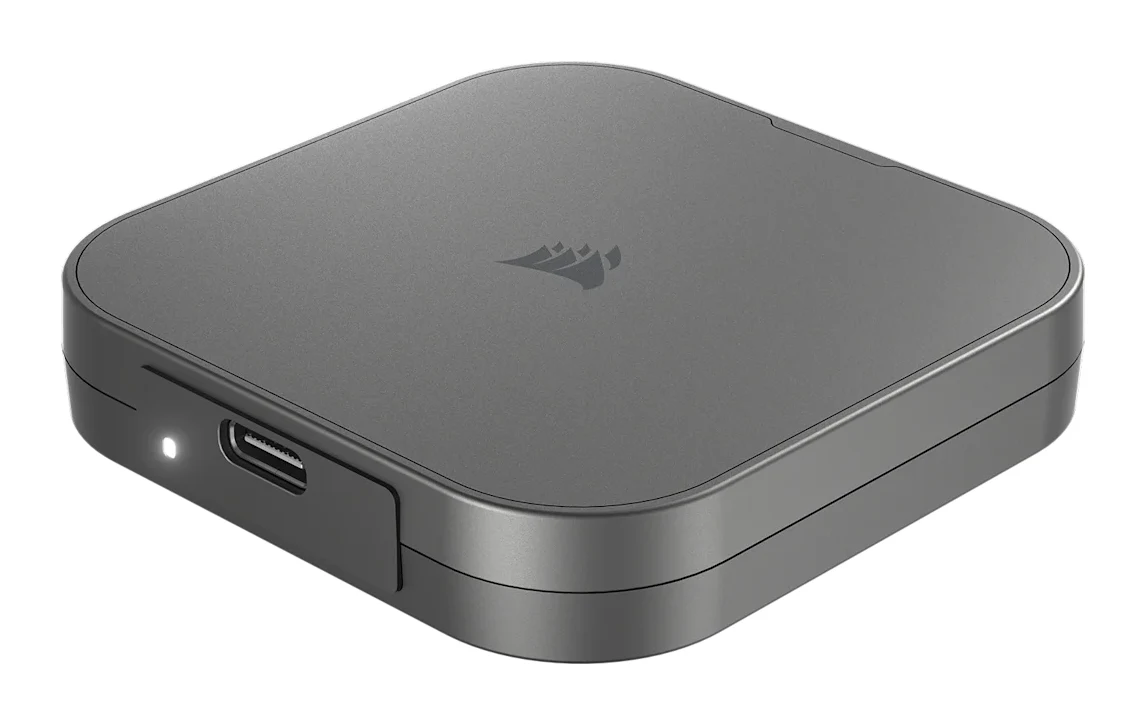
Best for: iPhone creators and USB4 users wanting maximum speed in a pocket
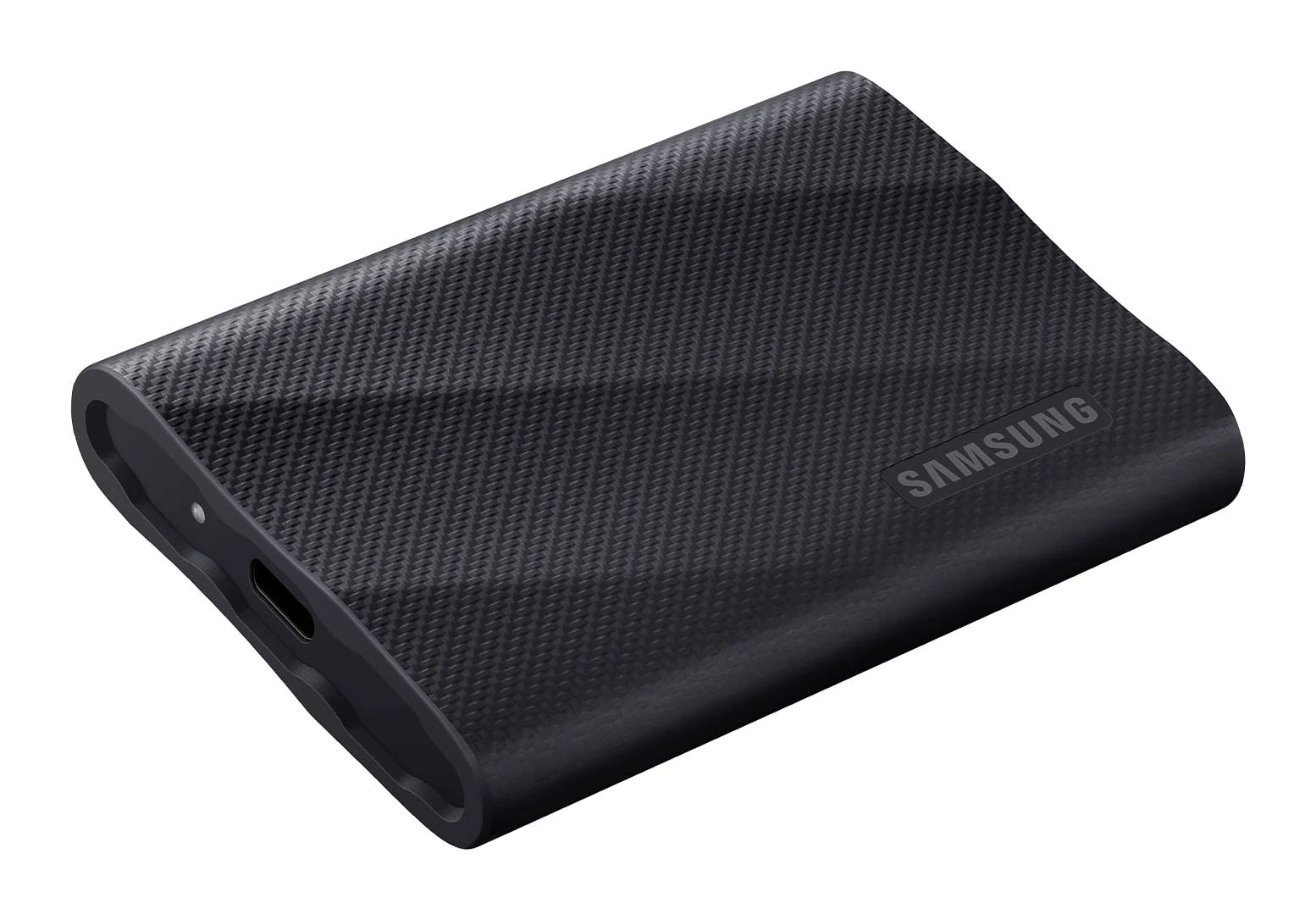
Best for: Rugged field use needing encryption, cool running and long warranty
In the Corsair EX400U vs Samsung Portable SSD T9 matchup, most buyers with a USB4 or Thunderbolt 4 port should pick the Corsair: it has the higher top speed, a tiny 38 g body and a built-in MagSafe ring for iPhones. The Samsung is the better choice if you want hardware encryption, drop resistance, cool running under load and a longer warranty more than peak speed.
Both drives come in 1TB, 2TB and 4TB and sit in the same mid-range price tier, so the decision comes down to what you plug them into and where you take them.
Corsair EX400U vs Samsung T9: speed
The Corsair connects over USB4 (40Gbps) and is rated for up to 4,000 MB/s reads and up to 3,600 MB/s writes. Corsair gives that figure for the drive, though one retailer lists the 1TB model's write speed at up to 3,500 MB/s. It is backward compatible with USB 3.2 and works with Thunderbolt 4.
The Samsung T9 uses USB 3.2 Gen 2x2 (20Gbps) and is rated for up to 2,000 MB/s reads. Writes reach up to 1,950 MB/s on the 1TB and 2TB models and up to 2,000 MB/s on the 4TB. That is half the Corsair's top read speed.
Both need the right port to hit those numbers. The Corsair needs a USB4 or Thunderbolt 4 port, and reviewers point out that the Samsung needs a USB 3.2 Gen 2x2 port that many PCs lack. Plugged into anything slower, each falls back to a lower speed. The Samsung is backward compatible with USB 3.2, 3.1, 3.0 and 2.0.
Winner on speed: the Corsair, for anyone with a USB4 or Thunderbolt 4 laptop or desktop who moves large video or photo libraries. If your computer has neither a USB4/Thunderbolt 4 port nor a USB 3.2 Gen 2x2 port, you won't see either drive's full speed.
Heat and sustained performance
This is where the Samsung makes up ground. It includes Dynamic Thermal Guard, which keeps speeds up under heavy loads, and reviewers found it runs cool. Samsung lists an operating range of 0°C to 60°C.
The Corsair's most common criticism is that it runs hot under sustained load. Corsair lists an operating range of 0°C ~ +70°C and a power draw of 4.5 W active read and 4.1 W active write.
Winner on sustained running: the Samsung, for people who regularly push large, long transfers. The Corsair's higher peak is still the bigger number, but reviewers describe the Samsung as the cooler drive.
Durability, security and warranty
Samsung's pitch is toughness. The rubberized body is rated to survive drops up to 3 m (9.8 ft). It also has AES 256-bit hardware encryption and a five-year limited warranty, and it is managed with Samsung Magician Software.
The Corsair is rated for 1500G max shock resistance but has no IP rating. Reviewers call the build plasticky. There is no hardware encryption, only software-based protection, according to TechRadar. The warranty is 3 years. Corsair SSD Toolbox software handles secure erase and firmware updates.
Winner on durability and security: the Samsung, clearly. If you carry sensitive files, work in rough conditions or want longer coverage, this round isn't close.
Size, weight and iPhone use
The Corsair is far more pocketable. It measures 64.3 x 64 x 12 mm and weighs 38 g. The Samsung is 88 x 60 x 14 mm and weighs 122 g, so it is noticeably larger and more than three times heavier.
The Corsair also has a built-in MagSafe ring that clips to an iPhone or to metal surfaces. It works with iOS and iPadOS as well as PC and Mac, and comes preformatted exFAT. Samsung's compatibility list covers Windows, macOS and Android, and doesn't include iOS or iPadOS. Those combined points make the Corsair the more natural choice for an iPhone creator who wants to record to an external drive.
Winner on portability and iPhone use: the Corsair.
Cables and device compatibility
The Corsair comes with an 11.8-inch (30 cm) 40Gb/s USB-C to USB-C cable. The Samsung includes both USB-C to C and USB-C to A cables, which helps if you plug into older computers with rectangular ports.
Samsung also lists compatibility with Windows, macOS and Android, and reviewers highlight its wide device support, including game consoles and cameras. Corsair lists PC, Mac, iOS and iPadOS and doesn't mention consoles or cameras.
Winner on flexibility: the Samsung, especially for mixed setups with consoles, cameras and Android phones.
What experts say
Reviewers rate both drives well, with the Corsair slightly ahead on average. The Corsair EX400U earns an expert average of 8.8 out of 10. TechRadar gave it 4.5 out of 5, PCWorld 4 out of 5, Macworld 4.5 out of 5 and Creative Bloq 4.5 out of 5. Reviewers praise the USB4 speed, the MagSafe ring, the tiny body, Thunderbolt 4 support and good price-to-performance among USB4 drives. The recurring criticisms are that it runs hot under sustained load, lacks hardware encryption, feels plasticky with no IP rating, and needs a USB4 or Thunderbolt 4 port for full speed.
The Samsung Portable SSD T9 has an expert average of 8.4 out of 10. TechRadar gave it 4 out of 5, Dong Knows Tech 8.1 out of 10, XDA Developers 9 out of 10, PCGamesN 9 out of 10 and Digital Citizen 4 out of 5. It is recommended in 2 expert buying guides. Reviewers praise the drop resistance, hardware encryption, cool sustained performance, the two included cables and the five-year warranty. The common complaints are the 2,000MB/s top speed, the need for a Gen 2x2 port many PCs lack, the larger and heavier body, and a premium price versus rival Gen 2x2 drives.
Choose Corsair EX400U if…
Best for: iPhone creators and USB4 users wanting maximum speed in a pocket
Pick the Corsair EX400U over the Samsung if you have a USB4 or Thunderbolt 4 port and want the fastest speeds in a tiny, light drive. The MagSafe ring also makes it the better choice for iPhone users shooting video.
Read our full Corsair EX400U review →- Capacity
- 1 TB, 2 TB, 4 TB
- Weight
- 92g
- Dimensions
- 64.3 x 64 x 12mm
- Ports
- USB Type-C (USB4)
- Warranty
- 3 years
- Encryption
- Software only, no hardware encryption
Reasons to buy
- USB4 40Gbps gives up to 4,000MB/s reads, double the Samsung's top speed
- Built-in MagSafe ring clips to iPhone or metal surfaces
- Very small and light at 38 g, easily pocketable
- Works with Thunderbolt 4 and falls back to USB 3.2
- Good price-to-performance among USB4 drives, per reviewers
Reasons to avoid
- Runs hot under sustained load
- No hardware encryption, software only
- Plasticky build with no IP rating; shorter 3-year warranty
- Full speed needs a USB4 or Thunderbolt 4 port
- PC World
- 8.0
- TweakTown
- 9.8
- KitGuru
- 8.5
- Creative Bloq
- 9.0
- Digital Citizen
- 9.0
- TechRadar
- 9.0
- Macworld
- 9.0
Choose the Corsair if your computer has USB4 or Thunderbolt 4 and you want the fastest transfers in the smallest package. It is also the better fit for iPhone users, thanks to the MagSafe ring and iOS and iPadOS support. Accept that it runs hotter under long loads, has no hardware encryption and comes with a 3-year warranty.
Choose Samsung Portable SSD T9 if…
Best for: Rugged field use needing encryption, cool running and long warranty
Choose the Samsung T9 over the Corsair if durability, hardware encryption, cool sustained performance and a longer warranty matter more than peak speed. It suits rougher field use and mixed devices such as consoles, cameras and Android phones.
Read our full Samsung Portable SSD T9 review →- Capacity
- 1TB, 2TB, 4TB
- Weight
- 122 grams (4.3 oz)
- Dimensions
- 88 x 60 x 14 mm (3.5 x 2.4 x 0.6 in)
- Ports
- USB 3.2 Gen 2x2 (20Gbps)
- Warranty
- Five (5) Year Limited Warranty
- Encryption
- AES 256-bit hardware encryption
Reasons to buy
- Rubberized body survives drops up to 3 m
- AES 256-bit hardware encryption protects sensitive files
- Dynamic Thermal Guard sustains speeds and reviewers found it runs cool
- Includes both USB-C to C and USB-C to A cables
- Five-year warranty and wide device compatibility, including consoles and cameras
Reasons to avoid
- Top speed of 2,000MB/s is half the Corsair's
- Full speed needs a USB 3.2 Gen 2x2 port many PCs lack
- Larger and heavier at 122 g versus 38 g
- Premium price versus rival Gen 2x2 drives
- TechRadar
- 8.0
- PCWorld
- 9.0
- PCGamesN
- 9.0
- XDA Developers
- 9.0
- Dong Knows Tech
- 8.1
- CGMagazine
- 8.5
- Digital Citizen
- 8.0
Choose the Samsung if you want a drive that survives drops up to 3 m, encrypts with AES 256-bit hardware, stays cool under load and carries a five-year warranty. It suits field work and mixed devices such as Android phones, consoles and cameras. You give up half the Corsair's top speed and carry a larger, heavier body.
Compare our picks side by side
The specs most of our picks share, from each maker’s spec page (— = not published). Expert score = the average of published expert reviews, which rate each product for its price. Scroll sideways on small screens.
| Spec | Corsair EX400U | Samsung Portable SSD T9 |
|---|---|---|
| Best for | Our Pick | The Alternative |
| Expert score | 8.9 | 8.5 |
| Price vs. these picks | Middle | Middle |
| Capacity | 1 TB, 2 TB, 4 TB | 1TB, 2TB, 4TB |
| Weight | 92g | 122 grams (4.3 oz) |
| Dimensions | 64.3 x 64 x 12mm | 88 x 60 x 14 mm (3.5 x 2.4 x 0.6 in) |
| Ports | USB Type-C (USB4) | USB 3.2 Gen 2x2 (20Gbps) |
| Warranty | 3 years | Five (5) Year Limited Warranty |
| Encryption | Software only, no hardware encryption | AES 256-bit hardware encryption |
| Speed | Up to 4,000MB/s read, up to 3,600MB/s write | Up to 2,000 MB/s read, Up to 1,950 MB/s write |
| Durability | 1500G max shock resistance; no IP rating | Up to 3-meter drop resistant |
| Where to buy | View on Amazon | View on Amazon |
The verdict
For most buyers with a modern USB4 or Thunderbolt 4 laptop, the Corsair EX400U is the better pick: it is faster, far lighter and works neatly with iPhones, and reviewers score it slightly higher. The Samsung Portable SSD T9 wins on toughness, security, heat and warranty, so choose it if protection and reliability in rough conditions matter more than peak speed.
Ready to buy?
 Our PickCorsair EX400UView on Amazon
 The AlternativeSamsung Portable SSD T9View on Amazon
Related buying guides
- Best External SSDs of 2026: USB4, Rugged & Encrypted Picks
- Corsair EX400U 2TB Review (2026): USB4 Speed, Magnetic Ring
- Best microSD Cards for Cameras 2026: 4K Speed & Durability
- Best NAS Devices for Home 2026: Backup, Media & Growth
- PNY PRO Elite Prime microSDXC Review (2026): Big 4K Storage
- Synology DiskStation DS925+ Review (2026): Quiet, No 10GbE
Frequently asked questions
Is the Corsair EX400U better than the Samsung T9?
The Corsair EX400U is better for speed, size and iPhone use, while the Samsung T9 is better for durability, hardware encryption and warranty. Reviewers give the Corsair a slightly higher average (8.8 out of 10 versus 8.4), but the right pick depends on your ports and how you work.
Which is faster, the Corsair EX400U or the Samsung T9?
The Corsair EX400U is faster, with up to 4,000 MB/s reads over USB4 (40Gbps). The Samsung T9 tops out at up to 2,000 MB/s over USB 3.2 Gen 2x2 (20Gbps). You need a USB4 or Thunderbolt 4 port to get the Corsair's full speed.
Does the Samsung T9 or the Corsair EX400U run cooler?
The Samsung T9 runs cooler according to reviewers, and it includes Dynamic Thermal Guard to keep speeds up under heavy loads. The Corsair EX400U is commonly criticized for running hot under sustained load.
Which SSD works better with an iPhone?
The Corsair EX400U is the better fit for iPhone. It has a built-in MagSafe ring that clips to an iPhone and is listed for iOS and iPadOS. Samsung's compatibility list covers Windows, macOS and Android and doesn't include iOS.
Does the Corsair EX400U or Samsung T9 have hardware encryption?
The Samsung T9 has AES 256-bit hardware encryption. The Corsair EX400U has software-only protection and no hardware encryption, according to TechRadar.
Which drive is tougher and has the longer warranty?
The Samsung T9 is tougher and has the longer warranty. It is rated to survive drops up to 3 m and has a five-year limited warranty. The Corsair EX400U is rated for 1500G max shock resistance, has no IP rating and carries a 3-year warranty.
Sources
Specs are taken from the manufacturers' official pages; expert recommendations from the publications below.
- Corsair EX400U: corsair.com, thessdreview.com, thepcenthusiast.com
- Samsung Portable SSD T9: samsung.com, news.samsung.com
More buying guides
Samsung Portable SSD T9 Review (2026): Fast, Port-Picky
A look at the Samsung Portable SSD T9 based on Samsung's specs and independent expert reviews: 20Gbps speeds, a drop-rated body, encryption and one big catch.
Published Oct 19, 2026Best External SSDs of 2026: USB4, Rugged & Encrypted Picks
We compared five external SSDs to find the best of 2026. See how Corsair, Samsung, WD and SanDisk stack up on speed, durability, encryption and warranty.
Published Oct 8, 2026Corsair EX400U 2TB Review (2026): USB4 Speed, Magnetic Ring
A pocket-sized USB4 SSD with a built-in magnetic ring. Here is what the Corsair EX400U 2TB offers, where experts say it struggles, and who it suits.
Published Oct 23, 2026