Acer Spin 714 vs Lenovo Duet Gen 9 (2026): Laptop or Tablet?
The Acer Chromebook Plus Spin 714 is the better main laptop, while the Lenovo Chromebook Duet Gen 9 is the light, cheap tablet-first pick. Here is how they differ.
Head-to-head comparison · Research-based · Affiliate links
We earn a commission from qualifying purchases made through our links, at no extra cost to you. It never decides our picks. As an Amazon Associate I earn from qualifying purchases. How we make money
Acer Chromebook Plus Spin 714 (CP714-1H-54UB) vs Lenovo Chromebook Duet (11", Gen 9): which one should you buy?
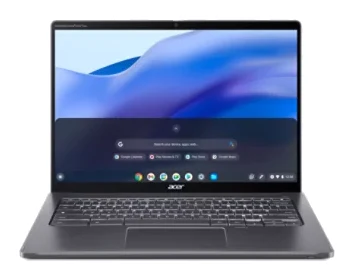
Best for: Main-computer users wanting a powerful, port-rich Chromebook
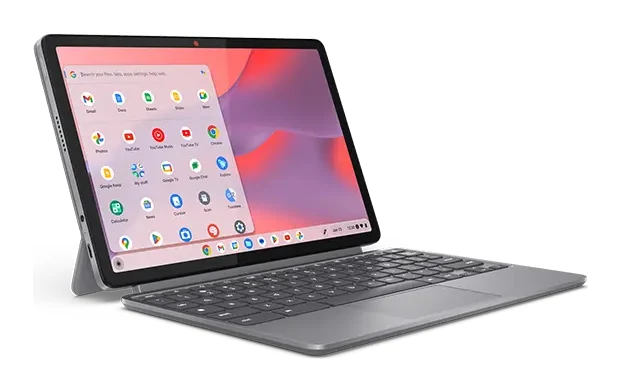
Best for: Budget buyers wanting an ultralight tablet-style Chromebook for travel
If you want one Chromebook to do all your daily work, the Acer Chromebook Plus Spin 714 (CP714-1H-54UB) is the one most buyers should pick in this Acer Chromebook Plus Spin 714 vs Lenovo Chromebook Duet (11", Gen 9) matchup. The Lenovo is the better choice if you care more about weight, a low price and a tablet you can toss in a bag than about raw performance.
These two are different kinds of device. The Acer is a 14-inch 360-degree convertible laptop at the premium end. The Lenovo is a 10.95-inch tablet with a folio stand and keyboard cover, and it is the budget option here. Most of the choice comes down to which of those you actually want.
Acer Chromebook Plus Spin 714 vs Lenovo Chromebook Duet: performance
The Acer runs an Intel Core Ultra 5 115U (8-core, 1.50 GHz) with 8 GB LPDDR5 and a 256 GB PCIe NVMe SSD. It is Chromebook Plus certified, with built-in Google AI tools. Reviewers say the Core Ultra 5 handles multitasking smoothly, which suits a main computer with plenty of tabs and apps open. A common criticism in expert reviews is the premium price with only 8 GB of RAM.
The Lenovo uses a MediaTek Kompanio 838 (8C, 2x A78 @2.6GHz + 6x A55 @2.0GHz) with an NPU. Memory is 4GB or 8GB LPDDR4X, and storage is 64GB or 128GB of eMMC 5.1. Lenovo says it boots in under 10 seconds. Reviewers describe the processor power as modest. They also say the 4GB base model bottlenecks and that 8GB is the sensible configuration.
Edge: Acer. If you multitask or want headroom, the Acer is the clear pick. The Lenovo is fine for browsing, media and light work, and you should choose the 8GB version.
Display and portability
The two screens share a 1920 x 1200 WUXGA IPS panel with touch and a 60 Hz refresh rate. The Acer stretches that across 14 inches with 100% sRGB coverage and a CineCrystal (glare) finish. Reviewers praise the 16:10 touchscreen but call it only moderately bright and prone to glare. If you often work near windows, that matters.
The Lenovo's 10.95-inch panel is rated at 400 nits and uses Corning Gorilla Glass 3. It also carries TÜV Low Blue Light certification. Reviewers praise it as bright.
Portability is where the Lenovo pulls ahead. The tablet weighs 510 g (1.12 lbs) and is 7.6 mm thin. With the folio stand and folio keyboard attached it starts at 1.101 kg (2.43 lbs). The Acer weighs 3.20 lb and measures 0.71" H x 12.3" W x 8.8" D. That is still a reasonable size, but you can't pretend it's a tablet you forget about. The Lenovo is also MIL-STD-810H tested, works with the optional USI Pen 2, and has a 5MP front camera with a privacy shutter and an 8MP rear camera.
Edge: Lenovo for travel and tablet use, Acer for a bigger workspace and a stated 100% sRGB coverage.
Keyboard, ports and everyday use
This round shows the gap in price. The Acer has a backlit keyboard and a large glass touchpad, and reviewers say both make typing comfortable. It also has a 1440p webcam with a privacy shutter. Its ports are two Thunderbolt 4 USB-C ports, a USB-A 3.2 Gen 1 port and a full-size HDMI port. It charges from a 65 W USB-C power supply. The downsides are no fingerprint reader and no memory card reader, and reviewers say the speakers lack bass depth.
The Lenovo's folio keyboard cover and stand are included, so it switches between laptop, tablet and portrait modes. Reviewers criticize the folio keyboard as cramped, with a small trackpad and no backlight. They also call it awkward to use on your lap in laptop mode. Ports are two USB-C ports (USB 5Gbps, PD, DisplayPort 1.4 for external displays), a 3.5mm headphone/mic combo jack and a pogo pin connector. That gives you external display support, but there is no HDMI or USB-A, so you may need adapters. Lenovo doesn't list a fingerprint reader or card reader.
Edge: Acer. Anyone who types for hours or plugs in peripherals will notice the difference. The Lenovo works better for short sessions, reading and video than for long typing days.
Battery life and long-term support
Lenovo claims up to 12 hours from a 29Wh battery, and the Duet is fanless and silent. Acer quotes up to 10 hours and doesn't list a battery capacity. On paper the Lenovo lasts longer. Since the 12-hour figure is Lenovo's own claim, treat it as a best case.
On software support, Acer promises ChromeOS updates until June 2034, and reviewers count that as a plus. Lenovo's spec sheet doesn't give an update date. If you plan to keep a Chromebook for many years, that is a point in the Acer's favor.
Edge: Lenovo on claimed battery life, Acer on a stated update commitment.
What experts say
The Acer Chromebook Plus Spin 714 has an expert average of 8.5 out of 10. That comes from PCWorld, which gave it 4.5 out of 5, and Laptop Mag, which gave it 4 out of 5. Reviewers consistently praise its multitasking performance, port selection, 14-inch 16:10 touchscreen, keyboard and touchpad, and long update promise. Common criticisms are the missing fingerprint and card readers, weak bass in the speakers, a display that is only moderately bright and prone to glare, and a premium price with only 8 GB of RAM.
The Lenovo Chromebook Duet (11", Gen 9) has one published expert score, 8 out of 10 from Android Authority, so there is no average to compare. It has also been recommended in one expert buying guide. Reviewers like how light and thin it is, the included folio keyboard and stand, the bright 2K display, the claimed battery life, and the silent fanless design with a privacy-shutter camera. They criticize the cramped folio keyboard and small trackpad, the bottleneck on the 4GB model, awkward lap use and modest processor power with no backlit keyboard.
The two scores are close, but they were given on different scales by different reviewers. Read them as both being well regarded for what they are, not as a ranking of equals.
Choose the Acer Chromebook Plus Spin 714 if…
Acer Chromebook Plus Spin 714 (CP714-1H-54UB)
Best for: Main-computer users wanting a powerful, port-rich Chromebook
Pick the Acer Spin 714 over the Duet if you want a full-size 2-in-1 laptop for daily work, with a better keyboard, more ports and stronger performance. It suits people who will use it as their main computer and can afford the higher price.
Read our full Acer Chromebook Plus Spin 714 (CP714-1H-54UB) review →- Battery life
- Up to 10 hours
- Weight
- 3.20 lb
- Dimensions
- 0.71" H x 12.3" W x 8.8" D
- Display
- 14" WUXGA (1920 x 1200) IPS touchscreen, 100% sRGB, CineCrystal (glare)
- Resolution
- 1920 x 1200
- Refresh rate
- 60 Hz
Reasons to buy
- Intel Core Ultra 5 handles multitasking smoothly
- Two Thunderbolt 4 ports plus HDMI and USB-A
- 14-inch 16:10 touchscreen with 100% sRGB coverage
- Backlit keyboard and large glass touchpad for comfortable typing
- ChromeOS updates promised until June 2034
Reasons to avoid
- No fingerprint reader or memory card reader
- Speakers lack bass depth
- Display is only moderately bright and prone to glare
- Premium price, with only 8 GB RAM
- PCWorld
- 9.0
- Android Police
- 8.0
- PCMag
- 10.0
- Android Police (via Notebookcheck)
- 8.0
- Laptop Mag
- 8.0
Choose the Acer if this will be your main computer. It has stronger performance, a backlit keyboard and a large glass touchpad, and a 14-inch touchscreen that folds into tablet mode. Two Thunderbolt 4 ports, HDMI and USB-A save you from carrying adapters, and the ChromeOS update promise runs until June 2034. You pay the premium price, accept 8 GB of RAM and live without a fingerprint reader.
Choose the Lenovo Chromebook Duet (11", Gen 9) if…
Best for: Budget buyers wanting an ultralight tablet-style Chromebook for travel
Pick the Lenovo Duet over the Acer if portability and a low price matter more than raw power. It fits casual users, students and travelers who want a light, tablet-first Chromebook for browsing, media and light work.
Read our full Lenovo Chromebook Duet (11", Gen 9) review →- Battery life
- 29Wh
- Weight
- Tablet starting at 510 g (1.12 lbs); tablet + folio stand + folio keyboard starting at 1.101 kg (2.43 lbs)
- Dimensions
- Tablet: 255.37 x 166.92 x 7.6 mm (10.05 x 6.57 x 0.29 inches)
- Display
- 10.95" WUXGA (1920 x 1200) IPS, 400 nits, touch, Corning Gorilla Glass 3
- Resolution
- 1920 x 1200 (WUXGA)
- Refresh rate
- 60Hz
Reasons to buy
- Very light 510 g tablet, only 7.6 mm thin
- Folio keyboard cover and stand included
- Bright 2K display with Gorilla Glass 3
- Up to 12 hours battery life (Lenovo claim)
- Fanless, silent operation with a privacy-shutter camera
Reasons to avoid
- Folio keyboard feels cramped and the trackpad is small
- 4GB RAM base model bottlenecks; 8GB is advisable
- Awkward to use on the lap in laptop mode
- Modest processor power and no backlit keyboard
- Android Authority
- 8.0
- Android Central
- 9.0
- Chrome Unboxed
- 9.0
- Laptop Mag
- 8.0
- PC World
- 8.0
Choose the Lenovo if you want the budget option that is light enough to carry everywhere. It suits students, travelers and casual users who browse, stream and do light work. You get a bright display, a folio keyboard and stand in the box, a silent fanless design and a claimed 12 hours of battery. Go for the 8GB version if you can, and accept that typing on the folio keyboard and using it on your lap are not its strengths.
Compare our picks side by side
The specs most of our picks share, from each maker’s spec page (— = not published). Expert score = the average of published expert reviews, which rate each product for its price. Scroll sideways on small screens.
| Spec | Acer Chromebook Plus Spin 714 (CP714-1H-54UB) | Lenovo Chromebook Duet (11", Gen 9) |
|---|---|---|
| Best for | Our Pick | The Alternative |
| Expert score | 8.6 | 8.4 |
| Price vs. these picks | Higher | Lower |
| Battery life | Up to 10 hours | 29Wh |
| Weight | 3.20 lb | Tablet starting at 510 g (1.12 lbs); tablet + folio stand + folio keyboard starting at 1.101 kg (2.43 lbs) |
| Dimensions | 0.71" H x 12.3" W x 8.8" D | Tablet: 255.37 x 166.92 x 7.6 mm (10.05 x 6.57 x 0.29 inches) |
| Display | 14" WUXGA (1920 x 1200) IPS touchscreen, 100% sRGB, CineCrystal (glare) | 10.95" WUXGA (1920 x 1200) IPS, 400 nits, touch, Corning Gorilla Glass 3 |
| Resolution | 1920 x 1200 | 1920 x 1200 (WUXGA) |
| Refresh rate | 60 Hz | 60Hz |
| Processor | Intel Core Ultra 5 115U, 8-core, 1.50 GHz | MediaTek Kompanio 838 (8C, 2x A78 @2.6GHz + 6x A55 @2.0GHz) |
| RAM | 8 GB LPDDR5 | 4GB / 8GB LPDDR4X |
| Where to buy | View on Amazon | View on Amazon |
The verdict
For most people the Acer Chromebook Plus Spin 714 is the better buy. It is a proper laptop with more power, more ports, a better typing setup and a stated update commitment, and it is the one to get if it will be your daily driver. The Lenovo Chromebook Duet (11", Gen 9) wins when weight and price come first and you want a light, tablet-first machine for media and light work.
Ready to buy?
 Our PickAcer Chromebook Plus Spin 714 (CP714-1H-54UB)View on Amazon
 The AlternativeLenovo Chromebook Duet (11", Gen 9)View on Amazon
Related buying guides
- Acer Spin 714 vs Lenovo Chromebook Duet (2026)
- Lenovo Chromebook Duet 11 Gen 9 Review: Light but Cramped
- Lenovo ThinkPad P1 Gen 8 Review (2026): Thin, Upgradeable
- Lenovo IdeaPad Slim 3x 15" Review (2026): Battery First
- Best Laptops in 2026: Overall Picks for Every Budget
- Best Laptops for Video Editing 2026: Macs to RTX
Frequently asked questions
Is the Acer Chromebook Plus Spin 714 better than the Lenovo Chromebook Duet Gen 9?
The Acer Chromebook Plus Spin 714 is better for most people who want a main laptop, thanks to its Intel Core Ultra 5, backlit keyboard, large touchpad and more ports. The Lenovo Duet is the better choice if you want a very light, low-priced tablet-style Chromebook for travel and casual use.
Which has longer battery life, the Acer Spin 714 or the Lenovo Duet?
The Lenovo Chromebook Duet has the longer rated battery life, at up to 12 hours according to Lenovo. The Acer Chromebook Plus Spin 714 is rated at up to 10 hours. Both are manufacturer figures, so real use will vary.
Which Chromebook has more ports?
The Acer Chromebook Plus Spin 714 has more ports: two Thunderbolt 4 USB-C ports, a USB-A 3.2 Gen 1 port and a full-size HDMI port. The Lenovo Chromebook Duet has two USB-C ports with DisplayPort 1.4 and a 3.5mm headphone/mic jack, but no HDMI or USB-A.
Which is lighter and easier to carry?
The Lenovo Chromebook Duet is much lighter. The tablet alone weighs 510 g (1.12 lbs), or from 1.101 kg (2.43 lbs) with the folio stand and keyboard. The Acer Chromebook Plus Spin 714 weighs 3.20 lb.
Does the Lenovo Chromebook Duet have a good keyboard?
No, not compared with the Acer. Reviewers say the Duet's folio keyboard feels cramped, the trackpad is small and there is no backlight. The Acer Chromebook Plus Spin 714 has a backlit keyboard and a large glass touchpad that reviewers find comfortable.
How long will the Acer Spin 714 get ChromeOS updates?
The Acer Chromebook Plus Spin 714 is promised ChromeOS updates until June 2034. Lenovo's spec sheet for the Chromebook Duet doesn't give an update date.
Sources
Specs are taken from the manufacturers' official pages; expert recommendations from the publications below.
- Acer Chromebook Plus Spin 714 (CP714-1H-54UB): acer.com, bestbuy.com, consumerreports.org, laptopmag.com
- Lenovo Chromebook Duet (11", Gen 9): lenovo.com, laptopmag.com, howtogeek.com, psrefstuff.lenovo.com
More buying guides
Acer Spin 714 vs Lenovo Chromebook Duet (2026)
Acer's laptop-class convertible against Lenovo's featherweight detachable. We compare performance, portability, keyboards, ports and what experts say.
Published Nov 4, 2026Acer Chromebook Plus Spin 714 Review (2026): Updates to 2034
A convertible ChromeOS laptop with a Core Ultra 5 chip, a 1440p webcam, two Thunderbolt 4 ports and updates promised to June 2034. Here is who it suits and where it falls short.
Published Oct 23, 2026Lenovo Chromebook Duet 11 Gen 9 Review: Light but Cramped
Our Lenovo Chromebook Duet 11 Gen 9 review looks at a featherweight, fanless Chromebook tablet with a detachable folio keyboard, and at who will tolerate its compromises.
Published Nov 4, 2026