Best Chromebooks 2026: Budget, 2-in-1 and AMOLED Picks
Five of the best Chromebooks for 2026, from a premium convertible with a decade of updates to a budget detachable and a slim AMOLED laptop.
22 products compared · Research-based · Affiliate links
We earn a commission from qualifying purchases made through our links, at no extra cost to you. It never decides our picks. How we make money
Which one should you buy?
Our picks by what matters to you · details below ↓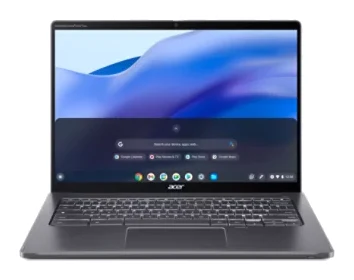
Best for: Long-term users wanting a premium convertible with stylus
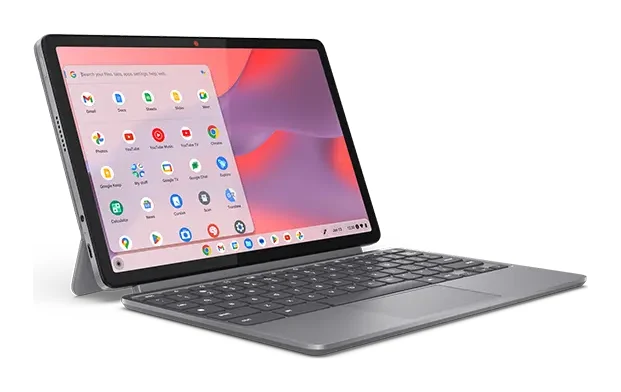
Check price on Amazon- Best BudgetLenovo Chromebook Duet 11 Gen 9Best for: Students wanting a portable, stylus-friendly tablet-style ChromebookCheck price
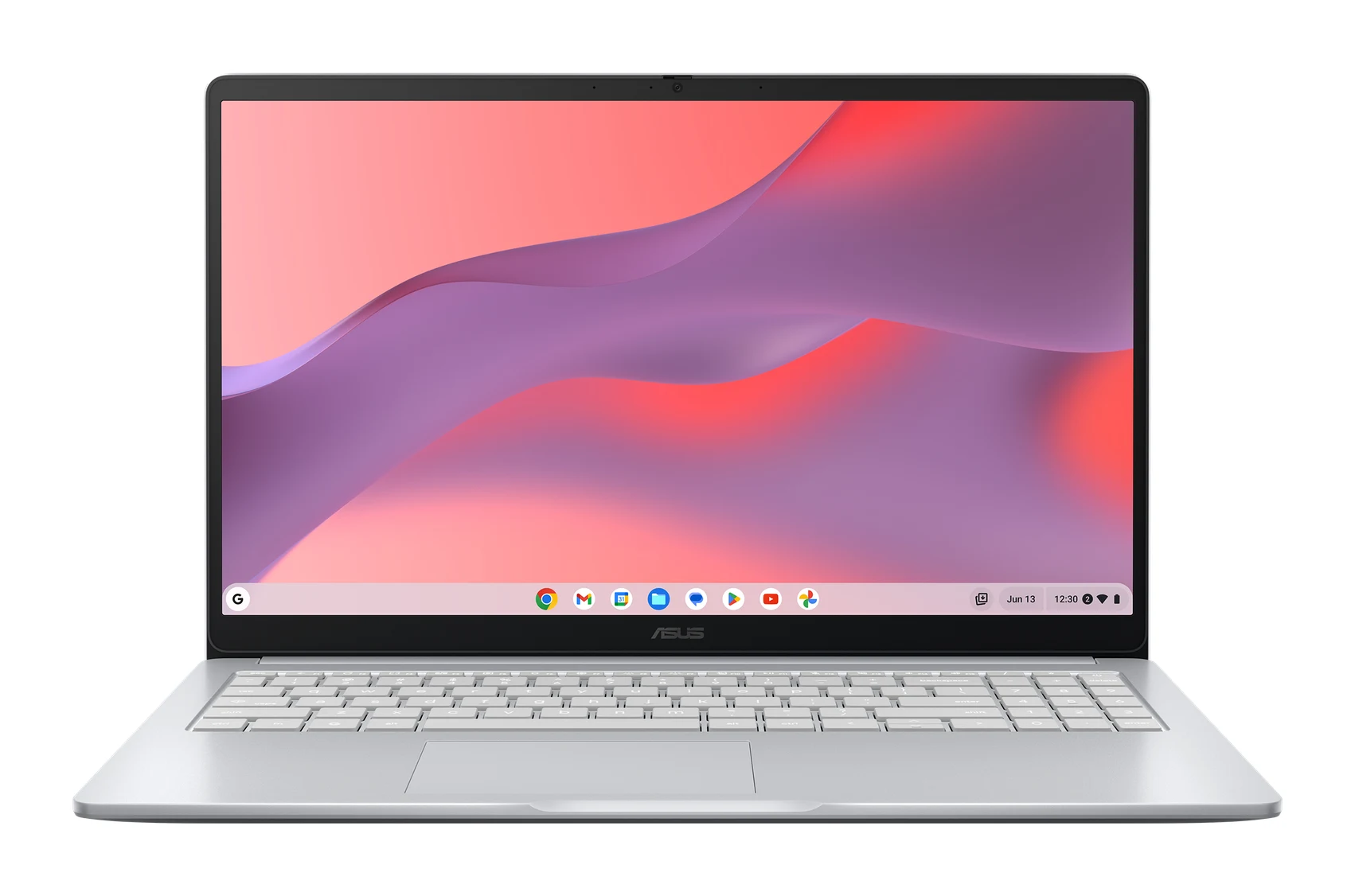
- Best ValueASUS Chromebook CX15 (CX1505)Best for: Budget shoppers wanting a large screen and long batteryCheck price
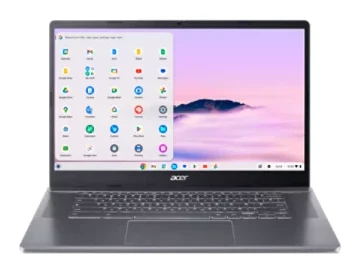
- Also GreatAcer Chromebook Plus 515Best for: Everyday users wanting AI features and a big screenCheck price
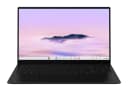
- Premium PickSamsung Galaxy Chromebook PlusBest for: Media lovers wanting a slim laptop with AMOLED displayCheck price
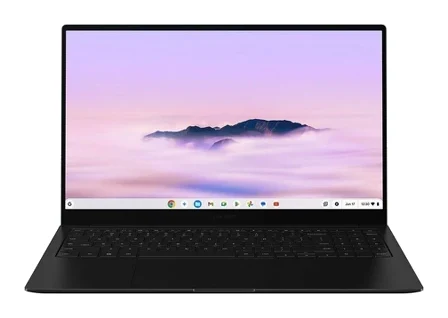
Finding the best Chromebooks in 2026 comes down to matching a few trade-offs: screen size, weight, battery life, and how much you want to spend. We narrowed the field to five picks, each suited to a different kind of buyer. There is a premium convertible with a long update window, a budget detachable for students, two big-screen laptops, and a slim AMOLED model for media.
This guide is based on manufacturer specs and independent expert recommendations. It is not based on hands-on testing. Use the live "check price" buttons to see current pricing.
Best Chromebooks at a Glance
| Pick | Label | Display | Battery life | Weight | Best for | Buy |
|---|---|---|---|---|---|---|
| Acer Chromebook Plus Spin 714 | Best Overall | 14-inch touchscreen | 10 hours | 3.21 lbs | Long-term users wanting a premium convertible with stylus | Check price |
| Lenovo Chromebook Duet 11 Gen 9 | Best Budget | 10.95-inch 2K | Up to 12 hours | 1.12 lbs (tablet only) | Students wanting a portable, stylus-friendly tablet-style Chromebook | Check price |
| ASUS Chromebook CX15 (CX1505) | Best Value | 15.6-inch FHD | Up to 13 hours | 3.51 lbs | Budget shoppers wanting a large screen and long battery | Check price |
| Acer Chromebook Plus 515 | Also Great | 15.6-inch Full HD IPS | Up to 10 hours | 3.7 lbs | Everyday users wanting AI features and a big screen | Check price |
| Samsung Galaxy Chromebook Plus | Premium Pick | 15.6-inch AMOLED | Up to 13 hours | 2.58 lbs | Media lovers wanting a slim laptop with AMOLED display | Check price |
Acer Chromebook Plus Spin 714: Best Overall for Long-Term Use
Best for: Long-term users wanting a premium convertible with stylus
The Spin 714 pairs an Intel Core Ultra 5 processor with a versatile convertible design and a long update window. It suits buyers who want a durable, well-connected Chromebook that lasts for years.
Read our full Acer Chromebook Plus Spin 714 review →- Battery life
- 10 hours
- Weight
- 3.21 lbs
- Display
- 14-inch 1920 x 1200 IPS touchscreen
- Resolution
- 1920 x 1200
- Refresh rate
- 60 Hz
- Processor
- Intel Core Ultra 5 115U
Reasons to buy
- Convertible 2-in-1 hinge with built-in stylus
- Sharp 14-inch touchscreen with 100% sRGB color accuracy
- Two Thunderbolt 4 ports plus HDMI and USB-A
- Chrome OS updates promised through June 2034
- Aluminum chassis with MIL-STD-810H durability
Reasons to avoid
- 8 GB RAM may limit heavy multitasking
- Premium price tier costs more than most Chromebooks
- PCWorld
- 9.0
- Android Police
- 8.0
- PCMag
- 10.0
The Acer Chromebook Plus Spin 714 is our best overall pick because it combines a versatile 360-degree convertible design with a long update promise: Chrome OS updates through June 2034. It suits buyers who want a premium, durable Chromebook that will stay current for years. It is recommended in 6 expert guides.
Keep reading about Acer Chromebook Plus Spin 714
The hardware backs that up. It has an Intel Core Ultra 5 115U processor, 8 GB of LPDDR5 RAM and a 256 GB PCIe NVMe SSD. The 14-inch 1920 x 1200 IPS touchscreen offers 100% sRGB color accuracy, and a stylus is built in. Connectivity is a strength, with two Thunderbolt 4 USB-C ports, a USB-A 3.2 Gen 1 port, HDMI 2.0 and a combo audio jack. Wi-Fi 6E and a 1440p webcam round out the package. The aluminum chassis is built to MIL-STD-810H durability standards.
The main trade-offs are the 8 GB of RAM, which may limit heavy multitasking, and the premium price tier, which costs more than most Chromebooks. Expert scores are strong: PC World gave it 4.5 out of 5, Android Police 8 out of 10 and PCMag 100 out of 100.
Lenovo Chromebook Duet 11 Gen 9: Best Budget for Portable Note-Taking
Best for: Students wanting a portable, stylus-friendly tablet-style Chromebook
The Duet 11 delivers a portable tablet-style Chromebook with a keyboard included at a budget price. It is a strong pick for light productivity, media and note-taking on the go.
- Battery life
- Up to 12 hours
- Weight
- 1.12 pounds (tablet only), 2.08 pounds (with keyboard and case)
- Display
- 10.95-inch WUXGA (1920 x 1200) IPS, 60Hz, 400 nits, 72% NTSC, Corning Gorilla Glass 3
- Resolution
- 1920 x 1200
- Refresh rate
- 60Hz
- Processor
- MediaTek Kompanio 838 (8-core: 2x Cortex-A78 @ 2.6GHz + 6x Cortex-A55 @ 2.0GHz)
Reasons to buy
- Detachable design includes folio keyboard and stand
- Bright 10.95-inch 2K display reaches 400 nits
- Up to 12 hours of battery life
- Tablet alone weighs only 1.12 lbs
- Supports USI 2.0 stylus for notes and drawing
Reasons to avoid
- Small screen limits split-screen multitasking
- eMMC storage and 4GB option suit only light use
- Android Central
- 9.0
- Chrome Unboxed
- 9.0
- Laptop Mag
- 8.0
- PC World
- 8.0
The Lenovo Chromebook Duet 11 Gen 9 earns Best Budget because it is a detachable, tablet-style Chromebook with a folio keyboard and stand included. It is aimed at students and anyone who wants a light, stylus-friendly device for notes, media and everyday tasks. It is recommended in 4 expert guides.
Keep reading about Lenovo Chromebook Duet 11 Gen 9
The tablet alone weighs 1.12 lbs, or 2.08 pounds with the keyboard and case, so it is the most portable pick here. The 10.95-inch WUXGA (1920 x 1200) IPS display reaches 400 nits and is covered in Corning Gorilla Glass 3. Battery life is up to 12 hours. It is powered by the AI-enabled MediaTek Kompanio 838 with a dedicated NPU. It is also compatible with a USI 2.0 stylus. The cameras are an 8MP rear camera with auto-focus and a 5MP front camera with a physical privacy shutter.
The compromises are what you would expect at this size and tier. The small screen limits split-screen multitasking, and the eMMC storage and 4GB RAM option suit only light use. RAM comes in 4GB or 8GB and storage in 64GB or 128GB, and the 4GB option suits only light use. Reviewers scored it well: Android Central and Chrome Unboxed each gave it 9 out of 10, and Laptop Mag and PC World each gave it 8 out of 10.
ASUS Chromebook CX15 (CX1505): Best Value for Big-Screen Battery Life
Best for: Budget shoppers wanting a large screen and long battery
The CX15 offers a big screen, long battery life and rugged build at a budget tier. It works well for everyday browsing, schoolwork and streaming.
- Battery life
- up to 13 hours
- Weight
- 3.51 lbs (1.59 kg)
- Display
- 15.6-inch FHD (1920 x 1080) 16:9 anti-glare LCD
- Resolution
- 1920 x 1080
- Refresh rate
- 60Hz
- Processor
- Intel Celeron N4500 or Intel Processor N50 or Intel Core 3 N355 (varies by config)
Reasons to buy
- Large 15.6-inch FHD anti-glare display
- Up to 13 hours of battery life
- MIL-STD-810H durability testing
- Full port selection with USB-C, USB-A and HDMI
- Multiple RAM, storage and processor configurations available
Reasons to avoid
- Entry-level Celeron or N50 configs are modest in power
- Heavier at 3.51 lbs than compact models
- Tom's Guide
- 8.0
- TechRadar
- 8.0
- PC World
- 7.0
The ASUS Chromebook CX15 is the best value pick for budget shoppers who want a large screen and a long-lasting battery. It has a 15.6-inch FHD display and up to 13 hours of battery life at a budget price tier. It is recommended in 6 expert guides.
Keep reading about ASUS Chromebook CX15 (CX1505)
The 1920 x 1080 anti-glare LCD is paired with a full set of ports: two USB 3.2 Gen 1 Type-C, one Type-A, HDMI 1.4 and a combo audio jack. It has been tested to the MIL-STD-810H military-grade durability standard. Wireless is Wi-Fi 6 and Bluetooth 5.4. ASUS offers it in several configurations, with 4GB to 16GB of LPDDR5 RAM, 64GB to 256GB of eMMC storage, and a choice of Intel Celeron N4500, Intel Processor N50 or Intel Core 3 N355 depending on the model.
That flexibility cuts both ways. The entry-level Celeron or N50 configurations are modest in power, so check which configuration you are buying. At 3.51 lbs it is also heavier than compact models. Scores include 4 out of 5 from Tom's Guide and TechRadar and 3.5 out of 5 from PC World. It works well for everyday browsing, schoolwork and streaming.
Acer Chromebook Plus 515: Also Great for Everyday AI Features
Best for: Everyday users wanting AI features and a big screen
The Chromebook Plus 515 combines an Intel Core i3 processor, 8GB of memory and AI tools in a roomy 15.6-inch laptop. It fits users who want capable everyday performance without a premium price.
- Battery life
- Up to 10 hours
- Weight
- 3.7 lbs
- Display
- 15.6 inch IPS Full HD (1920 x 1080)
- Resolution
- 1920 x 1080
- Refresh rate
- 60 Hz
- Processor
- Intel Core i3-1215U (6-core, up to 4.4 GHz)
Reasons to buy
- Gemini-powered Google AI features built in
- Full HD IPS anti-glare 15.6-inch display
- 8GB LPDDR5X memory helps with multitasking
- 1080p webcam with privacy shutter
- Wi-Fi 6E and 128GB UFS storage
Reasons to avoid
- At 3.7 lbs, it is the heaviest here
- Battery life tops out at 10 hours
- Tom's Guide
- 8.0
- TechRadar
- 8.0
- Trusted Reviews
- 9.0
- PC World
- 8.0
The Acer Chromebook Plus 515 is an also-great pick for everyday users who want a roomy 15.6-inch screen along with Google AI features. It comes with Gemini built in, an Intel Core i3 processor and 8GB of memory, without moving into the premium price tier. It is recommended in 4 expert guides.
Keep reading about Acer Chromebook Plus 515
The Core i3-1215U is a 6-core chip that runs at up to 4.4 GHz, and it is paired with 8GB of LPDDR5X memory and 128GB of UFS storage. The 15.6-inch Full HD IPS display has an anti-glare ComfyView coating. The 1080p webcam includes a privacy shutter. Wireless is Wi-Fi 6E, and ports include two USB-C 3.2 Gen 1, one USB-A 3.2 Gen 1, HDMI 1.4 and a 3.5mm audio jack.
The downsides are physical. At 3.7 lbs it is the heaviest model in this guide, and battery life tops out at up to 10 hours. Expert reviews are consistently positive, with Trusted Reviews giving it 4.5 out of 5, and Tom's Guide, TechRadar and PC World each giving it 4 out of 5.
Samsung Galaxy Chromebook Plus: Premium Pick for a Slim AMOLED Screen
Best for: Media lovers wanting a slim laptop with AMOLED display
The Galaxy Chromebook Plus stands out for its AMOLED screen and light, slim metal build. It suits buyers who prioritize display quality and portability over raw power.
- Battery life
- up to 13 hours
- Weight
- 1.17 kg (2.58 lbs)
- Display
- 15.6-inch AMOLED, 1920 x 1080 (FHD), 60Hz
- Resolution
- 1920 x 1080
- Refresh rate
- 60Hz
- Processor
- Intel Core 3 100U
Reasons to buy
- Vibrant 15.6-inch AMOLED display with 120% DCI-P3 gamut
- Ultra-thin 0.47-inch body weighs just 2.58 lbs
- Up to 13 hours of battery life
- Galaxy AI features and Quick Insert key
- Includes microSD slot, HDMI and USB-A
Reasons to avoid
- Intel Core 3 100U is aimed at everyday tasks only
- Display is limited to 60Hz Full HD
- Trusted Reviews
- 9.0
- PCWorld
- 8.0
- Engadget
- 8.5
- Notebookcheck
- 8.1
The Samsung Galaxy Chromebook Plus is our premium pick for media lovers who want a large, vibrant display in a slim body. It pairs a 15.6-inch AMOLED screen with a 0.47-inch metal design that weighs just 2.58 lbs. It is recommended in 5 expert guides.
Keep reading about Samsung Galaxy Chromebook Plus
The AMOLED panel is 1920 x 1080 with a 120% DCI-P3 color gamut. Battery life is up to 13 hours. Samsung adds Galaxy AI features and a Quick Insert key. Ports include two USB-C, a USB-A 3.2, HDMI, a microSD slot and a 3.5mm audio jack, which is a useful set on such a thin laptop. Inside are an Intel Core 3 100U, 8GB of LPDDR5X RAM, a 256GB SSD, and Wi-Fi 6E with Bluetooth 5.3.
Its limits are clear. The Core 3 100U is aimed at everyday tasks only, and the display is limited to 60Hz Full HD. If you prioritize screen quality and portability over raw power, it is a strong fit. Scores include 4.5 out of 5 from Trusted Reviews, 4.25 from Engadget, 4.05 from Notebookcheck and 4 from PCWorld.
Compare our picks side by side
The specs most of our picks share, from each maker’s spec page (— = not published). Expert score = the average of published expert reviews, which rate each product for its price. Scroll sideways on small screens.
| Spec | Acer Chromebook Plus Spin 714 | Lenovo Chromebook Duet 11 Gen 9 | ASUS Chromebook CX15 (CX1505) | Acer Chromebook Plus 515 | Samsung Galaxy Chromebook Plus |
|---|---|---|---|---|---|
| Best for | Best Overall | Best Budget | Best Value | Also Great | Premium Pick |
| Expert score | 9.0 | 8.5 | 7.7 | 8.3 | 8.4 |
| Price vs. these picks | Higher | Lower | Lower | Lower | Higher |
| Battery life | 10 hours | Up to 12 hours | up to 13 hours | Up to 10 hours | up to 13 hours |
| Weight | 3.21 lbs | 1.12 pounds (tablet only), 2.08 pounds (with keyboard and case) | 3.51 lbs (1.59 kg) | 3.7 lbs | 1.17 kg (2.58 lbs) |
| Display | 14-inch 1920 x 1200 IPS touchscreen | 10.95-inch WUXGA (1920 x 1200) IPS, 60Hz, 400 nits, 72% NTSC, Corning Gorilla Glass 3 | 15.6-inch FHD (1920 x 1080) 16:9 anti-glare LCD | 15.6 inch IPS Full HD (1920 x 1080) | 15.6-inch AMOLED, 1920 x 1080 (FHD), 60Hz |
| Resolution | 1920 x 1200 | 1920 x 1200 | 1920 x 1080 | 1920 x 1080 | 1920 x 1080 |
| Refresh rate | 60 Hz | 60Hz | 60Hz | 60 Hz | 60Hz |
| Processor | Intel Core Ultra 5 115U | MediaTek Kompanio 838 (8-core: 2x Cortex-A78 @ 2.6GHz + 6x Cortex-A55 @ 2.0GHz) | Intel Celeron N4500 or Intel Processor N50 or Intel Core 3 N355 (varies by config) | Intel Core i3-1215U (6-core, up to 4.4 GHz) | Intel Core 3 100U |
| RAM | 8 GB LPDDR5 | 4GB or 8GB LPDDR4X | 4GB–16GB LPDDR5 | 8GB LPDDR5X | 8GB LPDDR5X |
| Storage | 256 GB PCIe NVMe SSD | 64GB or 128GB eMMC | 64GB–256GB eMMC | 128GB UFS | 256GB SSD |
| Where to buy | Check price | Check price | Check price | Check price | Check price |
How to Choose the Best Chromebooks for Your Needs
Decide on screen size and form factor
If you want maximum portability, the Lenovo Duet 11 is a detachable tablet-style device at 1.12 lbs (tablet only). If you prefer a laptop with a large display, the ASUS CX15, Acer Chromebook Plus 515 and Samsung Galaxy Chromebook Plus all have 15.6-inch screens. The Acer Spin 714 sits in between with a 14-inch touchscreen and a convertible hinge.
Check the processor, RAM and storage
RAM and storage matter most if you keep many browser tabs or apps open. The Acer Spin 714, Acer Chromebook Plus 515 and Samsung each list 8 GB or 8GB of RAM. The ASUS CX15 and Lenovo Duet 11 come in several configurations, so confirm the exact RAM, storage and processor before you buy.
Consider update support
Chromebooks receive updates for a fixed period. Of the five here, only the Acer Spin 714 lists a specific promise in its facts: Chrome OS updates through June 2034. Check the update policy for any other model before buying if you plan to keep it a long time.
Think about ports and extras
If you connect external displays or fast storage, the Spin 714's two Thunderbolt 4 ports are the standout. If you use memory cards, the Samsung includes a microSD slot. For handwriting, the Spin 714 has a built-in stylus, and the Duet 11 is compatible with a USI 2.0 stylus.
How We Picked
We compared these five Chromebooks using manufacturer specs, including display, processor, memory, storage, ports, weight and battery life. We also weighed independent expert recommendations and published review scores. Each product's role reflects how it stacks up for a particular kind of buyer, such as budget, value or premium. We did not test these devices ourselves, and prices are left to the live "check price" buttons because they change often.
Bottom Line
The Acer Chromebook Plus Spin 714 is the best overall choice if you want a premium convertible with a stylus, strong connectivity and a long update window. The Lenovo Chromebook Duet 11 Gen 9 is the best budget pick for light, portable use. The ASUS Chromebook CX15 is the best value for a big screen and up to 13 hours of battery life. The Acer Chromebook Plus 515 suits everyday users who want Gemini-powered AI features, and the Samsung Galaxy Chromebook Plus is the one to buy if display quality and a slim body matter most.
Ready to buy?
 Best OverallAcer Chromebook Plus Spin 714Check price
- Best BudgetLenovo Chromebook Duet 11 Gen 9Check price
- Best ValueASUS Chromebook CX15 (CX1505)Check price
- Also GreatAcer Chromebook Plus 515Check price
- Premium PickSamsung Galaxy Chromebook PlusCheck price
Related buying guides
- Best Laptops for College Students 2026: All-Day Battery
- Apple MacBook Neo Review (2026): Quiet, Light, Everyday Mac
- Best Portable Monitor 2026 for Laptops, Consoles & Travel
- Best Wireless Keyboard and Mouse Combo 2026: Budget to Pro
- Best Ergonomic Mice 2026: Vertical or Palm Grip, Any Budget
- Best Webcams for Streaming and Work Calls 2026: 4K to Budget
- Best Mesh Wi-Fi System for 2026: Wi-Fi 7 on Any Budget
Frequently asked questions
Which Chromebook here has the longest battery life?
The ASUS Chromebook CX15 and the Samsung Galaxy Chromebook Plus: up to 13 hours each. The Lenovo Chromebook Duet 11 Gen 9 follows with up to 12 hours, while the Acer Spin 714 and Acer Chromebook Plus 515 are rated at 10 hours or up to 10 hours.
Which Chromebook has the longest update support?
The Acer Chromebook Plus Spin 714: Chrome OS updates through June 2034. It is the only model in this guide whose facts list a specific update end date, so check the update policy for the others before buying.
What is the lightest Chromebook in this guide?
The Lenovo Chromebook Duet 11 Gen 9: 1.12 lbs (tablet only). With the keyboard and case it weighs 2.08 pounds. Among the traditional laptops, the Samsung Galaxy Chromebook Plus is lightest at 2.58 lbs.
Which Chromebook is best for stylus use?
The Acer Chromebook Plus Spin 714 has a built-in stylus and a 360-degree convertible hinge. The Lenovo Chromebook Duet 11 Gen 9 is compatible with a USI 2.0 stylus, which suits note-taking and creative work on a smaller screen.
Which Chromebook has an AMOLED display?
The Samsung Galaxy Chromebook Plus: a 15.6-inch AMOLED display at 1920 x 1080 with a 120% DCI-P3 color gamut. It is limited to 60Hz Full HD, so it is more about color and slim design than screen speed.
Sources
Specs are taken from the manufacturers' official pages; expert recommendations from the publications below.
- Acer Chromebook Plus Spin 714: acer.com, rtings.com, starryhope.com, consumerreports.org
- Lenovo Chromebook Duet 11 Gen 9: psref.lenovo.com, laptopmag.com, notebookcheck.net, howtogeek.com
- ASUS Chromebook CX15 (CX1505): asus.com
- Acer Chromebook Plus 515: store.acer.com, acer.com, rtings.com, itpro.com
- Samsung Galaxy Chromebook Plus: samsung.com, laptopmedia.com, shi.com, itpro.com
More buying guides
Acer Chromebook Plus Spin 714 Review (2026): Updates to 2034
A convertible ChromeOS laptop with a Core Ultra 5 chip, a 1440p webcam, two Thunderbolt 4 ports and updates promised to June 2034. Here is who it suits and where it falls short.
Published Oct 23, 2026
Best Laptops in 2026: Overall Picks and by Budget
Five laptops for 2026, from the best all-rounder to the best budget buy, compared on display, battery, weight and ports using manufacturer specs and expert recommendations.
Published Oct 30, 2026
Best Laptops for Video Editing 2026: Macs to RTX
Five video editing laptops compared on processor, GPU, display, ports, weight and battery life, drawn from manufacturer specs and independent expert recommendations.
Published Oct 25, 2026