Acer Spin 714 vs Samsung Galaxy Chromebook Plus (2026)
The Samsung is a big, light AMOLED laptop; the Acer is a cheaper, tougher touchscreen 2-in-1. Here is how they differ and who should buy which.
Head-to-head comparison · Research-based · Affiliate links
We earn a commission from qualifying purchases made through our links, at no extra cost to you. It never decides our picks. As an Amazon Associate I earn from qualifying purchases. How we make money
Samsung Galaxy Chromebook Plus (XE550XGA) vs Acer Chromebook Plus Spin 714: which one should you buy?
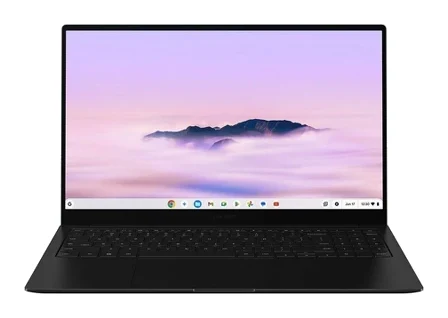
Best for: Buyers wanting a big, light laptop with an AMOLED screen
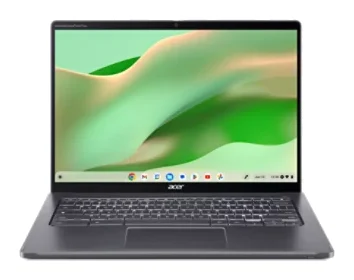
Best for: Users wanting a rugged touchscreen 2-in-1 for calls and docking
The Samsung Galaxy Chromebook Plus is the better pick for most people comparing the Acer Chromebook Plus Spin 714 vs Samsung Galaxy Chromebook Plus (XE550XGA): it is a large, very light laptop with an AMOLED screen and a full set of ports, and it has the higher expert average. The Acer is the better choice if you want a touchscreen that folds into tablet mode, a sharper webcam and Thunderbolt 4 for docks, and it is also the budget option of the two.
The two take different routes to the same Chromebook Plus experience. Samsung makes a premium 15.6-inch laptop built around portability and a vivid display. Acer makes a compact 14-inch convertible built around flexibility and durability. Which one is right depends on whether you value screen size and weight or touch and tablet use.
Acer Chromebook Plus Spin 714 vs Samsung Galaxy Chromebook Plus: design and portability
The Samsung's headline is size against weight. Samsung says it is the thinnest and lightest Chromebook Plus, at 2.58 lb and 0.47 in thick, even with a 15.6" screen. Reviewers praise how thin and light it is for a 15.6-inch laptop. The trade-off, according to reviewers, is a very wide chassis and an offset keyboard that take some getting used to.
The Acer is the smaller laptop, with a 14" screen, but it is heavier and thicker at 3.20 lb and 0.71 in. In return you get a 360-degree hinge and an aluminum chassis tested to MIL-STD 810H, which reviewers describe as solid build quality. Acer also lists an H1 security chip and a camera shutter, and a backlit keyboard with an OceanGlass touchpad.
For carrying around all day, the Samsung wins on weight despite the bigger screen. For a laptop that is built to be knocked about and bent into other shapes, the Acer is the more rugged option.
Display and touch: AMOLED or touchscreen
This is the clearest split between them. The Samsung has a 15.6" FHD AMOLED display at 1920 x 1080 and 400 nits, which Samsung calls the only Chromebook Plus with AMOLED. Reviewers call it bright and vivid. It is a 60Hz, non-touch panel, and a lack of touch is one of the common criticisms.
The Acer has a 14" IPS touchscreen in a 16:10 shape, at 1920 x 1200, 60 Hz and 340 nits, with 100% sRGB colour. Reviewers call the display sharp, but also say it is glossy, handles reflections poorly and is only moderately bright. Samsung doesn't list a colour-gamut figure for its panel, so the sRGB claim belongs to the Acer alone.
If you mainly watch video, browse and work in standard laptop mode, the Samsung's AMOLED panel and larger screen are the draw. If you want to draw, annotate, tap or use the machine as a tablet, only the Acer can do it. The Samsung has no touchscreen at all.
Ports, storage and memory
Both have a decent set of connections. The Samsung has 2x USB-C, 1x USB-A 3.2, HDMI, microSD and a 3.5mm headphone/mic jack, so it needs no dongles. The Acer has 2x USB Type-C (Thunderbolt 4), 1x USB 3.2 Gen 1 Type-A, 1x HDMI and a headphone/mic combo jack.
The differences are small but meaningful:
- Thunderbolt 4: Acer lists it on both USB-C ports, which reviewers say suits monitors and docks. Samsung doesn't list Thunderbolt.
- Memory cards: the Samsung has a microSD slot. Reviewers note the Acer has no memory-card reader.
- Upgrades: the Acer's 8 GB of LPDDR5 can be configured up to 16 GB, and its 256 GB SSD up to 512 GB. The Samsung is listed with 8GB LPDDR5X and 256GB UFS, with no other configurations given. Reviewers do caution that the Acer's soldered RAM tops out at 16 GB and that it is too slow for heavy workloads.
The Acer suits anyone who docks to external displays or wants more memory and storage. The Samsung suits people who move files in from camera or phone memory cards.
Webcam, speakers and AI features
The Acer has the stronger webcam on paper: a 1440p camera (2560 x 1440) with AI video-call tools and a physical shutter. Samsung has a 1080p wide-angle camera with Google AI lighting and background tools, which reviewers rate as average.
On the AI side, the Samsung has a dedicated Quick Insert key for Google AI and Gemini writing and image tools, and reviewers say it brings those tools into everyday work. Samsung also includes 12 months of Gemini Advanced and 2TB of cloud storage at launch. Acer lists Chromebook Plus AI features on its Intel Core Ultra processors, but no dedicated key or bundled subscription.
Neither wins on sound: reviewers call the speakers weak on both. If you spend a lot of time on video calls, the Acer's camera is the better one. If you want quick access to Gemini tools, the Samsung is the more convenient.
Battery and performance
Samsung claims up to 13 hours of battery from a 68 Wh battery, with Super Fast Charging via a 45W USB-C adapter. Acer lists up to 10 hours and doesn't give a battery capacity. Both figures are manufacturer claims, so real-world results will vary, but on paper the Samsung has the longer-lasting battery.
On processors, the Samsung uses an Intel Core 3 100U (up to 4.7 GHz). The Acer unit here has an Intel Core Ultra 5 115U, and other configurations offer the Core Ultra 5 125U and Core Ultra 7. If you want a higher processor tier, the Acer is the one that lists options. For everyday Chromebook work, such as browsing, documents and video calls, neither is pitched at heavy workloads.
Both have Wi-Fi 6E. The Samsung has Bluetooth 5.3 and the Acer has Bluetooth 5.2.
What experts say
Samsung's Galaxy Chromebook Plus has the higher expert average, 8.7 out of 10. The scores are Stuff 5/5, Trusted Reviews 4.5/5, Android Central 4.25/5, and PCWorld and Tom's Guide at 4/5 each. It is also recommended in 2 expert buying guides. Reviewers consistently praise the thin, light body, the vivid AMOLED screen, the full port selection and a keyboard and touchpad they found comfortable. The common criticisms are the high price for a Chromebook, the lack of a touchscreen and fingerprint reader, weak speakers, an average webcam and the very wide chassis.
The Acer Chromebook Plus Spin 714 averages 8.3 out of 10, from PCWorld (4.5/5) and RTINGS (7.6/10). Reviewers praise the easy laptop-to-tablet switching, the solid MIL-STD 810H build, the 1440p webcam, the Thunderbolt 4 and HDMI connections and the sharp 16:10 display. They criticise its extra weight and thickness compared with the Samsung, the glossy and only moderately bright screen, weak speakers, the missing card reader and RAM that tops out at 16 GB.
The gap is modest, and the Acer has fewer published reviews behind its score. The Samsung leads with reviewers, while the Acer's lower price tier is a real argument in its favour.
If you are weighing the Acer against a smaller tablet-style option, see our Acer Chromebook Plus Spin 714 vs Lenovo Duet 11 Gen 9 comparison. For a roomier, non-convertible Acer, there is the Acer Chromebook Plus 515 review.
Choose the Samsung Galaxy Chromebook Plus if…
Samsung Galaxy Chromebook Plus (XE550XGA)
Best for: Buyers wanting a big, light laptop with an AMOLED screen
Pick the Samsung over the Acer if you want a large, light, portable laptop with a vivid AMOLED screen and a full set of built-in ports including microSD. It suits people who work in traditional laptop mode and do not need a touchscreen.
- Battery life
- 68 Wh, 45W USB-C adapter
- Weight
- 2.58 lb (1.17 kg)
- Dimensions
- 13.9 x 8.9 x 0.47 in
- Display
- 15.6" FHD AMOLED, 60Hz, non-touch, 400 nits
- Resolution
- 1920 x 1080
- Processor
- Intel Core 3 100U (up to 4.7 GHz)
Reasons to buy
- Very thin and light for a 15.6-inch laptop, at 2.58 lb and 0.47 in
- Bright, vivid 15.6-inch FHD AMOLED display
- Full port selection: 2 USB-C, USB-A, HDMI, microSD, no dongles needed
- Quick Insert key brings Google AI and Gemini tools into everyday work
- Backlit keyboard with number pad, and reviewers found the keyboard and touchpad comfortable
Reasons to avoid
- Expensive for a Chromebook
- No touchscreen and no fingerprint reader
- Thin, weak speakers and an average 1080p webcam
- Very wide chassis and offset keyboard take some getting used to
- Trusted Reviews
- 9.0
- PCWorld
- 8.0
- Engadget
- 8.5
- Notebookcheck
- 8.1
- Tom's Guide
- 8.0
- Android Central
- 8.5
- Stuff
- 10.0
Choose the Samsung if you want a big screen without a heavy laptop: at 2.58 lb and 0.47 in thick, it is what Samsung calls the thinnest and lightest Chromebook Plus, and reviewers praise its bright, vivid AMOLED panel. It also suits you if you need a microSD slot, a number pad and a full set of ports, or if you like the Gemini-focused Quick Insert key. You should be comfortable with a premium price, no touchscreen and no fingerprint reader.
Choose the Acer Chromebook Plus Spin 714 if…
Best for: Users wanting a rugged touchscreen 2-in-1 for calls and docking
Pick the Acer over the Samsung if you want a touchscreen 2-in-1 that folds into tablet mode, with Thunderbolt 4 and a sharper webcam for video calls. It is the better fit for a compact 14-inch, tougher-built convertible.
Read our full Acer Chromebook Plus Spin 714 review →- Battery life
- Up to 10 hours
- Weight
- 3.20 lb
- Dimensions
- 0.71" H x 12.3" W x 8.8" D
- Display
- 14" IPS touchscreen, 16:10, 60 Hz, 340 nits, 100% sRGB
- Resolution
- 1920 x 1200
- Processor
- Intel Core Ultra 5 115U (Core Ultra 5 125U and Core Ultra 7 options on other configs)
Reasons to buy
- 360-degree hinge with touchscreen switches easily between laptop and tablet modes
- Aluminum chassis tested to MIL-STD 810H, with solid build quality
- 1440p webcam with AI video-call tools plus a camera shutter
- Thunderbolt 4 ports and HDMI for monitors and docks
- Sharp 16:10 display with 100% sRGB colour; configurable up to 16 GB RAM and 512 GB storage
Reasons to avoid
- Heavier and thicker than the Samsung, at 3.20 lb and 0.71 in
- Glossy display handles reflections poorly and is only moderately bright
- Weak speakers and no memory-card reader
- Soldered RAM tops out at 16 GB; too slow for heavy workloads
- PCWorld
- 9.0
- Android Police
- 8.0
- PCMag
- 10.0
- Android Police (via Notebookcheck)
- 8.0
- RTINGS
- 7.6
Choose the Acer if you want a touchscreen that folds into tablet mode, or a tougher aluminum build tested to MIL-STD 810H. Its 1440p webcam with a shutter helps for video calls, and Thunderbolt 4 and HDMI suit a desk with monitors or a dock. It is also the budget option, and it can be configured up to 16 GB of RAM and 512 GB of storage. Accept that it is heavier, has a glossy and only moderately bright screen, and has no card reader.
Compare our picks side by side
The specs most of our picks share, from each maker’s spec page (— = not published). Expert score = the average of published expert reviews, which rate each product for its price. Scroll sideways on small screens.
| Spec | Samsung Galaxy Chromebook Plus (XE550XGA) | Acer Chromebook Plus Spin 714 |
|---|---|---|
| Best for | Our Pick | The Alternative |
| Expert score | 8.6 | 8.5 |
| Price vs. these picks | Higher | Lower |
| Battery life | 68 Wh, 45W USB-C adapter | Up to 10 hours |
| Weight | 2.58 lb (1.17 kg) | 3.20 lb |
| Dimensions | 13.9 x 8.9 x 0.47 in | 0.71" H x 12.3" W x 8.8" D |
| Display | 15.6" FHD AMOLED, 60Hz, non-touch, 400 nits | 14" IPS touchscreen, 16:10, 60 Hz, 340 nits, 100% sRGB |
| Resolution | 1920 x 1080 | 1920 x 1200 |
| Processor | Intel Core 3 100U (up to 4.7 GHz) | Intel Core Ultra 5 115U (Core Ultra 5 125U and Core Ultra 7 options on other configs) |
| RAM | 8GB LPDDR5X | 8 GB LPDDR5 (up to 16 GB) |
| Storage | 256GB UFS | 256 GB PCIe NVMe SSD (up to 512 GB) |
| Where to buy | View on Amazon | View on Amazon |
The verdict
For most people, the Samsung Galaxy Chromebook Plus is the better laptop: lighter, with a more vivid AMOLED screen, longer claimed battery life, more complete built-in ports and the higher expert average. The Acer Chromebook Plus Spin 714 is the one to buy if you need a touchscreen and tablet mode, a sharper webcam or Thunderbolt 4, or if the Samsung's premium price is a barrier.
Ready to buy?
 Our PickSamsung Galaxy Chromebook Plus (XE550XGA)View on Amazon
 The AlternativeAcer Chromebook Plus Spin 714View on Amazon
Frequently asked questions
Is the Acer Chromebook Plus Spin 714 better than the Samsung Galaxy Chromebook Plus?
Not for most people, but it is better for some. The Samsung has the higher expert average (8.7 vs 8.3 out of 10) and is lighter. The Acer is better if you want a touchscreen, tablet mode, Thunderbolt 4 and a lower price tier.
Which has longer battery life, the Acer Spin 714 or the Samsung Galaxy Chromebook Plus?
The Samsung Galaxy Chromebook Plus claims longer battery life: up to 13 hours from a 68 Wh battery, against up to 10 hours for the Acer Chromebook Plus Spin 714. Both are manufacturer figures, and Acer doesn't list a battery capacity.
Does the Samsung Galaxy Chromebook Plus have a touchscreen?
No. The Samsung Galaxy Chromebook Plus has a non-touch 15.6" FHD AMOLED display. The Acer Chromebook Plus Spin 714 has a 14" touchscreen and a 360-degree hinge for tablet mode.
Which is lighter, the Acer Spin 714 or the Samsung Galaxy Chromebook Plus?
The Samsung Galaxy Chromebook Plus is lighter, at 2.58 lb and 0.47 in thick, even with its bigger 15.6" screen. The Acer Chromebook Plus Spin 714 weighs 3.20 lb and is 0.71 in thick.
Which is better for video calls?
The Acer Chromebook Plus Spin 714 is better on paper, with a 1440p webcam, AI video-call tools and a camera shutter. The Samsung has a 1080p wide-angle camera with Google AI lighting and background tools, which reviewers call average.
Does the Acer Spin 714 or the Samsung Galaxy Chromebook Plus have a microSD slot?
The Samsung Galaxy Chromebook Plus has a microSD slot. Reviewers note the Acer Chromebook Plus Spin 714 has no memory-card reader, though it offers Thunderbolt 4 ports and HDMI.
Sources
Specs are taken from the manufacturers' official pages; expert recommendations from the publications below.
- Samsung Galaxy Chromebook Plus (XE550XGA): samsung.com, laptopmag.com, engadget.com, trustedreviews.com
- Acer Chromebook Plus Spin 714: acer.com
More buying guides
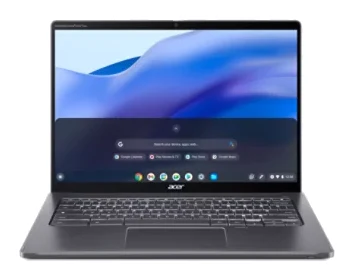
Acer Chromebook Plus Spin 714 Review (2026): Updates to 2034
A convertible ChromeOS laptop with a Core Ultra 5 chip, a 1440p webcam, two Thunderbolt 4 ports and updates promised to June 2034. Here is who it suits and where it falls short.
Published Oct 23, 2026Acer Spin 714 vs Lenovo Chromebook Duet (2026)
Acer's laptop-class convertible against Lenovo's featherweight detachable. We compare performance, portability, keyboards, ports and what experts say.
Published Nov 4, 2026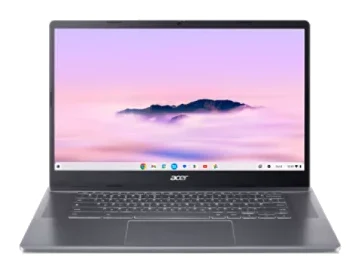
Acer Chromebook Plus 515 Review (2026): Roomy and Quick
The Acer Chromebook Plus 515 pairs a big 15.6-inch matte screen with quick performance and a generous port selection. Here is where it shines and where it falls short.
Published Nov 11, 2026