Logitech MX Master 4 vs Logitech Lift (2026): Which Grip?
The MX Master 4 is the feature-packed pick for right-handed users with larger hands. The Lift is the budget vertical mouse for small hands, left-handers and strain relief.
Head-to-head comparison · Research-based · Affiliate links
We earn a commission from qualifying purchases made through our links, at no extra cost to you. It never decides our picks. As an Amazon Associate I earn from qualifying purchases. How we make money
Logitech MX Master 4 vs Logitech Lift Vertical Ergonomic Mouse: which one should you buy?
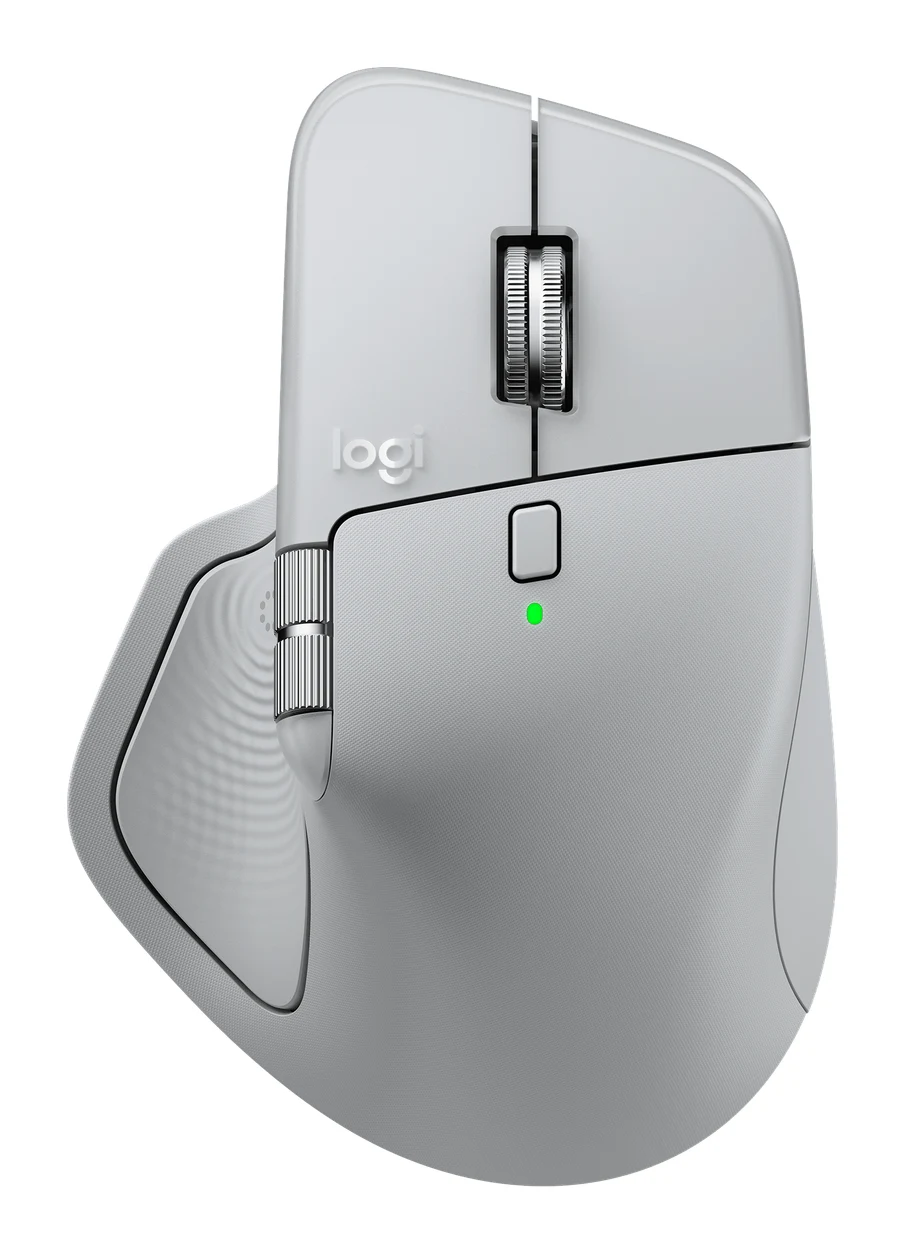
Best for: Right-handed power users wanting a premium, highly customizable productivity mouse
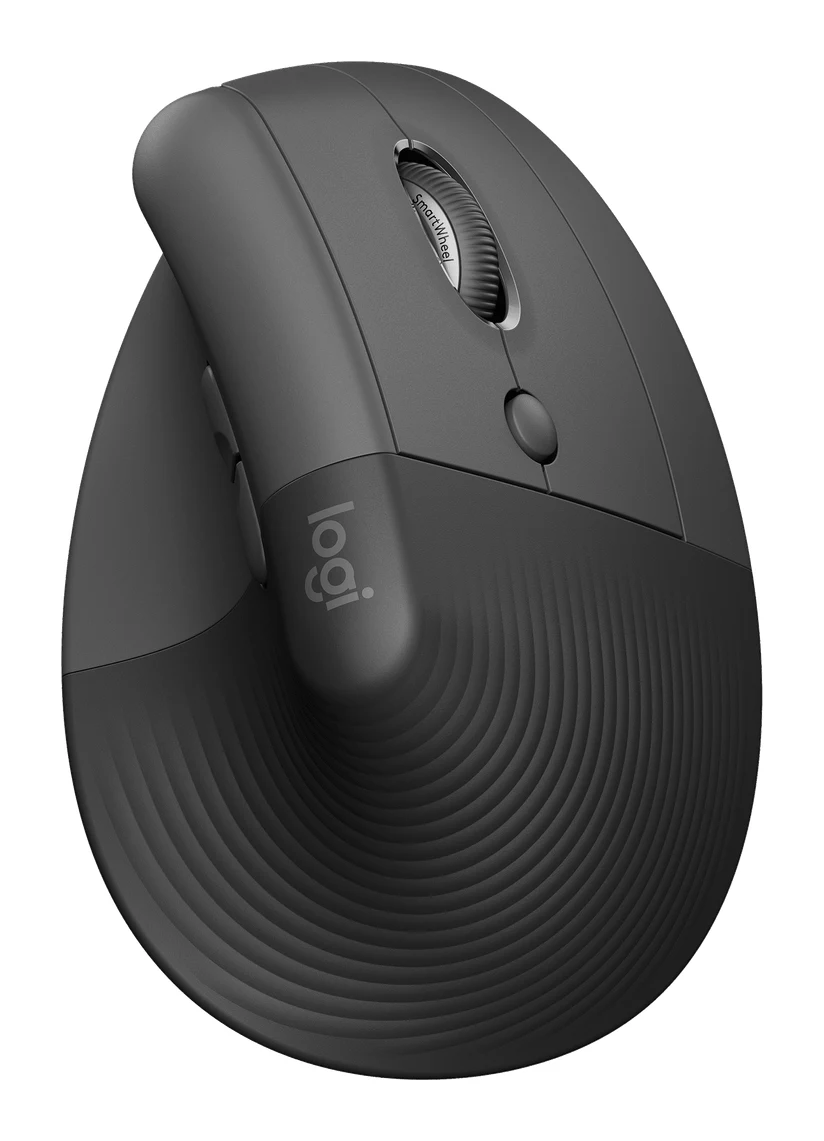
Best for: Small-handed or left-handed users wanting an affordable vertical ergonomic mouse
The Logitech MX Master 4 vs Logitech Lift Vertical Ergonomic Mouse question comes down to what you want from an ergonomic mouse. Most buyers who are right-handed and have medium to large hands should pick the MX Master 4: it is the more capable, more customizable mouse, and it was recommended in far more expert guides. The Lift is the better choice if you want a true vertical grip, have small to medium hands, need a left-handed model, or want the budget option.
Both are Logitech mice that pair with up to 3 devices and use Logi Options+ for button customization, so the decision is less about ecosystem and more about shape, features and size.
Logitech MX Master 4 vs Logitech Lift Vertical Ergonomic Mouse: grip and fit
This is the biggest difference, and it will decide the purchase for many people.
The Lift puts your hand at a 57° vertical angle, which Logitech describes as a natural handshake position. Reviewers praise that posture for easing strain. It is sized for small to medium hands and has a soft rubber grip with a thumb rest. A left-handed model is available. The trade-off reviewers mention is a learning curve: it takes some getting used to, especially for precise work, and the fit is not ideal for large hands.
The MX Master 4 takes a different approach. It has a sculpted ergonomic shape that reviewers find comfortable, but it is not vertical. It measures 128.2 x 88.4 x 50.8 mm and weighs 150 g, against the Lift's 125 g. Reviewers flag the weight, and also note it is right-handed only and large for small hands.
Edge: the Lift for small hands, left-handed users and anyone who wants a vertical grip to relieve wrist and forearm strain. The MX Master 4 for right-handers with bigger hands who prefer a conventional, sculpted shape.
Features and scrolling
Here the MX Master 4 is clearly the more feature-rich mouse.
- Haptic Sense Panel: gives tactile feedback for specific actions. Reviewers note that haptic feedback works in few apps so far, so treat it as a bonus rather than a reason to buy.
- Actions Ring: puts shortcuts and tools at your cursor. Reviewers cite it, with Logi Options+, as a source of deep customization.
- MagSpeed steel scroll wheel: switches between ratchet and free-spin scrolling.
- Buttons: 8 in total, including a gesture button, a wheel mode-shift button and the Actions Ring button.
- Quiet Click: cuts click noise by 90%.
The Lift is simpler. It has 4 customizable side buttons plus the SmartWheel, which is silent and switches between line-by-line and fast scrolling. Its clicks are also quiet. Reviewers praise the quiet clicks and smooth wheel, but a common criticism is that the buttons feel somewhat mushy and the DPI button below the scroll wheel is awkward to reach.
One MX Master 4 limitation is that it has no onboard memory, so settings depend on software.
Edge: the MX Master 4 for power users who want shortcuts, haptics and a premium wheel. The Lift is enough if you only need quiet, comfortable everyday use.
Tracking and sensor
The MX Master 4 has an 8,000 DPI Darkfield sensor, adjustable from 200-8,000 DPI in 50 DPI increments. Logitech says it tracks on any surface, including glass 4 mm or thicker. That suits people who work at glass desks, in cafés or at changing workspaces.
The Lift uses a Pluto One sensor with a 400–4,000 DPI range. Logitech doesn't list glass tracking for the Lift, so if you work on glass or unusual surfaces, the MX Master 4 is the safer bet. The Lift's range is narrower, at 400–4,000 DPI, and reviewers say its DPI button below the scroll wheel is awkward to reach.
Edge: the MX Master 4, especially for varied surfaces, including glass 4 mm or thicker.
Battery and connectivity
The two mice take opposite approaches to power.
The MX Master 4 is rechargeable over USB-C (the cable isn't included) and lasts up to 70 days on a full charge. Quick charging is strong: 1 minute gives up to 3 hours of use. The Lift runs on 1 x AA battery for up to 24 months. You never plug it in, but you do need a spare AA eventually.
On the wireless side they are closely matched. Both offer Bluetooth Low Energy and a Logi Bolt receiver, both have a 10 m wireless range, and both use Easy-Switch for up to 3 devices. The MX Master 4's receiver is USB-C and Logitech highlights it for stronger, encrypted wireless. The Lift's is a Logi Bolt USB receiver.
Edge: the Lift for set-and-forget battery life; the MX Master 4 for fast top-ups. Connectivity is essentially a tie.
What experts say
Reviewers rate both highly. The MX Master 4 has an expert average of 8.8 out of 10, based on TechRadar (4.5/5), PCWorld (4/5), CGMagazine (9/10) and EFTM (90/100). It was recommended in 8 expert guides. Reviewers praise its comfortable shape, the MagSpeed wheel, battery life with quick charging, Quiet Click and deep customization. Their criticisms are the 150 g weight, the right-handed-only large body, limited haptic support in apps and the lack of onboard memory.
The Lift averages 9 out of 10 from two reviews: PCWorld (4.5/5) and TechRadar (4.5/5). It was recommended in 1 expert guide. Reviewers praise the natural vertical angle, compact size, left-handed option, 24-month battery life and quiet clicks. They criticize the adjustment period, the hard-to-reach DPI button, the poor fit for large hands and mushy buttons.
The Lift's slightly higher average comes from fewer reviews. On the two outlets that scored both, the Lift matched or beat the MX Master 4. It was also recommended in far fewer buying guides. Reviewers are saying that both are very good, just for different hands and habits.
Choose Logitech MX Master 4 if…
Best for: Right-handed power users wanting a premium, highly customizable productivity mouse
Pick the MX Master 4 over the Lift if you want a feature-rich productivity mouse with haptics, an Actions Ring and a premium scroll wheel. It suits right-handed users with medium to large hands who value customization and tracking on any surface, including glass, over a vertical grip.
Read our full Logitech MX Master 4 review →- Battery life
- Up to 70 days on a full charge
- Range
- 10 m
- Weight
- 150 g (5.29 oz)
- Dimensions
- 128.2 x 88.4 x 50.8 mm (5.05 x 3.48 x 2.0 in)
- DPI
- 200-8,000 DPI (50 DPI increments)
- Buttons
- 8 (left/right-click, back/forward, gesture, wheel mode-shift, middle click, Actions Ring)
Reasons to buy
- Sculpted ergonomic shape that reviewers find comfortable
- MagSpeed wheel switches between ratchet and free-spin scrolling
- Up to 70 days of battery, with quick charging
- Quiet Click buttons cut click noise by 90%
- Actions Ring and Logi Options+ allow deep customization
Reasons to avoid
- Heavy at 150 g compared with other mice
- Right-handed only and large for small hands
- Haptic feedback works in few apps so far
- No onboard memory, so settings depend on software
- Tom's Guide
- 9.0
- TechRadar
- 9.0
- PCWorld
- 8.0
- Technerdo
- 8.7
- The Tech Showdown
- 9.2
- CGMagazine
- 9.0
- EFTM
- 9.0
Choose the MX Master 4 if you're right-handed, have medium to large hands and want a premium productivity mouse. The Actions Ring, MagSpeed wheel, eight buttons and Quiet Click give you plenty to customize, and the sensor tracks on any surface, including glass 4 mm or thicker. It is the premium option, and it is heavier at 150 g with no onboard memory.
Choose Logitech Lift Vertical Ergonomic Mouse if…
Best for: Small-handed or left-handed users wanting an affordable vertical ergonomic mouse
Pick the Lift over the MX Master 4 if you want a vertical grip to relieve wrist and forearm strain at a lower price. It is the better choice for small to medium hands and for left-handed users, since a left-handed version exists.
Read our full Logitech Lift Vertical Ergonomic Mouse review →- Battery life
- Up to 24 months (1 x AA battery)
- Range
- 10 m / 33 ft
- Weight
- 125 g
- Dimensions
- 71 mm (H) × 70 mm (W) × 108 mm (D)
- DPI
- 400–4,000 DPI
- Buttons
- 4 customizable side buttons plus SmartWheel
Reasons to buy
- 57° vertical angle gives a natural handshake position that eases strain
- Compact size suits small to medium hands
- Left-handed model available
- Up to 24 months of battery from one AA
- Quiet clicks and a silent, smooth SmartWheel
Reasons to avoid
- Takes some getting used to, especially for precise work
- DPI button below the scroll wheel is awkward to reach
- Not ideal for large hands; fit varies by user
- Buttons feel somewhat mushy compared with mechanical switches
- TechRadar
- 9.0
- PCWorld
- 9.0
- Tom's Guide
- 7.0
- Trusted Reviews
- 9.0
- BinaryFork
- 9.0
Choose the Lift if you want a vertical grip to ease wrist and forearm strain, have small to medium hands, or need a left-handed model. It is the budget option, runs for up to 24 months on one AA battery and has quiet clicks and a silent SmartWheel. Expect an adjustment period, especially for precise work, and some mushy-feeling buttons.
Compare our picks side by side
The specs most of our picks share, from each maker’s spec page (— = not published). Expert score = the average of published expert reviews, which rate each product for its price. Scroll sideways on small screens.
| Spec | Logitech MX Master 4 | Logitech Lift Vertical Ergonomic Mouse |
|---|---|---|
| Best for | Our Pick | The Alternative |
| Expert score | 8.8 | 8.6 |
| Price vs. these picks | Higher | Lower |
| Battery life | Up to 70 days on a full charge | Up to 24 months (1 x AA battery) |
| Range | 10 m | 10 m / 33 ft |
| Weight | 150 g (5.29 oz) | 125 g |
| Dimensions | 128.2 x 88.4 x 50.8 mm (5.05 x 3.48 x 2.0 in) | 71 mm (H) × 70 mm (W) × 108 mm (D) |
| DPI | 200-8,000 DPI (50 DPI increments) | 400–4,000 DPI |
| Buttons | 8 (left/right-click, back/forward, gesture, wheel mode-shift, middle click, Actions Ring) | 4 customizable side buttons plus SmartWheel |
| Ergonomic design | Yes, sculpted full-size mouse with natural hand position | 57° vertical angle, natural handshake position |
| Wireless connectivity | Logi Bolt USB-C receiver and Bluetooth Low Energy | Logi Bolt USB receiver and Bluetooth Low Energy |
| Where to buy | View on Amazon | View on Amazon |
The verdict
For most people, the MX Master 4 is the better all-round mouse: more features, a wider DPI range and tracking on glass, with a comfortable shape reviewers like. The Lift is the better ergonomic specialist and the cheaper pick. If your priority is a vertical posture, small hands or left-handed use, it is the right call, and its expert scores (an average of 9 out of 10 from two reviews) are as high as the MX Master 4's.
Ready to buy?
 Our PickLogitech MX Master 4View on Amazon
 The AlternativeLogitech Lift Vertical Ergonomic MouseView on Amazon
Related buying guides
Frequently asked questions
Is the Logitech MX Master 4 better than the Logitech Lift?
The MX Master 4 is better for features and customization, while the Lift is better for vertical ergonomics and small hands. The MX Master 4 has the Actions Ring, haptic panel and MagSpeed wheel, and it averages 8.8 out of 10 from reviewers. The Lift averages 9 out of 10 from two reviews and is the budget option.
Which has longer battery life, the MX Master 4 or the Lift?
The Lift lasts longer: up to 24 months from 1 x AA battery. The MX Master 4 lasts up to 70 days on a full charge, but quick charging gives up to 3 hours of use from 1 minute.
Is the Logitech Lift good for left-handed users?
Yes, a left-handed Lift model is available. The MX Master 4 is right-handed only, so left-handers who want a Logitech ergonomic mouse should look at the Lift.
Does the MX Master 4 or the Lift work better for large hands?
The MX Master 4 suits larger hands better. The Lift is sized for small to medium hands, and reviewers say it is not ideal for large hands. The MX Master 4 is large for small hands.
Which mouse is better for wrist strain, the MX Master 4 or the Lift?
The Lift is the more purpose-built option, with a 57° vertical angle that reviewers say eases strain. The MX Master 4 has a sculpted shape that reviewers find comfortable, but it is not a vertical design.
Can the MX Master 4 and the Lift connect to multiple devices?
Yes, both pair with up to 3 devices using Easy-Switch. Both connect through Bluetooth Low Energy or a Logi Bolt receiver, with a wireless range of 10 m.
Sources
Specs are taken from the manufacturers' official pages; expert recommendations from the publications below.
- Logitech MX Master 4: logitech.com, hub.sync.logitech.com
- Logitech Lift Vertical Ergonomic Mouse: logitech.com, hub.sync.logitech.com
More buying guides
Logitech Lift Vertical Ergonomic Mouse Review: Small Hands
A look at the Logitech Lift vertical mouse: its 57° angle, compact body, quiet clicks and long battery life, and who should skip it.
Published Oct 26, 2026Logitech MX Master 4 Review (2026): Refined, Not Radical
The MX Master 4 is a comfortable, quiet, highly customizable productivity mouse with long battery life. Here is who it suits, and who should look elsewhere.
Published Oct 22, 2026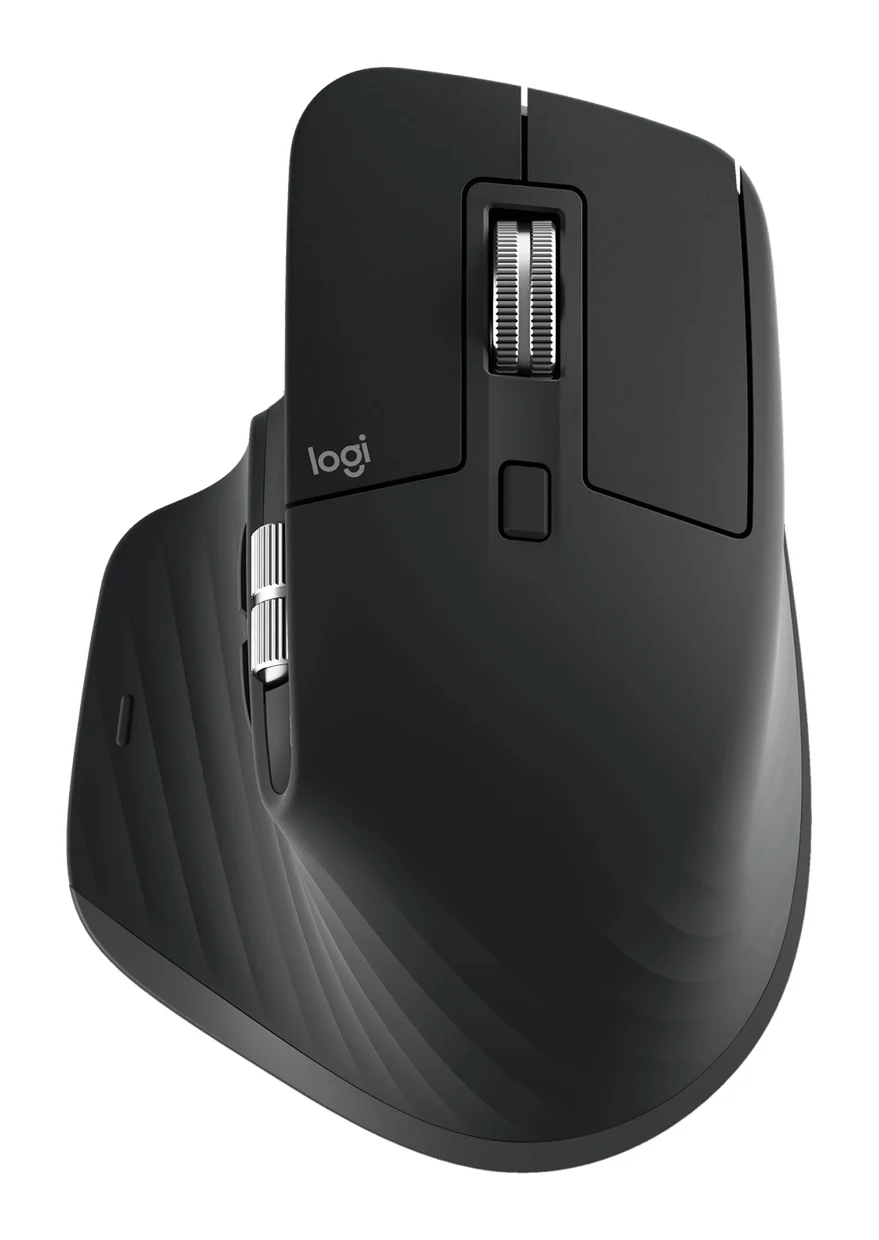
Logitech MX Master 3S Review (2026): Quiet Office Workhorse
A look at the Logitech MX Master 3S: a quiet, sculpted, right-handed productivity mouse with a MagSpeed wheel, 3-device pairing and long battery life, and who should skip it.
Published Nov 4, 2026