TP-Link Deco BE63 vs TP-Link Deco BE23 (2026): Which Mesh?
The Deco BE63 is a tri-band Wi-Fi 7 mesh with 6 GHz, 320 MHz channels and four 2.5 Gbps ports per unit. The BE23 is the simpler dual-band option. Here is who should buy which.
Head-to-head comparison · Research-based · Affiliate links
We earn a commission from qualifying purchases made through our links, at no extra cost to you. It never decides our picks. As an Amazon Associate I earn from qualifying purchases. How we make money
TP-Link Deco BE63 vs TP-Link Deco BE23: which one should you buy?
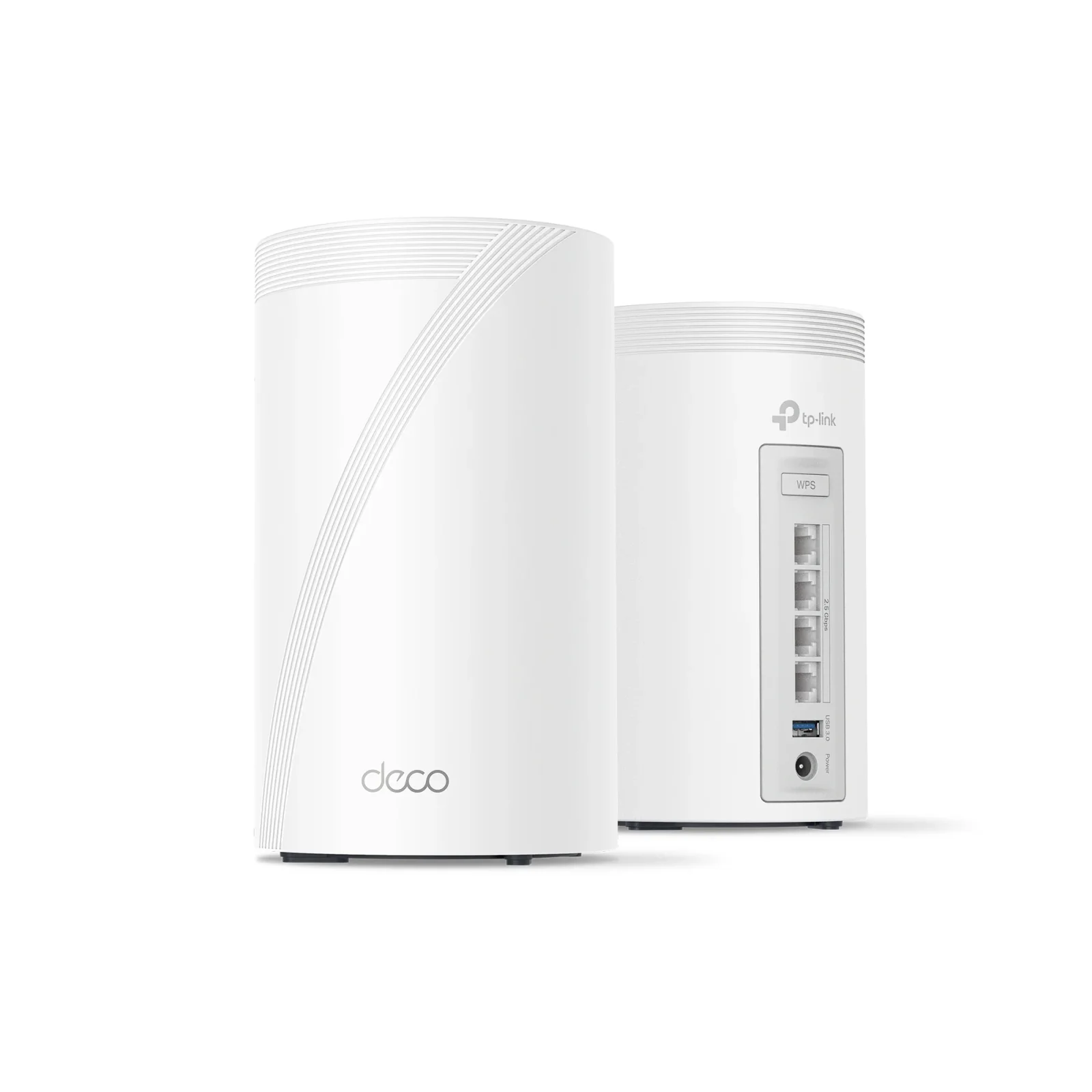
Best for: Larger homes needing tri-band Wi-Fi 7 and many wired devices
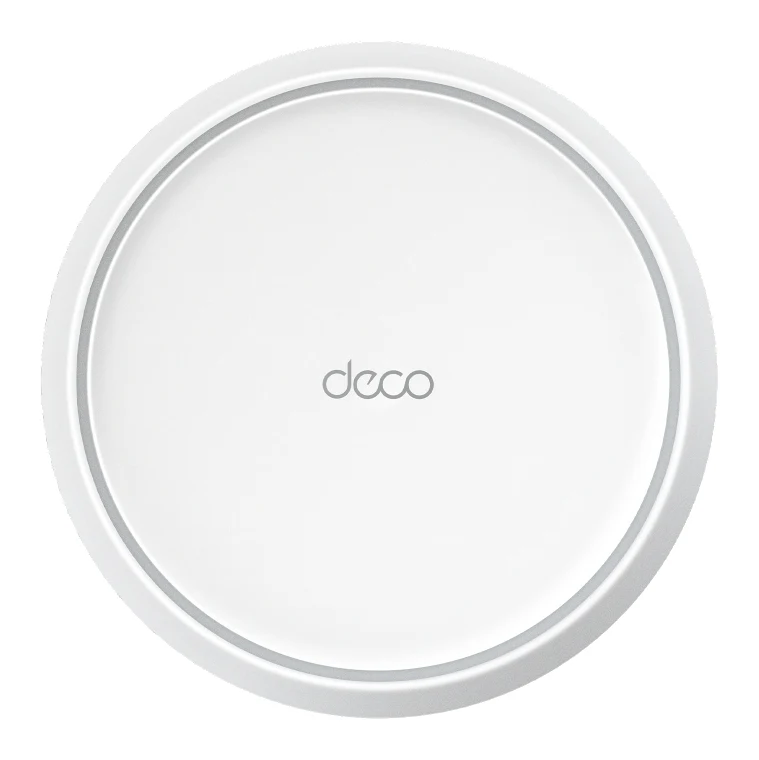
Best for: Budget buyers wanting simple Wi-Fi 7 mesh for smaller homes
The TP-Link Deco BE63 vs TP-Link Deco BE23 decision mostly comes down to home size and how many wired devices you run. Most buyers who want room to grow should pick the BE63, a tri-band Wi-Fi 7 system with a 6 GHz band, 320 MHz channels and four 2.5 Gbps ports per unit. The BE23 is the better choice if you want a simple, compact Wi-Fi 7 mesh for a smaller home with only a few wired devices.
Both are TP-Link Deco systems sold as 1-pack, 2-pack and 3-pack, both run in Router Mode or Access Point Mode, and both have four internal antennas and a Limited 2-Year Manufacturer Warranty. The differences are in the radios, the ports and the mesh features.
TP-Link Deco BE63 vs TP-Link Deco BE23: bands and speed
This is the biggest gap between the two. The Deco BE63 is a BE10000 tri-band Wi-Fi 7 system. TP-Link lists 6 GHz at 5188 Mbps, 5 GHz at 4324 Mbps and 2.4 GHz at 574 Mbps. The 6 GHz band is the draw, because it gives your newest devices a less congested place to connect. The BE63 also supports Multi-Link Operation, 320 MHz channels and 4K-QAM.
The Deco BE23 is a BE3600 dual-band Wi-Fi 7 (802.11be) system: 2882 Mbps on 5 GHz plus 688 Mbps on 2.4 GHz. It has Multi-Link Operation and 4K-QAM, and reviewers praise getting those Wi-Fi 7 features at a very low price. But its channel width tops out at 160 MHz, and it has no 6 GHz band and no 320 MHz support. Reviewers list that as its first criticism.
The BE63 wins on raw capability. The BE23 still gives you Wi-Fi 7 fundamentals, which may be all a modest home needs, but it can't match the BE63's spectrum.
The BE63 isn't flawless. Reviewers note that speeds drop at longer distances and that 2.4 GHz performance is weak. That matters if you have older or far-away devices that rely on the 2.4 GHz band.
Wired ports and USB
If you have a desktop, NAS, console or smart TV near a unit, port count matters. Each Deco BE63 unit has four 2.5 Gbps WAN/LAN ports (auto-sensing) and one USB port. The USB port supports FTP, media and Samba server functions, so you can share a drive over the network. Reviewers praise both the ports and the USB sharing.
Each Deco BE23 unit has two 2.5 Gbps WAN/LAN ports. That's enough for a multi-gig internet connection plus one wired device, or for wired backhaul between units. But reviewers flag that two Ethernet ports per unit is limiting, and the BE23 has no USB port.
The BE63 clearly comes out ahead for anyone with several wired devices or who wants a shared drive. One limit applies to both: neither has the 10G or SFP+ ports some enthusiasts want. Reviewers call that out for the BE63, and the BE23 lists only 2.5 Gbps ports.
Backhaul and mesh behaviour
In a mesh, the link between units decides how well the far rooms perform. The BE63 supports wireless and wired backhaul, and the two can be combined. With a tri-band design, it has more radio capacity to work with than a dual-band system.
The BE23's 2.5 Gbps ports can handle wired backhaul. But it has no dedicated wireless backhaul band, and reviewers report speed drops and packet loss when traffic passes through nodes. The BE23 does offer AI-driven mesh with smart roaming. Its listing doesn't mention combining wired and wireless backhaul.
The BE63 isn't perfect here either. Reviewers say wireless latency and jitter on satellite units can hurt gaming. If you're serious about gaming, run a cable to the satellites rather than relying on wireless backhaul. The BE63's ports make that easy, but the BE23's two ports go quickly if you also have wired devices.
The BE63 is the stronger mesh.
Coverage and device capacity
TP-Link rates the Deco BE63 for up to 5,800 sq. ft. with a 2-pack and up to 7,600 sq. ft. with a 3-pack, and for up to 200 devices. It has a 1.5 GHz quad-core processor and 1 GB of RAM.
The Deco BE23 is rated for up to 2,500 sq.ft per unit, with a 3-pack covering up to 6,500 sq.ft, and for 150+ devices. It uses a quad-core 1.1GHz processor (Qualcomm IPQ5312 plus QCN6422 Wi-Fi chips, per Tom's Guide). TP-Link doesn't list a RAM figure for it.
The BE63 is the better fit for a large home or one with a crowded network. A 3-pack BE23 still covers a decent area, so for a typical smaller home the gap won't hurt. Treat all coverage numbers as best-case ratings. Walls and layout change real results.
Setup, app and design
Both systems are set up and managed through the Deco app, and both include HomeShield security and parental controls. The BE63 also works with Alexa and Google Assistant and offers a separate IoT network. The BE23 has guided setup that reviewers call quick, plus VPN server and client support.
One caveat on the BE63: reviewers say advanced HomeShield security and parental controls need a paid subscription. For the BE23, reviewers say app controls beyond the basics are limited.
The BE23 units are the more compact, low-profile design at 5.91 × 5.91 × 2.44 in (150 × 150 × 62 mm). The BE63 units are taller at 4.23 × 4.23 × 6.93 in (107.5 × 107.5 × 176 mm), with a smaller footprint. Either choice is about where you can put it. Neither is a clear winner here.
What experts say
Reviewers praise the Deco BE63 for its tri-band Wi-Fi 7 with a 6 GHz band, four 2.5 Gbps ports on every unit plus USB, combinable wired and wireless backhaul, and coverage of up to 7,600 sq. ft. with a 3-pack. Common criticisms are the paid subscription for advanced HomeShield features, falling speeds at longer distances, weak 2.4 GHz performance, wireless latency on satellite units and no 10G or SFP+ ports.
The published scores are strong: Tom's Guide gave it 4.5 out of 5, TechRadar 5 out of 5 and Dong Knows Tech 7.8 out of 10. The expert average is 8.9 out of 10.
The Deco BE23 has been recommended in 1 expert buying guide. Reviewers praise Wi-Fi 7 with MLO and 4K-QAM at a very low price, two 2.5 Gbps ports per unit, quick guided setup, Router or Access Point mode with VPN support, and the compact units. Their criticisms are the missing 6 GHz band and 320 MHz channels, no dedicated wireless backhaul band, only two Ethernet ports per unit, no USB port and limited advanced app controls.
Choose TP-Link Deco BE63 if…
Best for: Larger homes needing tri-band Wi-Fi 7 and many wired devices
Pick the Deco BE63 over the BE23 if you want a dedicated 6 GHz band, 320 MHz channels and more wired ports per unit for a larger home. It also adds USB file sharing and combined wired and wireless backhaul, which the BE23 lacks.
Read our full TP-Link Deco BE63 review →- Processor
- 1.5 GHz quad-core
- RAM
- 1 GB
- Ports
- 4× 2.5 Gbps WAN/LAN (auto-sensing) and 1× USB per unit
- Warranty
- Limited 2-Year Manufacturer Warranty
- Antennas
- 4× internal
- Backhaul
- Ethernet, wireless, or mixed wired and wireless backhaul
Reasons to buy
- Tri-band Wi-Fi 7 with a 6 GHz band for less congestion
- Four 2.5 Gbps WAN/LAN ports on every unit, plus USB
- Wireless and wired backhaul can be combined
- Covers up to 7,600 sq. ft. with a 3-pack, 200+ devices
- USB port supports FTP, media and Samba server
Reasons to avoid
- Advanced HomeShield security and parental controls need a paid subscription
- Speeds drop at longer distances and 2.4 GHz performance is weak
- Wireless latency and jitter on satellite units can hurt gaming
- No 10G or SFP+ ports for the fastest wired setups
- Tom's Guide
- 9.0
- TechRadar
- 10.0
- Home Office Research
- 8.1
- Dong Knows Tech (preliminary assessment)
- 7.8
- BroadbandNow
- 8.8
- The Inspect Aspect
- 9.0
Choose the BE63 if you have a larger home, a crowded network or several wired devices. The dedicated 6 GHz band, 320 MHz channels, four 2.5 Gbps ports per unit and USB file sharing give you far more room to grow. It also lets you combine wired and wireless backhaul. Just budget for the HomeShield subscription if you want the advanced security and parental controls.
Choose TP-Link Deco BE23 if…
Best for: Budget buyers wanting simple Wi-Fi 7 mesh for smaller homes
Pick the Deco BE23 over the BE63 if you want an affordable entry into Wi-Fi 7 mesh with multi-gig ports and simple setup. It suits smaller homes with few wired devices, where the missing 6 GHz band and USB matter less.
Read our full TP-Link Deco BE23 review →- Processor
- Quad-core 1.1GHz
- RAM
- 512 MB
- Ports
- 2× 2.5 Gbps WAN/LAN per unit
- Warranty
- Limited 2-Year Manufacturer Warranty
- Antennas
- 4× internal
- Backhaul
- Wireless and wired
Reasons to buy
- Wi-Fi 7 with MLO and 4K-QAM at a very low price, per reviewers
- Two 2.5 Gbps WAN/LAN ports per unit for multi-gig plans
- Quick, guided setup in the Deco app
- Router or Access Point mode, with VPN server and client support
- Compact, low-profile units
Reasons to avoid
- No 6 GHz band and no 320 MHz channels
- No dedicated wireless backhaul band, so speed drops and packet loss occur via nodes
- Only two Ethernet ports per unit
- No USB port and limited advanced controls in the app
- Tom's Guide
- 9.0
- TechGearLab
- 8.4
Choose the BE23 if you want an affordable way into Wi-Fi 7 mesh with multi-gig ports and simple setup. It suits a smaller home with few wired devices, where the missing 6 GHz band, USB port and extra Ethernet ports matter less. Its units are also compact and low-profile.
Compare our picks side by side
The specs most of our picks share, from each maker’s spec page (— = not published). Expert score = the average of published expert reviews, which rate each product for its price. Scroll sideways on small screens.
| Spec | TP-Link Deco BE63 | TP-Link Deco BE23 |
|---|---|---|
| Best for | Our Pick | The Alternative |
| Expert score | 8.8 | 8.7 |
| Price vs. these picks | Middle | Middle |
| Processor | 1.5 GHz quad-core | Quad-core 1.1GHz |
| RAM | 1 GB | 512 MB |
| Ports | 4× 2.5 Gbps WAN/LAN (auto-sensing) and 1× USB per unit | 2× 2.5 Gbps WAN/LAN per unit |
| Warranty | Limited 2-Year Manufacturer Warranty | Limited 2-Year Manufacturer Warranty |
| Antennas | 4× internal | 4× internal |
| Backhaul | Ethernet, wireless, or mixed wired and wireless backhaul | Wireless and wired |
| Coverage area | Up to 5,800 sq. ft. (2-pack); up to 7,600 sq. ft. (3-pack) | Up to 2,500 sq.ft per unit; 3-pack up to 6,500 sq.ft (TP-Link US page) |
| WiFi standard | Wi-Fi 7, BE10000 tri-band (6 GHz 5188 Mbps, 5 GHz 4324 Mbps, 2.4 GHz 574 Mbps) | Wi-Fi 7 (802.11be), BE3600, dual-band: 2882 Mbps (5 GHz) + 688 Mbps (2.4 GHz) |
| Where to buy | View on Amazon | View on Amazon |
The verdict
For most buyers, the Deco BE63 is the better mesh system. It has the extra 6 GHz band, wider channels, more wired ports and USB sharing, and the average expert score is 8.9 out of 10. The Deco BE23 is the sensible pick for smaller homes and simpler setups, as long as you accept two Ethernet ports per unit and no 6 GHz band.
Ready to buy?
 Our PickTP-Link Deco BE63View on Amazon
 The AlternativeTP-Link Deco BE23View on Amazon
Related buying guides
- TP-Link Deco X55 Review (2026): Easy Mesh, Gigabit Limits
- TP-Link Archer BE3600 Review (2026): Wi-Fi 7 Without 6 GHz
- TP-Link Archer BE770 Review (2026): Multi-Gig Wi-Fi 7
- Best Mesh Wi-Fi System for 2026: Wi-Fi 7 on Any Budget
- Best Wi-Fi Routers in 2026: Wi-Fi 7 for Homes of Every Size
- Best Wi-Fi Range Extenders for 2026 to Kill Dead Zones
Frequently asked questions
Is the TP-Link Deco BE63 better than the Deco BE23?
Yes, for most buyers the Deco BE63 is the stronger system. It is tri-band with a 6 GHz band, supports 320 MHz channels, and has four 2.5 Gbps ports plus USB per unit. The BE23 is dual-band with two 2.5 Gbps ports and no USB, so it only makes sense for smaller homes and simpler needs.
Does the Deco BE63 or Deco BE23 cover more area?
The Deco BE63 covers more. TP-Link rates it for up to 5,800 sq. ft. with a 2-pack and up to 7,600 sq. ft. with a 3-pack. The Deco BE23 is rated for up to 2,500 sq.ft per unit and up to 6,500 sq.ft with a 3-pack.
Does the Deco BE23 have a 6 GHz band?
No. The Deco BE23 is a dual-band Wi-Fi 7 system covering 5 GHz and 2.4 GHz only, with no 6 GHz band and no 320 MHz channels. The Deco BE63 is tri-band and includes 6 GHz.
Which has more Ethernet ports, the Deco BE63 or Deco BE23?
The Deco BE63 has more. Each unit has four 2.5 Gbps WAN/LAN ports and a USB port. Each Deco BE23 unit has two 2.5 Gbps WAN/LAN ports and no USB port.
Can the Deco BE63 or Deco BE23 share files over USB?
Only the Deco BE63. Its USB port supports FTP, media and Samba server functions. Reviewers note the Deco BE23 has no USB port.
Do the Deco BE63 and Deco BE23 need a subscription?
Both include HomeShield security and parental controls in the Deco app. Reviewers say the Deco BE63's advanced HomeShield security and parental controls need a paid subscription.
Sources
Specs are taken from the manufacturers' official pages; expert recommendations from the publications below.
- TP-Link Deco BE63: tp-link.com, bhphotovideo.com, datawiresolutions.com
- TP-Link Deco BE23: tp-link.com, bhphotovideo.com, tomsguide.com, community.tp-link.com
More buying guides
TP-Link Deco BE23 Review (2026): A Simple Wi-Fi 7 Mesh
The TP-Link Deco BE23 brings Wi-Fi 7, MLO and 2.5 Gbps ports to a mid-range mesh system. Here is what it does well, where it compromises, and who it suits.
Published Nov 4, 2026TP-Link Deco BE63 Review (2026): Multi-Gig Wi-Fi 7 Mesh
A look at the TP-Link Deco BE63, a mid-range tri-band Wi-Fi 7 mesh system with multi-gig ports on every unit, based on its specs and what independent experts report.
Published Oct 20, 2026
TP-Link Deco X55 Review (2026): Easy Mesh, Gigabit Limits
The TP-Link Deco X55 is a mid-range AX3000 Wi-Fi 6 mesh system built for easy setup and gigabit-or-slower connections. Here is what the specs and expert reviews say.
Published Oct 29, 2026