Apple MacBook Air M5 vs Dell XPS 13 (2026): Mac or Windows?
The Dell XPS 13 is the lighter, cheaper touchscreen pick for most buyers. The MacBook Air M5 wins on base memory, silent performance and ports.
Head-to-head comparison · Research-based · Affiliate links
We earn a commission from qualifying purchases made through our links, at no extra cost to you. It never decides our picks. As an Amazon Associate I earn from qualifying purchases. How we make money
Dell XPS 13 (2026) vs Apple MacBook Air (13-inch, M5): which one should you buy?
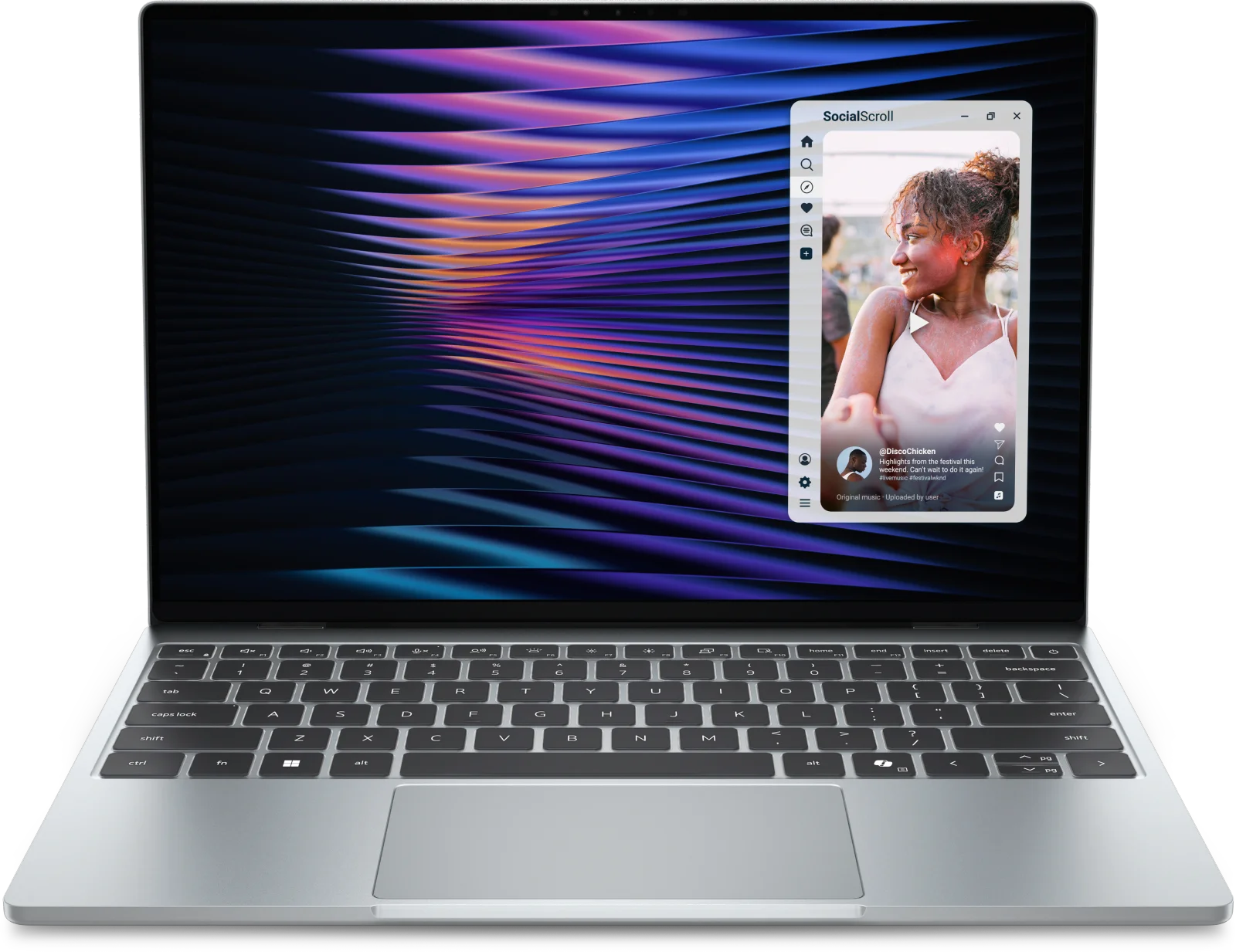
Best for: Budget-minded Windows users wanting a light touchscreen ultraportable
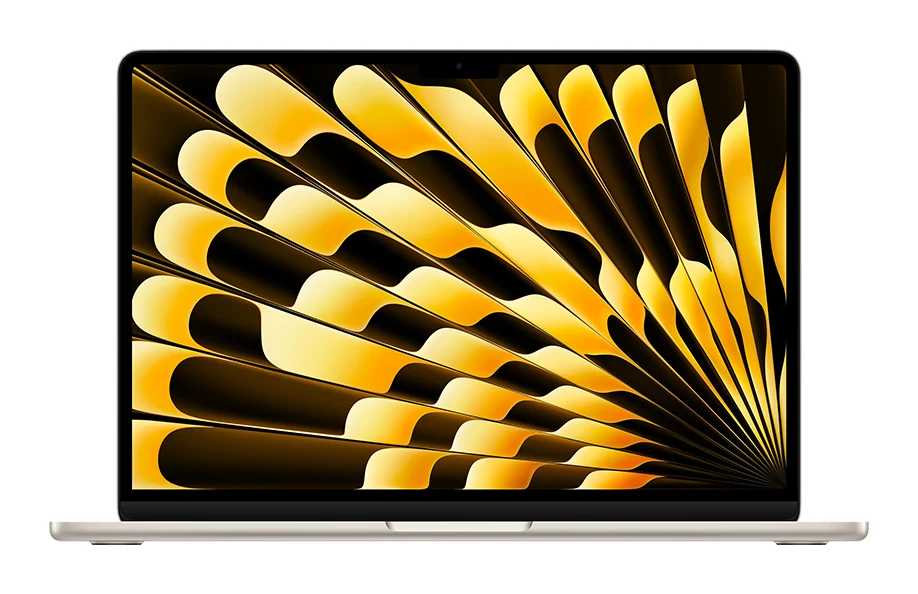
Best for: Buyers wanting silent, powerful macOS performance with generous base memory and storage
For most buyers, the Dell XPS 13 (2026) is the better pick in the Apple MacBook Air (13-inch, M5) vs Dell XPS 13 (2026) matchup: it is lighter, sits in the budget price tier and adds a 120Hz touchscreen. The MacBook Air is the better choice if you want stronger, silent performance, a 16GB and 512GB base setup, and you are happy on macOS.
That is a simple summary of two quite different laptops. The Dell is a Windows ultraportable built around portability and a lively screen. The MacBook Air is a premium, fanless machine that is more generous where it matters for long-term use. Here is where they differ.
Performance and memory: MacBook Air vs Dell XPS 13
The MacBook Air runs the Apple M5, with a 10-core CPU (4 super cores and 6 efficiency cores) and an 8-core GPU. A 10-core GPU is optional. It ships with 16GB of unified memory and a 512GB SSD as the base setup, and can be configured up to 24GB or 32GB of memory and up to 4TB of storage. Reviewers praise its strong, efficient performance for everyday and creative work.
The Dell XPS 13 uses the Intel Series 3 Core 5 320, a 6-core chip with up to 4.6GHz. The Core Ultra 7 355 is an optional upgrade. The base model has only 8GB of LPDDR5x memory and a 256GB SSD. Dell offers 16GB and 32GB of RAM and 512GB and 1TB of storage, but reviewers note that 8GB is tight for Windows 11 and that the upgrades cost extra. They also say performance and graphics are limited for demanding work or gaming.
The MacBook Air has a clear edge here. The catch is that its fanless chassis throttles under sustained heavy loads, a common criticism. If you rarely push a laptop hard for long stretches, that matters less, but reviewers do flag the throttling under sustained heavy loads.
Winner: MacBook Air for anyone who wants the most capable machine out of the box. The Dell makes sense only if you budget for the 16GB upgrade.
Display and touch
This is where the Dell pulls ahead. Its 13.4" display is a 2.5K (2560x1600) InfinityEdge panel with 30-120Hz variable refresh and a rated 500 nits, and touch comes standard. Reviewers single out the bright 2.5K touchscreen as a highlight.
The MacBook Air has a 13.6-inch Liquid Retina (LED-backlit IPS) display at 2560-by-1664 and 224 ppi, also rated at 500 nits. Its refresh rate is 60 Hz and it has no touchscreen, which reviewers list as a drawback. Resolution and brightness look close on paper, so the difference comes down to motion smoothness and touch input.
Winner: Dell XPS 13 for anyone who values a smoother 120Hz screen or wants to tap and scroll on the display.
Portability and battery life
Both are thin. The MacBook Air is a 0.44-inch aluminum body weighing 2.7 pounds (1.23 kg). The Dell XPS 13 is 0.5 in. (12.7 mm) thick but weighs less, at 2.2 lbs (1 kg), and Dell calls it the thinnest and lightest XPS yet. It has a CNC aluminum chassis. Reviewers also point out the MacBook Air is heavier than the Dell. If you carry your laptop all day, the Dell is the easier one to live with.
On battery, Dell claims up to 20 hours from its 3-Cell, 52Whr battery. Apple quotes up to 18 hours of video streaming and up to 15 hours of wireless web from a 53.8-watt-hour battery. These figures come from different manufacturers' own tests, so they are not directly comparable. Reviewers describe the MacBook Air's battery life as long, and the Dell's 20-hour figure appears among its praised points, "per Dell". Both should last a full working day, but the Dell's claim is the higher number.
Winner: Dell XPS 13 on weight and its headline battery claim. Treat the battery gap as close.
Ports, keyboard and everyday extras
The MacBook Air has more connectivity: MagSafe 3 for charging, two Thunderbolt 4 ports and a 3.5 mm headphone jack. The Dell has two Thunderbolt 4 (USB Type-C) ports with DisplayPort 2.1 and Power Delivery, with no headphone jack and no card reader. Reviewers call the lack of ports a weakness for the Dell, while noting that the MacBook Air also has only two Thunderbolt ports. Both support Wi-Fi 7 and Bluetooth 6.
Both have backlit keyboards that reviewers like. The MacBook Air adds Touch ID, a haptic trackpad and a 12MP Center Stage camera with Desk View. For the Dell, reviewers say the trackpad and webcam are not premium. On sound, the Dell has quad speakers (8W) that reviewers call loud and clear, while the MacBook Air has a four-speaker system with Dolby Atmos.
Winner: MacBook Air for ports, trackpad and webcam. Reviewers praise the Dell's quad speakers as loud and clear.
What experts say
The Dell XPS 13 (2026) has an expert average of 8.8 out of 10. Tom's Guide gave it 4.5 out of 5, Engadget 7.5 out of 10, XDA Developers 8.5 out of 10 and Stuff 5 out of 5. Reviewers praise the thin, light CNC aluminum build, the bright 2.5K touchscreen, the quad speakers and the comfortable keyboard. The common criticisms are the 8GB base RAM, the two USB-C ports with no headphone jack, limited performance for demanding work, and an unremarkable trackpad and webcam.
The MacBook Air (13-inch, M5) has a published score of 4.5 out of 5 from Tom's Guide, so there is no average to compare. Reviewers praise its efficient M5 performance, the silent fanless design with long battery life, the 16GB and 512GB base setup and its comfortable keyboard. Complaints are the 60 Hz non-touch display, throttling under sustained heavy loads, the extra weight and the premium price tier.
Choose the Dell XPS 13 (2026) if…
Best for: Budget-minded Windows users wanting a light touchscreen ultraportable
Pick the Dell XPS 13 if you want a lighter Windows laptop with a 120Hz touchscreen at a lower price tier. It suits everyday work and portability, but budget for the 16GB upgrade and don't expect heavy-duty performance.
Read our full Dell XPS 13 (2026) review →- Battery life
- 3-Cell, 52Whr
- Weight
- 2.2 lbs (1 kg)
- Display
- 13.4", Touch, 2.5K, 30-120Hz, 500 nits, InfinityEdge
- Resolution
- 2560x1600
- Refresh rate
- 30-120Hz
- Processor
- Intel Series 3 Core 5 320 (6-core, 6MB cache, up to 4.6GHz); Core Ultra 7 355 optional
Reasons to buy
- Thinnest, lightest XPS yet at 2.2 lbs and 0.5 inches
- Bright 2.5K touchscreen with 30-120Hz variable refresh
- Premium CNC aluminum build at a budget price tier
- Up to 20 hours of battery life, per Dell
- Loud, clear quad speakers and comfortable backlit keyboard
Reasons to avoid
- 8GB base RAM is tight for Windows 11; upgrades cost extra
- Only two USB-C ports and no headphone jack
- Performance and graphics are limited for demanding work or gaming
- Trackpad and webcam are not premium
- Tom's Guide
- 9.0
- Stuff
- 10.0
- Engadget
- 7.5
- XDA Developers
- 8.5
- Techaeris
- 9.8
Choose the Dell if you want a light Windows laptop with a touchscreen and a 120Hz display, and the budget price tier matters. It suits everyday work and carrying around all day. Plan to pay for the 16GB RAM upgrade, and don't expect it to handle heavy graphics or gaming.
Choose the Apple MacBook Air (13-inch, M5) if…
Best for: Buyers wanting silent, powerful macOS performance with generous base memory and storage
Pick the MacBook Air over the Dell if you want stronger, quieter performance and a generous 16GB/512GB base spec, and you're comfortable with macOS. It's the better choice for creative and long-term everyday use, as long as you don't need a touchscreen or high refresh rate.
Read our full Apple MacBook Air (13-inch, M5) review →- Battery life
- Up to 18 hours video streaming; up to 15 hours wireless web
- Weight
- 2.7 pounds (1.23 kg)
- Display
- 13.6-inch Liquid Retina (LED-backlit IPS), 500 nits
- Resolution
- 2560-by-1664 at 224 ppi
- Refresh rate
- 60 Hz
- Processor
- Apple M5, 10-core CPU (4 super cores + 6 efficiency cores), 8-core GPU (10-core GPU optional)
Reasons to buy
- Strong, efficient M5 performance for everyday and creative work
- 16GB RAM and 512GB SSD come as the base setup
- Silent fanless design with long battery life
- Includes MagSafe 3, two Thunderbolt 4 ports and a headphone jack
- Comfortable keyboard with Touch ID and a haptic trackpad
Reasons to avoid
- Display is 60 Hz with no touchscreen
- Fanless chassis throttles under sustained heavy loads
- Heavier at 2.7 lbs than the Dell
- Premium price tier, with only two Thunderbolt ports
- TechRadar
- 9.0
- Trusted Reviews
- 9.0
- Stuff
- 10.0
- Creative Bloq
- 8.5
- Pickr
- 9.4
- MacWorld
- 9.3
- Lapzen Lab
- 9.0
- Tom's Guide
- 9.0
Choose the MacBook Air if you want silent, stronger performance and don't want to pay extra to reach a sensible amount of memory. It also gives you a headphone jack, MagSafe 3 and Touch ID. It fits creative and long-term everyday use, as long as you are comfortable with macOS and can live without a touchscreen or high refresh rate.
Compare our picks side by side
The specs most of our picks share, from each maker’s spec page (— = not published). Expert score = the average of published expert reviews, which rate each product for its price. Scroll sideways on small screens.
| Spec | Dell XPS 13 (2026) | Apple MacBook Air (13-inch, M5) |
|---|---|---|
| Best for | Our Pick | The Alternative |
| Expert score | 9.0 | 9.2 |
| Price vs. these picks | Lower | Higher |
| Battery life | 3-Cell, 52Whr | Up to 18 hours video streaming; up to 15 hours wireless web |
| Weight | 2.2 lbs (1 kg) | 2.7 pounds (1.23 kg) |
| Display | 13.4", Touch, 2.5K, 30-120Hz, 500 nits, InfinityEdge | 13.6-inch Liquid Retina (LED-backlit IPS), 500 nits |
| Resolution | 2560x1600 | 2560-by-1664 at 224 ppi |
| Refresh rate | 30-120Hz | 60 Hz |
| Processor | Intel Series 3 Core 5 320 (6-core, 6MB cache, up to 4.6GHz); Core Ultra 7 355 optional | Apple M5, 10-core CPU (4 super cores + 6 efficiency cores), 8-core GPU (10-core GPU optional) |
| RAM | 8GB LPDDR5x, up to 7467 MT/s (16GB and 32GB options) | 16GB unified memory (configurable to 24GB or 32GB) |
| Storage | 256GB M.2 2230 SSD Gen4x4 (512GB and 1TB options) | 512GB SSD (configurable to 1TB, 2TB or 4TB) |
| Where to buy | View on Amazon | View on Amazon |
The verdict
The Dell XPS 13 (2026) is the better pick for most people. It is lighter, cheaper and has a smoother touchscreen, and its expert scores are strong. The MacBook Air with the M5 is the better laptop to own for several years if you can afford the premium tier and prefer macOS. It brings more memory and storage as standard, more connectivity and quieter performance.
Ready to buy?
 Our PickDell XPS 13 (2026)View on Amazon
 The AlternativeApple MacBook Air (13-inch, M5)View on Amazon
Related buying guides
- Apple MacBook Air 13-inch M5 Review: Quiet All-Day Laptop
- Apple MacBook Pro 16-inch (M5 Pro, 2026) Review: Worth It?
- Apple MacBook Pro 14-inch (M5 Pro) Review: For Upgraders
- Apple MacBook Air 13-inch (M4, 2025) Review: Silent Speed
- Dell XPS 13 (2026) DX13260 Review: Light, Long-Lasting
- Apple MacBook Neo Review (2026): Quiet, Light, Everyday Mac
- Best Laptops for Video Editing 2026: Macs to RTX
- Best Laptops in 2026: Overall Picks for Every Budget
Frequently asked questions
Is the MacBook Air M5 better than the Dell XPS 13 (2026)?
The MacBook Air M5 is better for performance, base memory and ports, while the Dell XPS 13 is better for weight, price tier and its touchscreen. The MacBook Air starts with 16GB of memory and a 512GB SSD, and the Dell starts with 8GB and 256GB.
Which has longer battery life, the MacBook Air M5 or the Dell XPS 13?
The Dell XPS 13 has the higher claim: up to 20 hours per Dell, against Apple's up to 18 hours of video streaming and up to 15 hours of wireless web for the MacBook Air. The figures come from each manufacturer's own testing, so treat them as close.
Does the Dell XPS 13 (2026) have a touchscreen?
Yes. The Dell XPS 13 (2026) comes with a 13.4" 2.5K touchscreen with 30-120Hz variable refresh. The MacBook Air (13-inch, M5) has no touchscreen and a 60 Hz display.
Which is lighter, the MacBook Air M5 or the Dell XPS 13?
The Dell XPS 13 is lighter at 2.2 lbs (1 kg), compared with 2.7 pounds (1.23 kg) for the MacBook Air. The MacBook Air is slightly thinner at 0.44 inches, against 0.5 in. for the Dell.
Does the MacBook Air M5 or the Dell XPS 13 have more ports?
The MacBook Air M5 has more: MagSafe 3, two Thunderbolt 4 ports and a 3.5 mm headphone jack. The Dell XPS 13 has two Thunderbolt 4 ports, no headphone jack and no card reader.
Is 8GB of RAM enough on the Dell XPS 13 (2026)?
For light everyday use, possibly, but reviewers call 8GB tight for Windows 11. The Dell XPS 13 offers 16GB and 32GB options, at extra cost. The MacBook Air M5 starts at 16GB.
Sources
Specs are taken from the manufacturers' official pages; expert recommendations from the publications below.
- Dell XPS 13 (2026): dell.com, tomshardware.com, engadget.com, xda-developers.com
- Apple MacBook Air (13-inch, M5): apple.com, support.apple.com, theapplewiki.com
More buying guides
Apple MacBook Air 13-inch M5 Review: Quiet All-Day Laptop
Our Apple MacBook Air 13-inch M5 review looks at the silent, slim ultraportable: what the specs mean day to day, what experts praise and who should skip it.
Published Oct 25, 2026
Apple MacBook Pro 16-inch (M5 Pro, 2026) Review: Worth It?
Our Apple MacBook Pro 16-inch (M5 Pro, 2026) review covers the chip, XDR display, battery, ports and who should upgrade, based on specs and expert reports.
Published Oct 25, 2026
Apple MacBook Pro 14-inch (M5 Pro) Review: For Upgraders
A look at the 14-inch MacBook Pro with M5 Pro: the chip, XDR display, ports and battery, what experts praise and criticise, and who should upgrade.
Published Nov 9, 2026