ASUS ProArt P16 H7606 Review (2026): Built for Colour
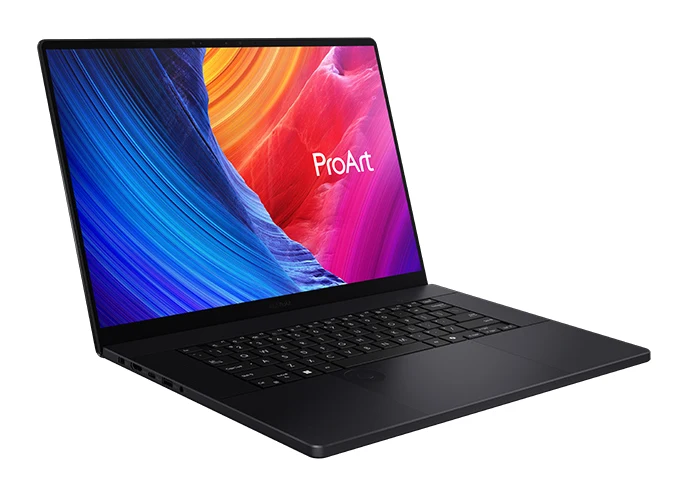
A 16-inch 4K OLED creator laptop with Ryzen AI 9, GPU options up to RTX 5090 and a built-in DialPad. Here is who it suits and where it falls short.
Research-based · We earn from qualifying purchases
Our verdict
The ProArt P16 is a premium creator laptop built around an excellent colour-accurate OLED screen, strong GPU options and the handy DialPad. It suits video editors, 3D artists and photographers who can afford it, but budget buyers and gamers should look elsewhere.
The good
- 16-inch 4K OLED touchscreen with 100% DCI-P3 and Pantone validation
- Strong creative performance, with GPU options up to RTX 5090
- Built-in DialPad gives quick, useful creative controls
- Wide port selection including USB4, HDMI 2.1 and SD Express 7.0
- Dual M.2 slots allow up to 4TB of storage
+2 more
- Wide port selection including USB4, HDMI 2.1 and SD Express 7.0
- Dual M.2 slots allow up to 4TB of storage
The bad
- Very high price, especially in top GPU configurations
- Fans become audible under heavy load
- RTX 5070 model has only a 60Hz, 400-nit display
- Gaming performance is only decent and there is no MUX switch
+1 more
- Gaming performance is only decent and there is no MUX switch
This ASUS ProArt P16 H7606 review looks at a laptop aimed squarely at people who make a living from pixels: video editors, 3D artists and photographers. It pairs a 16-inch 4K OLED touchscreen with an AMD Ryzen AI 9 HX 370 processor and NVIDIA graphics that can go up to the GeForce RTX 5090 Laptop GPU. It is built around colour accuracy and creative throughput rather than gaming or portability for its own sake. This review is based on ASUS's published specifications and what independent expert reviews report.
ASUS ProArt P16 H7606: specs at a glance
From the manufacturer- NPU
- AMD XDNA up to 50TOPS
- Ports
- USB 3.2 Gen 2 Type-C, USB 4.0 Gen 3 Type-C (40Gbps), 2x USB 3.2 Gen 2 Type-A, HDMI 2.1 FRL, combo audio jack, SD Express 7.0 card reader
- Memory
- Up to 64GB LPDDR5X on board
- Weight
- 1.85 kg (4.08 lbs); 1.95 kg (4.30 lbs) on some configs
- Battery
- 90WHrs, 4S1P, 4-cell Li-ion
- Display
- 16.0-inch 4K (3840 x 2400) OLED 16:10, touch, 100% DCI-P3, 0.2ms response time
- Storage
- Up to 4TB (2TB M.2 NVMe PCIe 4.0 SSD x 2); 1x M.2 2280 PCIe 4.0x4 + 1x M.2 2280 PCIe 4.0x2
- Graphics
- NVIDIA GeForce RTX 5070 Laptop GPU 8GB GDDR7 or RTX 5090 Laptop GPU 24GB GDDR7 (US configs)
- Wireless
- Wi-Fi 7 (802.11be), Bluetooth 5.4
- Processor
- AMD Ryzen AI 9 HX 370, 2.0GHz (up to 5.1GHz, 12 cores, 24 threads)
- Power adapter
- 200W AC adapter (20V DC, 10A)
- Operating system
- Windows 11 Home / Pro
- Dimensions (W x D x H)
- 35.49 x 24.69 x 1.49 ~ 1.73 cm (13.97" x 9.72" x 0.59" ~ 0.68")
- Refresh rate / brightness (RTX 5070 model)
- 60Hz, 400nits, 500nits HDR peak brightness
- Refresh rate / brightness (RTX 5090 model)
- 120Hz, 1600nits HDR peak brightness
Key features
- 16-inch 4K (3840 x 2400) OLED touchscreen with 100% DCI-P3 and Pantone validation for colour-critical work
- Up to GeForce RTX 5090 Laptop GPU for GPU-accelerated video and 3D work
- Ryzen AI 9 processor with NPU up to 50TOPS for AI-assisted creative tools
- Up to 64GB LPDDR5X RAM and up to 4TB PCIe 4.0 SSD storage
- ASUS DialPad built into the touchpad for quick creative controls
- Full port selection including USB4, HDMI 2.1 FRL and an SD Express 7.0 card reader
- MIL-STD 810H durability with a vapor chamber, tri-fan cooling and 0 dB ambient cooling mode
- 90WHrs battery and Wi-Fi 7 for working on the go
Design and build
The ProArt P16 is a 16-inch, 16:10 laptop. It measures 35.49 x 24.69 x 1.49 ~ 1.73 cm and weighs 1.85 kg (4.08 lbs), or 1.95 kg (4.30 lbs) on some configurations. It is a 16-inch notebook with a high-end GPU option, not an ultraportable. The 200W AC adapter is one more thing to pack if you work away from a desk.
ASUS says the chassis meets MIL-STD 810H durability standards, which suits a laptop that will be carried between studios, client sites and home. Inside, a vapor chamber and tri-fan cooling handle the heat from the processor and graphics. There is also a 0 dB ambient cooling mode for quiet moments. Reviewers do note that the fans become audible under heavy load, which is worth knowing if you edit in a quiet room.
ASUS ProArt P16 H7606 review: the display
The screen is the reason to consider this laptop. It is a 16.0-inch 4K (3840 x 2400) OLED touchscreen with 100% DCI-P3 coverage and Pantone validation, aimed at colour-critical work. The response time is listed at 0.2ms. Reviewers praise the display.
The screen specification depends on the GPU you choose, so check the configuration before you buy:
- RTX 5070 model: 60Hz, 400nits, with 500nits HDR peak brightness.
- RTX 5090 model: 120Hz, with 1600nits HDR peak brightness.
The 60Hz, 400nits panel on the RTX 5070 version is a common criticism. It is still a 4K OLED with the same colour coverage. But if you want the smoother refresh rate and much higher HDR peak, the RTX 5090 configuration is the one that delivers it. The display is a touchscreen.
Features and what they mean day to day
ASUS DialPad
The DialPad is built into the touchpad and provides quick creative controls. Reviewers consistently call it useful, and it suits editors and designers who spend their day adjusting parameters such as sliders and values. It will matter less if your workflow lives in a separate control surface or you rarely touch adjustment tools.
AI and processing
The Ryzen AI 9 HX 370 has 12 cores and 24 threads, running at 2.0GHz with boost up to 5.1GHz. Its AMD XDNA NPU is rated at up to 50TOPS to support AI-assisted creative tools. For day-to-day creative work, the CPU handles general tasks, project management and software that leans on processor threads. The NPU is there for the growing number of AI features in editing and design software, and the GPU takes on rendering and acceleration.
Memory and storage
Memory goes up to 64GB of LPDDR5X, soldered on board, so the amount you buy is the amount you keep. Storage goes up to 4TB, built from two 2TB M.2 NVMe PCIe 4.0 SSDs. The two slots are one M.2 2280 PCIe 4.0x4 and one M.2 2280 PCIe 4.0x2. Large video projects, RAW photo libraries and 3D scenes all benefit from that capacity, and reviewers single out the dual M.2 layout as a plus.
Ports and wireless
The port selection is generous for a thin laptop: one USB 3.2 Gen 2 Type-C, one USB 4.0 Gen 3 Type-C (40Gbps), two USB 3.2 Gen 2 Type-A, HDMI 2.1 FRL, a combo audio jack and an SD Express 7.0 card reader. For photographers and videographers, the built-in card reader means fewer dongles. HDMI 2.1 FRL helps with external displays and the USB4 port covers fast external storage and docks. Wireless is Wi-Fi 7 (802.11be) with Bluetooth 5.4.
Performance and battery
The graphics options are an RTX 5070 Laptop GPU with 8GB GDDR7 or an RTX 5090 Laptop GPU with 24GB GDDR7 (US configurations). For GPU-accelerated video and 3D work, that range is wide. The 24GB of video memory on the top option is a real draw for heavier scenes and complex timelines. Reviewers describe creative performance as strong.
Gaming is a different story. Reviewers call gaming performance only decent, and the laptop has no MUX switch. If you want a machine mainly to play games, look at a gaming laptop. For creative use with some gaming on the side, it will do the job.
The battery is 90WHrs, a 4S1P 4-cell Li-ion pack. ASUS markets it for working on the go, but the spec sheet doesn't give a runtime. Demanding GPU work will drain any battery quickly, so plan to be near the charger for rendering and exporting.
What experts like and what they criticise
The two published scores are strong. TechRadar gives it 5/5, and Creative Bloq scores the 2025 model 9/10. The site's verdict score of 9.5/10 is the average of those two expert reviews, so it rests on a small number of reviews rather than a broad consensus.
Reviewers praise:
- The colour-accurate 4K OLED touchscreen with Pantone validation.
- Strong creative performance with GPU options up to RTX 5090.
- The DialPad's quick, useful controls.
- A wide port selection, including USB4, HDMI 2.1 and SD Express 7.0.
- Dual M.2 slots that allow up to 4TB of storage.
A common criticism is price, especially in top GPU configurations. Other complaints are audible fans under heavy load, the 60Hz, 400nits display on the RTX 5070 model, and gaming performance that is only decent with no MUX switch. Reviewers flag the very high price, especially in top GPU configurations.
Who should buy it, and who should skip it
Buy it if you are a video editor, 3D artist or photographer who needs a colour-accurate display in a portable machine. The OLED panel, the SD Express 7.0 card reader, the USB4 port and the DialPad all serve creative work directly. If your work benefits from lots of GPU memory, the RTX 5090 configuration is the one to look at.
Skip it if your budget is tight, or you mainly want a gaming laptop. Fans that become audible under load may also bother you if you work in a very quiet space. And if you are considering the RTX 5070 version, remember that it comes with the 60Hz, 400nits panel rather than the 120Hz, 1600nits HDR peak version.
How it fits against the rest of its category
The ProArt P16 puts the display and creative controls first while still offering serious GPU options. If screen quality is what you care about most, that focus is its main strength. If raw gaming performance is what you care about most, it is not the right tool.
Verdict
The ASUS ProArt P16 H7606 is a focused tool for creative professionals. The 4K OLED panel, the GPU range, the DialPad and the practical ports make a convincing case. The trade-offs are cost, fan noise under heavy load, and a weaker display on the RTX 5070 model. If your income depends on colour and render time, it deserves a place on your shortlist. If it doesn't, it probably isn't the best use of your money.
Related buying guides
- Asus ROG Zephyrus G14 (2025) GA403 Review: Portable but Hot
- Best Laptops in 2026: Overall Picks for Every Budget
- Best Laptops for Video Editing 2026: Macs to RTX
- Best Laptops for College Students 2026: All-Day Battery
- Best Chromebooks 2026: Budget, 2-in-1 and AMOLED Picks
- Apple MacBook Air 13-inch M5 Review: Quiet All-Day Laptop
- Apple MacBook Pro 16-inch (M5 Pro, 2026) Review: Worth It?
Not sure about the ASUS ProArt P16 H7606? Consider these
- Best OverallApple MacBook Air (13-inch, M5)Why we picked it →
- Best ValueDell XPS 13 (2026)Why we picked it →
- Best BudgetApple MacBook NeoWhy we picked it →


Frequently asked questions
Is the ASUS ProArt P16 H7606 worth it?
For creative professionals who need a colour-accurate OLED screen and strong GPU power, reviewers say yes. It averages 9.5/10 across two expert reviews. If you are on a tight budget or mainly want to play games, it is harder to justify.
What display does the ProArt P16 H7606 have?
It has a 16.0-inch 4K (3840 x 2400) OLED touchscreen in 16:10, with 100% DCI-P3 coverage, Pantone validation and a 0.2ms response time. The RTX 5070 model is 60Hz with 400nits (500nits HDR peak), while the RTX 5090 model is 120Hz with 1600nits HDR peak brightness.
Is the ASUS ProArt P16 H7606 good for gaming?
Reviewers describe gaming performance as only decent, and there is no MUX switch. It can run games, but it is built for creative work rather than gaming.
How much RAM and storage can the ProArt P16 H7606 have?
It offers up to 64GB of LPDDR5X memory, soldered on board, and up to 4TB of storage from two 2TB M.2 NVMe PCIe 4.0 SSDs.
What ports does the ASUS ProArt P16 H7606 have?
It has one USB 3.2 Gen 2 Type-C, one USB 4.0 Gen 3 Type-C (40Gbps), two USB 3.2 Gen 2 Type-A, HDMI 2.1 FRL, a combo audio jack and an SD Express 7.0 card reader.
What is the DialPad on the ProArt P16?
The ASUS DialPad is built into the touchpad and provides quick creative controls. Reviewers describe it as useful for adjusting values and settings in creative software.
Sources
Specs are taken from the manufacturers' official pages; expert recommendations from the publications below.
- ASUS ProArt P16 H7606: asus.com, fstoppers.com, techradar.com
Related reviews & guides
Best Laptops in 2026: Overall Picks for Every Budget
Five of the best laptops for 2026, from a budget-friendly MacBook Neo to a premium Galaxy Book6 Ultra, compared on specs and expert recommendations.
Published Oct 30, 2026
Best Laptops for Video Editing 2026: Macs to RTX
Five video editing laptops compared on processor, GPU, display, ports, weight and battery life, drawn from manufacturer specs and independent expert recommendations.
Published Oct 25, 2026Best Laptops for College Students 2026: All-Day Battery
Five laptops for campus life in 2026, from a long-lasting MacBook Air to a budget OLED Chromebook, compared on battery, weight, memory and ports.
Published Oct 20, 2026