Best USB-C Docking Stations for Laptops 2026: Any Desk
Five USB-C and Thunderbolt docks for laptops, from a budget single-monitor hub to a Thunderbolt 5 powerhouse, compared on displays, charging and ports.
24 products compared · Research-based · Affiliate links
We earn a commission from qualifying purchases made through our links, at no extra cost to you. It never decides our picks. As an Amazon Associate I earn from qualifying purchases. How we make money
Which one should you buy?
Our picks by what matters to you · details below ↓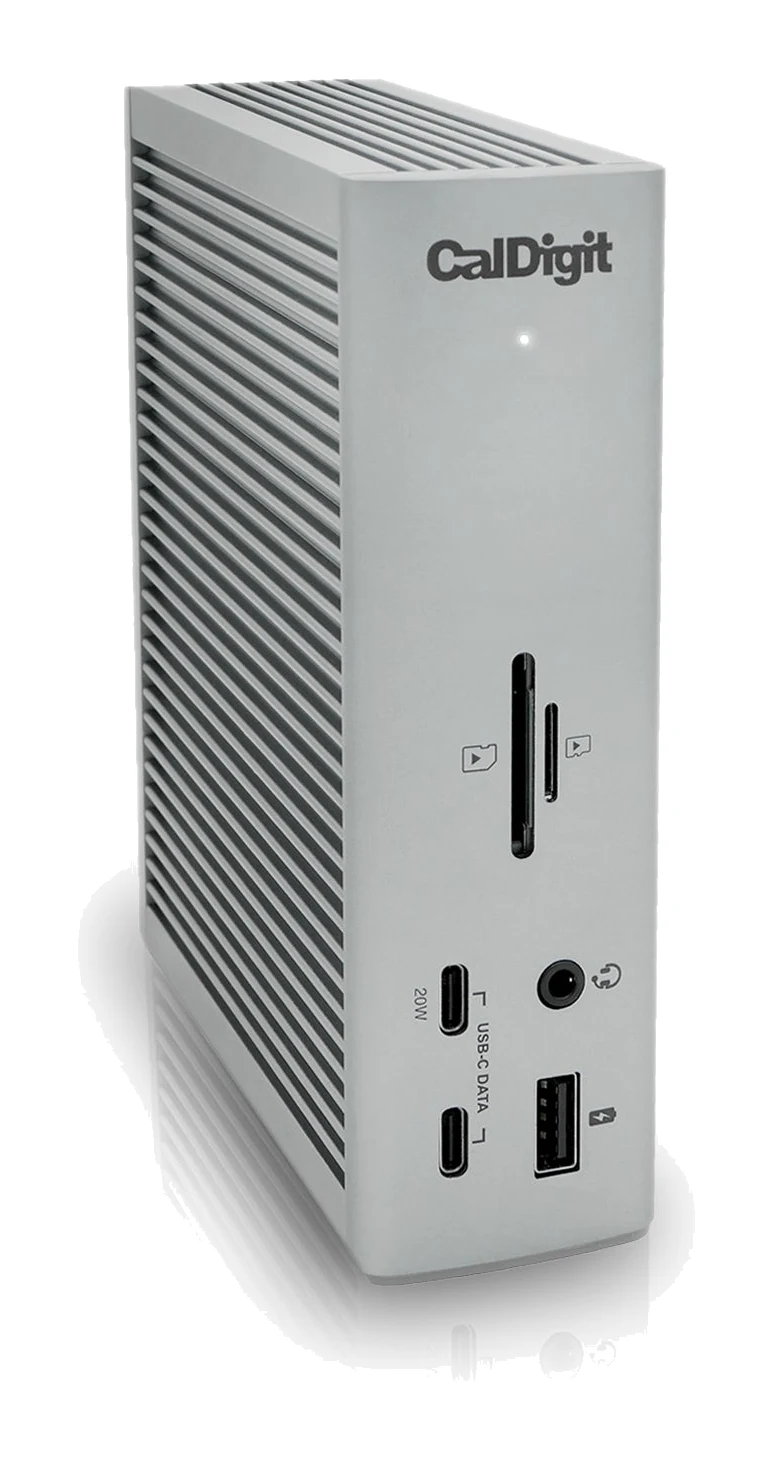
Best for: Desk-based pros wanting one Thunderbolt hub for everything
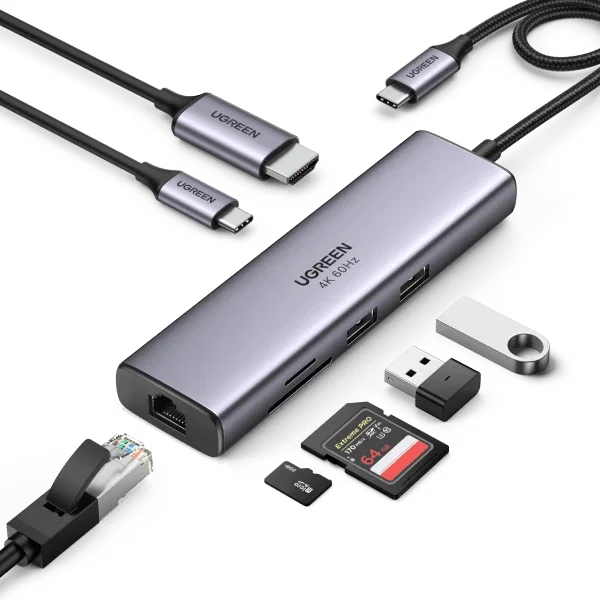
Check price on Amazon- Best ValueUGREEN Revodok Pro 7-in-1 Docking Station (Model 45365)Best for: Budget buyers wanting dual-monitor output from a compact hubView on Amazon
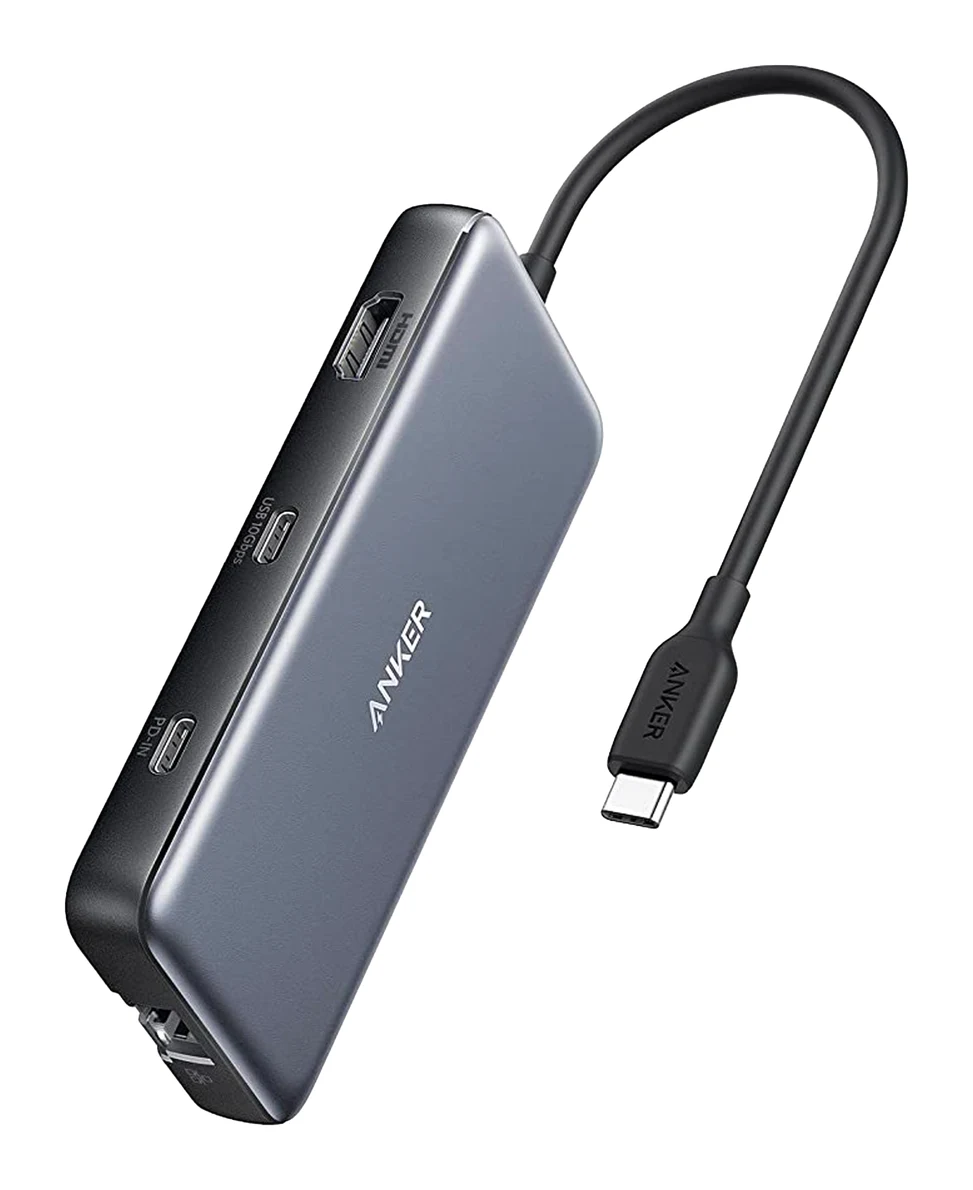
- Best BudgetAnker 555 USB-C Hub (8-in-1)Best for: Single-monitor users needing Ethernet and card readersView on Amazon
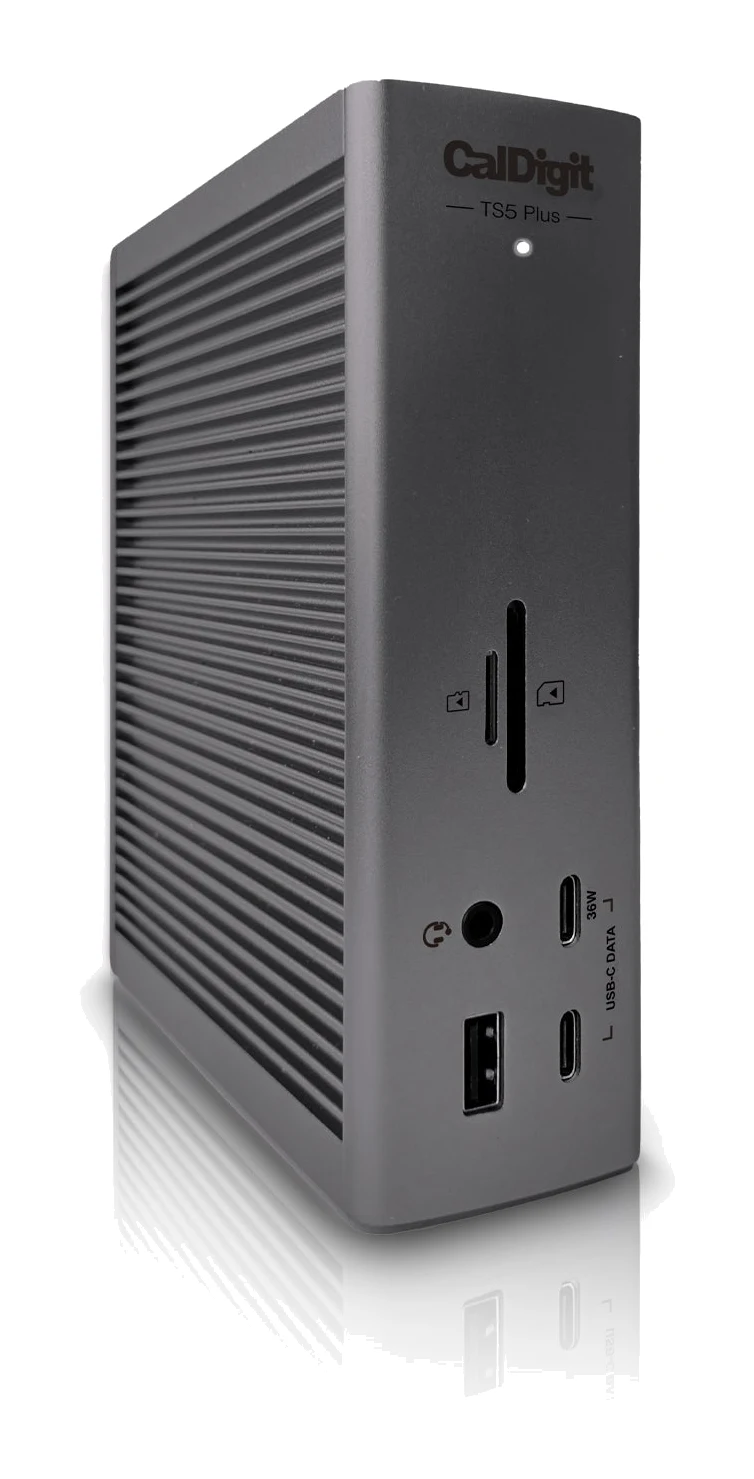
- Premium PickCalDigit TS5 PlusBest for: Power users with Thunderbolt 5 laptops and multiple displaysView on Amazon
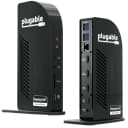
- Also GreatPlugable USB-C Triple 4K Monitor Docking Station with 100W Laptop ChargingBest for: Multi-monitor workers without a Thunderbolt-equipped laptopView on Amazon
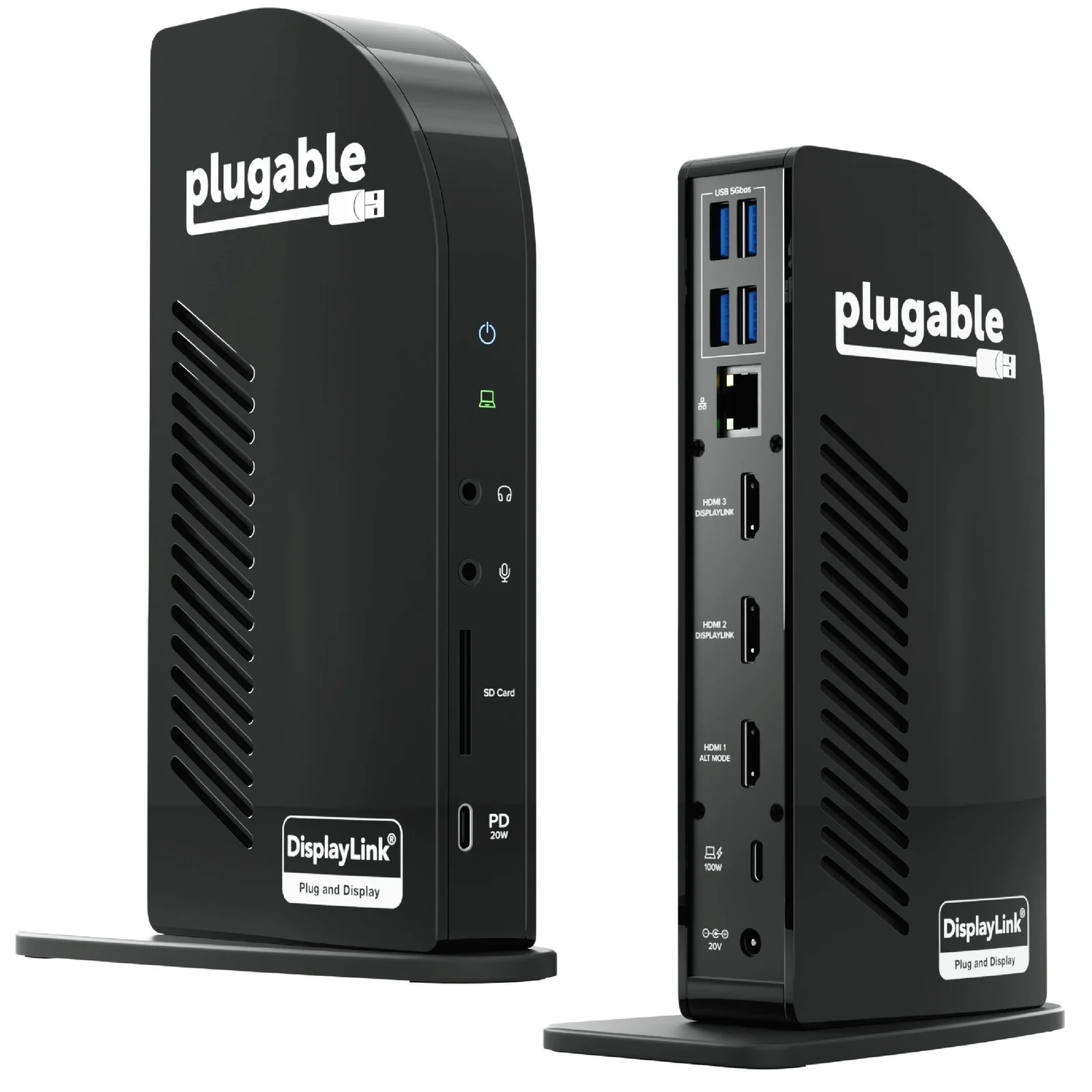
The best USB-C docking stations for laptops turn a single cable into a full desk setup: monitors, wired internet, card readers, accessories and laptop charging all at once. We narrowed the field to five docks that cover different hosts, monitor counts and budgets. This guide is based on manufacturer specs and independent expert recommendations, so you can match a dock to your laptop and desk.
Best USB-C Docking Stations for Laptops at a Glance
| Dock | Label | Host connection | Displays | Laptop charging | Buy |
|---|---|---|---|---|---|
| CalDigit TS4 | Best Overall | Thunderbolt 4/USB4 | Single 8K or dual 6K 60Hz | 98W host | View on Amazon |
| UGREEN Revodok Pro 7-in-1 | Best Value | Built-in 30cm USB-C cable | 2x HDMI 4K@60Hz | 85W pass-through | View on Amazon |
| Anker 555 USB-C Hub (8-in-1) | Best Budget | USB-C | 1x HDMI 4K@60Hz | 85W pass-through | View on Amazon |
| CalDigit TS5 Plus | Premium Pick | Thunderbolt 5 | Dual 8K@60Hz or triple 4K@144Hz on compatible systems | 140W host | View on Amazon |
| Plugable Triple 4K Docking Station | Also Great | USB-C with DisplayPort Alt Mode | Three 4K@60Hz | 100W |
CalDigit TS4: Best Overall for Port-Packed Desks
Best for: Desk-based pros wanting one Thunderbolt hub for everything
The TS4 pairs a huge port selection with strong laptop charging and high-end display support. It suits a permanent desk setup where one cable should handle everything.
- Weight
- 1.41 lbs (0.64kg)
- Ports
- 3x Thunderbolt 4 (40Gb/s), 3x USB-C (10Gb/s), 5x USB-A (10Gb/s), 1x DisplayPort 1.4, 1x SD 4.0 (UHS-II), 1x microSD 4.0 (UHS-II), 1x 2.5GbE Ethernet, 1x Front Combo Audio (3.5mm), 1x Rear Audio Out (3.5mm), 1x Rear Audio In (3.5mm)
- Warranty
- 2 Years
- USB 3.0 ports
- Not applicable - has USB 3.2 Gen 2 ports instead
- Video outputs
- DisplayPort 1.4, 2x Thunderbolt 4 ports (support DP Alt Mode)
- Power delivery
- 98W host, 15W downstream Thunderbolt ports, 20W front USB-C, 7.5W other USB-C
Reasons to buy
- 18 ports including three Thunderbolt 4 and eight USB ports
- 98W host charging covers even a 16-inch MacBook Pro
- Drives a single 8K or dual 6K 60Hz displays
- 2.5GbE Ethernet and dual UHS-II SD/microSD card readers
- Fanless aluminum body runs silently
Reasons to avoid
- Premium pricing
- Needs a Thunderbolt 4/USB4 host for full capability
- Large desktop footprint, not a travel hub
- TechRadar Pro
- 10.0
- Home Office Research
- 9.4
- Docking-Stations.info
- 9.2
- Sun Remarketing
- 9.5
The CalDigit TS4 is our best overall pick because it pairs a huge port selection with strong charging and high-end display support. It has 18 ports, including three Thunderbolt 4 (40Gb/s) and eight USB ports, and it suits desk-based pros who want one Thunderbolt hub to handle everything over a single cable.
Keep reading about CalDigit TS4
The 98W host power delivery charges even a 16-inch MacBook Pro at full speed. It supports a single 8K or dual 6K 60Hz displays, depending on the host's capabilities. Networking comes from 2.5 Gigabit Ethernet, and there are dual UHS-II SD and microSD card readers with 312 MB/s speeds. The aluminum body dissipates heat passively, so it runs fanless and silent.
The trade-offs are cost and size. It is premium-priced, needs a Thunderbolt 4/USB4 host for its full capability, and has a large desktop footprint, so it is not a travel hub. Reviewers rate it highly: TechRadar Pro gave it 5 out of 5, and it is recommended in 8 independent expert guides, the most of any dock here.
UGREEN Revodok Pro 7-in-1: Best Value for Dual 4K Monitors
UGREEN Revodok Pro 7-in-1 Docking Station (Model 45365)
Best for: Budget buyers wanting dual-monitor output from a compact hub
The Revodok Pro delivers dual 4K HDMI, fast 10Gbps ports and solid laptop charging in a small, low-cost package. A smart pick if you want a second screen without paying for Thunderbolt.
- Weight
- 6.3 ounces (approx 176g)
- Ports
- 2x HDMI, 2x USB-A 10Gbps, 2x USB-C 10Gbps, 1x USB-C 100W PD
- Warranty
- —
- USB 3.0 ports
- 2x USB 3.2 Gen 2 (USB-A), 2x USB 3.2 Gen 2 (USB-C)
- Video outputs
- 2x HDMI 4K@60Hz
- Power delivery
- 100W input, 85W pass-through to laptop
Reasons to buy
- Dual 4K 60Hz HDMI outputs for extended desktops
- 10Gbps on both USB-A and USB-C data ports
- Up to 85W pass-through charging for the laptop
- Compact aluminum body with built-in 30cm cable
- Works across Windows, macOS, ChromeOS and iPadOS
Reasons to avoid
- No Ethernet port
- No SD or microSD card reader
- Dual-display support depends on OS (extended mode on Windows/ChromeOS)
- Cubed3
- 8.0
- PixelReel
- 8.0
The UGREEN Revodok Pro 7-in-1 (Model 45365) earns Best Value by offering two 4K@60Hz HDMI outputs, fast 10Gbps ports and solid laptop charging in a small, budget-tier package. It suits anyone who wants a second screen without paying for Thunderbolt.
Keep reading about UGREEN Revodok Pro 7-in-1 Docking Station (Model 45365)
Beyond the dual HDMI ports, it has 10Gbps data transfer on its USB-A and USB-C ports. Power delivery is 100W input with up to 85W pass-through to the laptop. The aluminum alloy body measures 110 x 44 x 16mm, weighs 6.3 ounces (approx 176g) and has a built-in 30cm USB-C cable. It works across Windows, macOS, ChromeOS and iPadOS.
The main limits are what it leaves out: there is no Ethernet port and no SD or microSD card reader. Dual-display support also depends on the operating system, with extended mode on Windows and ChromeOS. It is recommended in 5 expert guides, and the two published reviews we found each scored it 8 out of 10 (Cubed3 and PixelReel).
Anker 555 USB-C Hub (8-in-1): Best Budget for Ethernet and Card Readers
Best for: Single-monitor users needing Ethernet and card readers
The Anker 555 packs Ethernet, card readers, fast USB ports and strong pass-through charging into a lightweight hub. It's a well-rounded choice for single-monitor users on a budget.
- Weight
- 4.4 oz (127.57 g)
- Ports
- 1× USB-C PD input (100W), 1× USB-C data (10Gbps), 2× USB-A (10Gbps), 1× HDMI (4K@60Hz), 1× Ethernet (1Gbps), 1× SD card, 1× microSD card
- Warranty
- 18 months
- USB 3.0 ports
- 2x USB-A 3.1 Gen 2
- Video outputs
- 1× HDMI 4K@60Hz
- Power delivery
- 100W input, 85W output to laptop
Reasons to buy
- Gigabit Ethernet for stable wired connection
- 4K 60Hz HDMI output for a single monitor
- 85W pass-through charging while using all ports
- SD and microSD readers suit photographers and creators
- 10Gbps USB-C and USB-A data ports
Reasons to avoid
- Supports only one external display
- Single HDMI output limits multi-monitor setups
- TechGearLab
- 8.5
- docking-stations.info
- 7.4
- Vivid Repairs
- 8.0
- TopTrustedProducts
- 9.0
The Anker 555 is the Best Budget pick because it packs Gigabit Ethernet, SD and microSD readers, fast USB ports and strong pass-through charging into a lightweight hub. It is a well-rounded choice for single-monitor users who still want a wired connection and card slots.
Keep reading about Anker 555 USB-C Hub (8-in-1)
It has one HDMI port at 4K@60Hz, two USB-A ports and a USB-C data port at 10Gbps, and a USB-C power input rated at 100W with 85W output to the laptop, so you can charge while using every port. It weighs 4.4 oz (127.57 g) and has an 18-month warranty. Reviewers rate it well, including TechGearLab at 8.5 out of 10, and it is recommended in 7 expert guides.
The key limitation is that it supports only one external display, so its single HDMI output rules it out for multi-monitor setups. If you need two screens, look at the UGREEN above or the Plugable below.
CalDigit TS5 Plus: Premium Pick for Thunderbolt 5 Power Users
Best for: Power users with Thunderbolt 5 laptops and multiple displays
The TS5 Plus is a top-end Thunderbolt 5 dock with extreme bandwidth, 10GbE and 140W charging. It makes sense if you have compatible hardware and want maximum future headroom.
- Weight
- 0.90 kg (1.98 lbs)
- Ports
- 1x Thunderbolt 5 Host (120Gb/s), 2x Thunderbolt 5 Downstream (80Gb/s), 5x USB-C (10Gb/s), 5x USB-A (10Gb/s), 1x DisplayPort 2.1, 1x 10 Gigabit Ethernet, SD 4.0 (UHS-II), microSD 4.0 (UHS-II)
- Warranty
- 2 years
- USB 3.0 ports
- 10 (5x USB-A 10Gb/s, 5x USB-C 10Gb/s)
- Video outputs
- 2x Thunderbolt 5 ports, 1x DisplayPort 2.1
- Power delivery
- 140W host via Thunderbolt 5, 36W downstream Thunderbolt 5 ports, 36W front USB-C port, 7.5W remaining USB ports
Reasons to buy
- Thunderbolt 5 with up to 120Gb/s Bandwidth Boost
- 20 ports including 10GbE and DisplayPort 2.1
- 140W host charging for power-hungry laptops
- Dual USB controllers avoid bottlenecks with many fast devices
- Supports dual 8K 60Hz or triple 4K 144Hz displays
Reasons to avoid
- Premium pricing
- Needs a Thunderbolt 5 system to use its top features
- Large and heavy, with a 330W external power brick
- Home Office Research
- 9.6
- MacRumors
- 9.0
- Docking Stations Info
- 9.0
- AppleInsider
- 8.0
The CalDigit TS5 Plus is the Premium Pick for power users with Thunderbolt 5 laptops and multiple displays. It is a top-end dock with up to 120Gb/s Bandwidth Boost, 10 Gigabit Ethernet, DisplayPort 2.1 and 140W host charging, which makes sense if you have compatible hardware and want maximum future headroom.
Keep reading about CalDigit TS5 Plus
It offers 20 total ports, including 3x Thunderbolt 5 and 10x USB (10Gb/s), plus UHS-II SD and microSD readers. Dual USB controllers are designed to eliminate bandwidth bottlenecks when you connect many fast devices at once. On compatible systems it supports dual 8K@60Hz or triple 4K@144Hz displays. Data speeds reach up to 6200 MB/s via Thunderbolt 5. Home Office Research scored it 9.6 out of 10, MacRumors gave it 4.5 out of 5, and AppleInsider gave it 4 out of 5.
The downsides are practical. It is premium-priced, needs a Thunderbolt 5 system to use its top features, and is large and heavy at 0.90 kg (1.98 lbs), with a 330W external power brick. For a laptop with Thunderbolt 4/USB4 rather than Thunderbolt 5, the CalDigit TS4 is the more sensible fit.
Plugable USB-C Triple 4K Docking Station: Also Great for Triple Monitors
Plugable USB-C Triple 4K Monitor Docking Station with 100W Laptop Charging
Best for: Multi-monitor workers without a Thunderbolt-equipped laptop
The Plugable dock offers three 4K monitors over ordinary USB-C, with ample charging and a full set of extras. It's a practical way to build a triple-screen desk without Thunderbolt.
- Weight
- 624 grams (22 ounces)
- Ports
- 3x HDMI 2.0, 3x DisplayPort 1.4, 4x USB 3.0 (5Gbps), 1x USB-C (10Gbps, 20W PD), 1x Gigabit Ethernet, SD card reader
- Warranty
- 2-year limited warranty
- USB 3.0 ports
- 4
- Video outputs
- 3x HDMI 2.0 or DisplayPort 1.4
- Power delivery
- 100W (96W certified)
Reasons to buy
- Triple 4K 60Hz output from a standard USB-C port
- Six video ports mix HDMI 2.0 and DisplayPort 1.4
- 100W Power Delivery while three monitors run
- Front USB-C port with 10Gbps data and 20W charging
- UHS-II SD reader, Gigabit Ethernet and four USB 3.0 ports
Reasons to avoid
- Only 5Gbps on the four USB-A ports
- No Thunderbolt-level bandwidth
- Bulkier than basic hubs at 22 ounces
- docking-stations.info
- 8.0
- TechAdvisor
- 8.0
- Laptop Mag
- 10.0
The Plugable USB-C Triple 4K Monitor Docking Station with 100W Laptop Charging is our Also Great pick for multi-monitor workers whose laptops lack Thunderbolt. It delivers triple 4K@60Hz output from a standard USB-C port, which is a practical way to build a three-screen desk.
Keep reading about Plugable USB-C Triple 4K Monitor Docking Station with 100W Laptop Charging
It has six video outputs (3x HDMI 2.0 and 3x DisplayPort 1.4) so you can mix monitor types, and its 100W Power Delivery keeps a large laptop charging while all three monitors run. A front USB-C port gives 10Gbps data and 20W charging for phones and accessories. You also get a UHS-II SD card reader, Gigabit Ethernet, four USB 3.0 ports, and 3.5mm audio in and out. It carries a 2-year limited warranty. Laptop Mag gave it 5 out of 5 and it is recommended in 6 expert guides.
The trade-offs: the four USB-A ports run at only 5Gbps, there is no Thunderbolt-level bandwidth, and at 22 ounces it is bulkier than basic hubs.
Compare our picks side by side
The specs most of our picks share, from each maker’s spec page (— = not published). Expert score = the average of published expert reviews, which rate each product for its price. Scroll sideways on small screens.
| Spec | CalDigit TS4 | UGREEN Revodok Pro 7-in-1 Docking Station (Model 45365) | Anker 555 USB-C Hub (8-in-1) | CalDigit TS5 Plus | Plugable USB-C Triple 4K Monitor Docking Station with 100W Laptop Charging |
|---|---|---|---|---|---|
| Best for | Best Overall | Best Value | Best Budget | Premium Pick | Also Great |
| Expert score | 9.5 | 8.0 | 8.2 | 8.9 | 8.7 |
| Price vs. these picks | Higher | Lower | Lower | Higher | Middle |
| Weight | 1.41 lbs (0.64kg) | 6.3 ounces (approx 176g) | 4.4 oz (127.57 g) | 0.90 kg (1.98 lbs) | 624 grams (22 ounces) |
| Ports | 3x Thunderbolt 4 (40Gb/s), 3x USB-C (10Gb/s), 5x USB-A (10Gb/s), 1x DisplayPort 1.4, 1x SD 4.0 (UHS-II), 1x microSD 4.0 (UHS-II), 1x 2.5GbE Ethernet, 1x Front Combo Audio (3.5mm), 1x Rear Audio Out (3.5mm), 1x Rear Audio In (3.5mm) | 2x HDMI, 2x USB-A 10Gbps, 2x USB-C 10Gbps, 1x USB-C 100W PD | 1× USB-C PD input (100W), 1× USB-C data (10Gbps), 2× USB-A (10Gbps), 1× HDMI (4K@60Hz), 1× Ethernet (1Gbps), 1× SD card, 1× microSD card | 1x Thunderbolt 5 Host (120Gb/s), 2x Thunderbolt 5 Downstream (80Gb/s), 5x USB-C (10Gb/s), 5x USB-A (10Gb/s), 1x DisplayPort 2.1, 1x 10 Gigabit Ethernet, SD 4.0 (UHS-II), microSD 4.0 (UHS-II) | 3x HDMI 2.0, 3x DisplayPort 1.4, 4x USB 3.0 (5Gbps), 1x USB-C (10Gbps, 20W PD), 1x Gigabit Ethernet, SD card reader |
| Warranty | 2 Years | — | 18 months | 2 years | 2-year limited warranty |
| USB 3.0 ports | Not applicable - has USB 3.2 Gen 2 ports instead | 2x USB 3.2 Gen 2 (USB-A), 2x USB 3.2 Gen 2 (USB-C) | 2x USB-A 3.1 Gen 2 | 10 (5x USB-A 10Gb/s, 5x USB-C 10Gb/s) | 4 |
| Video outputs | DisplayPort 1.4, 2x Thunderbolt 4 ports (support DP Alt Mode) | 2x HDMI 4K@60Hz | 1× HDMI 4K@60Hz | 2x Thunderbolt 5 ports, 1x DisplayPort 2.1 | 3x HDMI 2.0 or DisplayPort 1.4 |
| Power delivery | 98W host, 15W downstream Thunderbolt ports, 20W front USB-C, 7.5W other USB-C | 100W input, 85W pass-through to laptop | 100W input, 85W output to laptop | 140W host via Thunderbolt 5, 36W downstream Thunderbolt 5 ports, 36W front USB-C port, 7.5W remaining USB ports | 100W (96W certified) |
| Data transfer speed | Thunderbolt 4: 40Gb/s, USB-C/USB-A: 10Gb/s | 10Gbps USB 3.2 | 10Gbps | Up to 6200 MB/s via Thunderbolt 5, 80Gb/s per downstream Thunderbolt 5 port, 10Gb/s USB ports | 10Gbps |
| Maximum displays supported | Single 8K 60Hz or Dual 6K 60Hz (dependent on host capabilities) | 2 | 1 | Dual 8K@60Hz (Windows/Mac with compatible GPU), Dual 4K@240Hz (Mac), Triple 4K@144Hz (Windows Thunderbolt 5 PCs, M5 Pro/Max Macs) | 3 |
| Where to buy | View on Amazon | View on Amazon | View on Amazon | View on Amazon | View on Amazon |
How to Choose the Best USB-C Docking Stations for Laptops
Check your laptop's port first
A dock can only use what your laptop's port provides. The CalDigit TS4 needs a Thunderbolt 4/USB4 host for full capability, and the TS5 Plus needs Thunderbolt 5 for its top features. The UGREEN, Anker and Plugable docks work over USB-C, and the Plugable relies on DisplayPort Alt Mode support to drive its monitors.
Count the monitors you need
Decide how many screens you will run. The Anker 555 supports one, the UGREEN two, and the Plugable three. The CalDigit docks handle high-resolution setups, up to a single 8K or dual 6K 60Hz displays on the TS4, subject to your host.
Match the charging to your laptop
Higher-powered laptops need more wattage. The listed figures are 85W pass-through on the UGREEN and Anker, 98W on the TS4, 100W on the Plugable and 140W on the TS5 Plus. Check your laptop's charger rating and pick a dock that meets it.
Look at the extras you will use daily
If you need wired networking, the Anker has Gigabit Ethernet, the TS4 has 2.5 Gigabit Ethernet, and the TS5 Plus has 10 Gigabit Ethernet. The UGREEN has no Ethernet or card reader. Photographers should look at the dual card readers on the CalDigit docks or the SD and microSD slots on the Anker.
Consider size and portability
The CalDigit docks are desk fixtures with external power supplies. The UGREEN and Anker are compact, lightweight and easier to move between a desk and a bag.
How We Picked
We chose five docks that cover distinct needs. We relied on manufacturer specifications and on what independent expert reviews and buying guides consistently say, including how many guides recommend each dock and the scores published by named reviewers. This guide is not based on hands-on testing. Prices change often, so use the check price buttons for current offers.
Bottom Line
For most people with a Thunderbolt-equipped laptop and a permanent desk, the CalDigit TS4 is the best all-round dock. If you want dual 4K monitors on a tight budget, the UGREEN Revodok Pro is a strong value, and the Anker 555 is a good budget choice for one monitor with Ethernet and card readers. Choose the Plugable if you need three monitors from an ordinary USB-C port, and step up to the CalDigit TS5 Plus only if you have Thunderbolt 5 hardware to take advantage of it.
Ready to buy?
 Best OverallCalDigit TS4View on Amazon
- Best ValueUGREEN Revodok Pro 7-in-1 Docking Station (Model 45365)View on Amazon
- Best BudgetAnker 555 USB-C Hub (8-in-1)View on Amazon
- Premium PickCalDigit TS5 PlusView on Amazon
- Also GreatPlugable USB-C Triple 4K Monitor Docking Station with 100W Laptop ChargingView on Amazon
Related buying guides
- Best Laptops in 2026: Overall Picks for Every Budget
- Best Laptops for Video Editing 2026: Macs to RTX
- Best Laptops for College Students 2026: All-Day Battery
- Best Portable Monitor 2026 for Laptops, Consoles & Travel
- Best Chromebooks 2026: Budget, 2-in-1 and AMOLED Picks
- Best Wi-Fi Routers in 2026: Wi-Fi 7 for Homes of Every Size
- Best Ergonomic Mice 2026: Vertical or Palm Grip, Any Budget
- Best Monitors for Working From Home 2026: One-Cable Desks
- Best Mesh Wi-Fi System for 2026: Wi-Fi 7 on Any Budget
Frequently asked questions
What is the best USB-C docking station for laptops overall?
The CalDigit TS4. It offers 18 ports, 98W host charging and support for a single 8K or dual 6K 60Hz displays, and it is recommended in 8 independent expert guides. It needs a Thunderbolt 4/USB4 host for full capability.
Which dock supports the most monitors?
The Plugable USB-C Triple 4K Monitor Docking Station: three 4K@60Hz displays from a standard USB-C port. It has six video outputs, three HDMI 2.0 and three DisplayPort 1.4, so you can mix monitor connections.
Which dock charges a laptop at the highest wattage?
The CalDigit TS5 Plus: 140W host charging via Thunderbolt 5. It also needs a Thunderbolt 5 system to use its top features and comes with a 330W external power supply.
Which is the best budget USB-C dock?
The Anker 555 USB-C Hub (8-in-1). It adds Gigabit Ethernet, SD and microSD readers and 85W pass-through charging, but supports only one external display. For two 4K monitors on a budget, the UGREEN Revodok Pro is the alternative.
Do I need Thunderbolt to use a docking station?
No. The UGREEN Revodok Pro, Anker 555 and Plugable triple-monitor dock all work over standard USB-C. Thunderbolt docks like the CalDigit TS4 and TS5 Plus need a matching Thunderbolt host to unlock their full bandwidth and display support.
Sources
Specs are taken from the manufacturers' official pages; expert recommendations from the publications below.
- CalDigit TS4: caldigit.com, 9to5mac.com, bhphotovideo.com, manua.ls
- UGREEN Revodok Pro 7-in-1 Docking Station (Model 45365): us.ugreen.com, ugreen.com, manuals.plus
- Anker 555 USB-C Hub (8-in-1): anker.com, service.anker.com
- CalDigit TS5 Plus: us.caldigit.com, bhphotovideo.com, docking-stations.info, storagereview.com
- Plugable USB-C Triple 4K Monitor Docking Station with 100W Laptop Charging: plugable.com, bhphotovideo.com, docking-stations.info, manuals.plus
More buying guides
Best Laptops in 2026: Overall Picks for Every Budget
Five of the best laptops for 2026, from a budget-friendly MacBook Neo to a premium Galaxy Book6 Ultra, compared on specs and expert recommendations.
Published Oct 30, 2026
Best Laptops for Video Editing 2026: Macs to RTX
Five video editing laptops compared on processor, GPU, display, ports, weight and battery life, drawn from manufacturer specs and independent expert recommendations.
Published Oct 25, 2026
Best Ergonomic Mice 2026: Vertical or Palm Grip, Any Budget
Five ergonomic mice compared on manufacturer specs and expert recommendations, from a full-size palm-grip workhorse to budget vertical designs, plus advice on grip size, handedness and Mac use.
Published Oct 11, 2026